Android Activity: A Single Screen in Your App
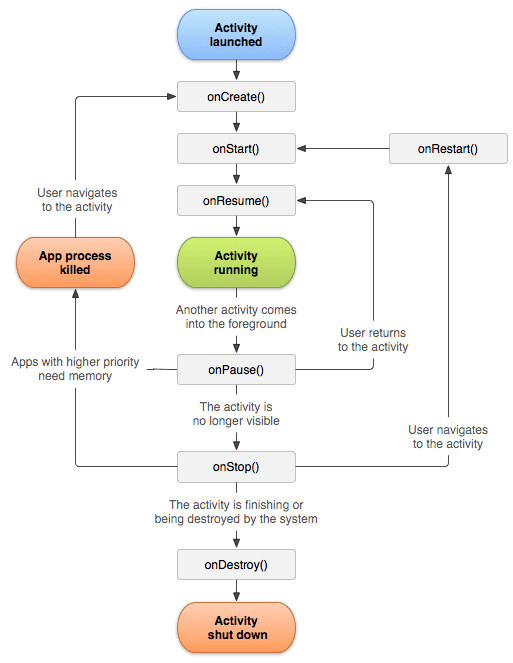
An Android Activity is the window for a single screen in your app where users interact with your UI. The OS manages a "back stack" of Activities; starting a new screen pushes one on, and pressing back pops it off.
WHY IT EXISTS: Mobile apps are composed of distinct screens that users navigate between. Android needed a core component to represent a single, focused task a user can perform, which typically corresponds to one screen of UI. The Activity provides this container.
THE MENTAL MODEL: An Activity is like a single page in a book or a single screen in your app. It's the window where the UI is drawn and user events are handled. The Android system manages a stack of these screens, called the "back stack." When you navigate to a new screen, a new Activity is pushed onto the top of the stack. When you press the back button, the top Activity is popped off, and the one below it becomes visible again.
HOW IT WORKS: An Activity has a well-defined lifecycle managed by the Android OS. It moves through states like onCreate(), onStart(), onResume(), onPause(), onStop(), and onDestroy() as the user navigates to and from it. You implement these callback methods to manage resources, save state, and handle UI updates. For example, you initialize your UI in onCreate() and might release heavy resources in onStop().
WHEN TO USE IT: Use an Activity to represent a distinct screen or a major entry point into your application's functionality. A login screen, a settings page, or a main dashboard are all classic examples of separate Activities.
WHEN NOT TO USE IT: Avoid creating a new Activity for minor UI changes on the same screen, like showing a dialog or a popup menu. Modern Android architecture often promotes a "Single-Activity" pattern, where one Activity hosts multiple Fragments or Composable screens. This simplifies navigation and state management within a complex feature.
ONE CANONICAL EXAMPLE: In an email app, the list of emails is one Activity. When you tap an email to read it, a new Activity starts, displaying the full content of that single email. Pressing back from the email view destroys that Activity and returns you to the list.
Read the original → developer.android.com
Get five bites like this every day.
Tezvyn delivers a daily feed of 60-second tech bites with quizzes to lock in what you learn.