APK Signature Scheme: Verifying App Integrity
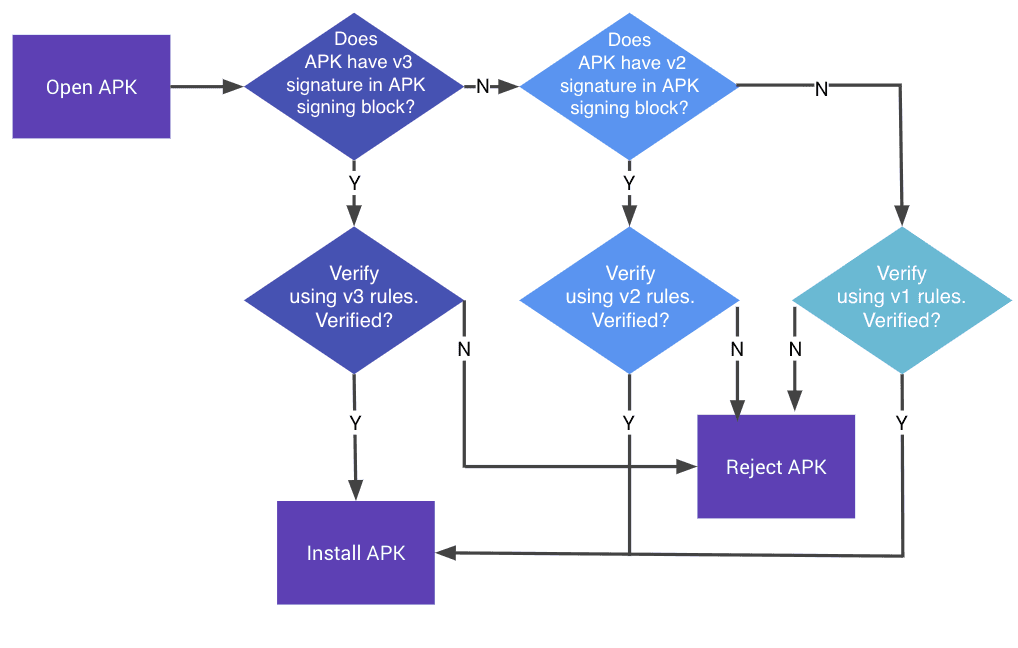
An APK signature is a tamper-evident seal, proving an app is from a specific developer and hasn't been altered. Android uses it to trust app updates and prevent malware. The footgun: losing your signing key means you can never update your app again.
Why it exists
The APK signature scheme exists to solve the problem of trust on an open platform. How does your phone know an app update is from the original developer and not a malicious actor who has injected malware? The signature provides a verifiable link between the developer and the code.
The mental model
Think of an APK signature as a cryptographic, tamper-evident seal on a software package. The developer signs the package with a secret private key. The Android OS can then use the corresponding public key to verify that the seal is unbroken (integrity) and that it was applied by the expected developer (authenticity).
How it works
During the build process, the compilation tools create a digest (a hash) of the APK's contents. This digest is then encrypted using the developer's private key, creating the signature. This signature is embedded within the APK file itself. When a user tries to install the app, the Android OS calculates its own hash of the APK contents. It also decrypts the embedded signature using the public key to retrieve the original hash. If the two hashes match, the installation proceeds.
When to use it
Signing is mandatory for all Android apps that will be installed on a device. It's a core requirement for publishing on the Google Play Store or any other app marketplace. The signature is what allows the OS to permit an update to an existing app—the new version's signature must match the installed version's signature.
When not to use it
You never ship an unsigned app. Even for local debugging, Android Studio uses a temporary debug key to sign the app. The only time you don't use your production signing key is for these non-production builds.
One canonical example
The app update process is the clearest example. If you have version 1.0 of an app on your phone, it was signed with a specific key. When the developer releases version 1.1, they must sign it with the exact same key. If a malicious party intercepts the update and injects their own code, they would have to sign it with their own, different key. The Android OS would detect the key mismatch and block the installation, protecting your data.
Interview question
How does the Android OS primarily use an APK signature to ensure a new app version is legitimate?
- a.It compares the hash of the new APK's content with a hash derived from the embedded signature, verified by the original public key.Correct
- b.It verifies that the app's package name and version number match the previously installed application.
- c.It decrypts the app's entire code using the public key to check for modifications.
- d.It scans the new APK for known malicious code patterns before allowing the update.
Why? this is the answer
The card explains that the OS calculates a hash of the APK and compares it to a hash obtained by decrypting the embedded signature using the public key. This process verifies both the integrity of the app and the authenticity of the developer. Option C is incorrect because the signature encrypts only the digest (hash), not the entire app's code.
Just read this? Test yourself on what you have been reading.
Read the original → source.android.com
Put your scrolling time to good use
Learn one idea, try a quiz and save useful cards for revision. Tezvyn makes it easy to learn and stay current in your tech field, a few minutes at a time.
The iPhone app is on the way
We are building it. Until it lands, nothing here is held back from you: every interview card, your saved cards, streaks and the job board all work in Safari, plus hundreds of free practice quizzes of thirty questions each. Sign in and it all carries over to the app the day it arrives.
Want it as an icon? Tap Share at the bottom of Safari, then Add to Home Screen. It opens full screen and the cards you have read stay available offline.
We are hiring for this. Open roles that interview on android — each one lists the topics its interview covers.
See open roles