Fitts's Law: Bigger, Closer Targets Are Faster to Hit
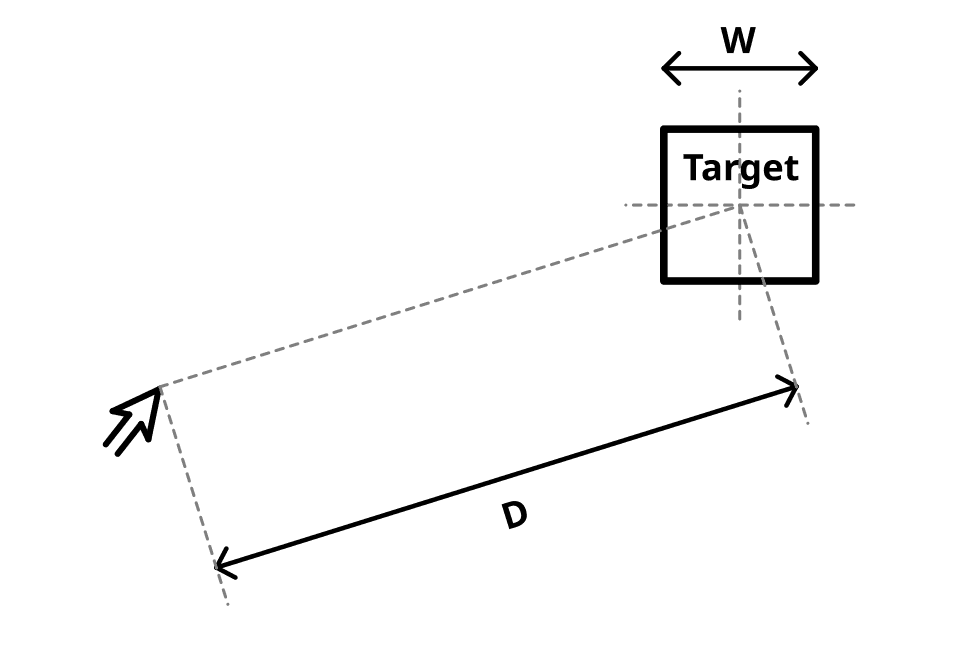
Fitts's Law predicts that the time to hit a target depends on its distance and size. This is why mobile buttons are large and context menus appear at your cursor. The footgun is making everything huge, which sacrifices information density and visual hierarchy.
WHY IT EXISTS Fitts's Law was created to quantify human movement in order to design more efficient physical and digital interfaces. Before this law, making buttons bigger felt intuitively better, but there was no way to predict or measure the performance gain. It provides a mathematical basis for answering, "Which of these two layouts is measurably faster to use?"
THE MENTAL MODEL Think of Fitts's Law like throwing a dart. Hitting a large target right in front of you is fast and easy. Hitting a tiny target across the room is slow and difficult. The law formalizes this intuition by stating that the time to move to a target is a function of the ratio between the distance to the target and the width of the target.
HOW IT WORKS The formal equation is T = a + b * log2(D/W + 1), where T is time, D is distance, and W is width. You don't need to do the math. The key takeaway is the relationship: as the Distance-to-Width ratio gets bigger, the time to click increases logarithmically. This means making a target twice as wide has a much greater impact on usability than moving it twice as close.
WHEN TO USE IT Use Fitts's Law to justify user-centric design decisions. First, for making primary call-to-action buttons large and easy to reach. Second, for placing related UI elements close together to minimize mouse travel. Third, for designing context menus that appear at the cursor's location, making the distance effectively zero. Finally, for making the clickable area of an icon or link larger than its visible boundary.
WHEN NOT TO USE IT Do not use Fitts's Law as a rule to make every single element massive. This leads to cluttered, low-density interfaces that force users to scroll constantly. Usability is a trade-off between target acquisition speed and information discovery. The law applies to rapid, targeted movements, not to exploratory browsing or reading where speed is not the primary goal.
ONE CANONICAL EXAMPLE The menu bar in macOS is placed at the very top edge of the screen. Because a user's cursor physically stops at the screen edge, they can't overshoot the target vertically. This gives the menu bar an effectively infinite width in that direction, making its items extremely fast to click. The same principle applies to the Windows Start button placed in the bottom-left corner.
Read the original → en.wikipedia.org
Get five bites like this every day.
Tezvyn delivers a daily feed of 60-second tech bites with quizzes to lock in what you learn.