Junction Table: Connecting Many to Many
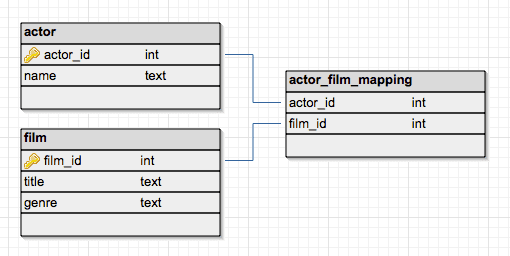
A junction table is a bridge between two other tables, enabling a many-to-many relationship. It's used to connect students to classes or tags to articles. The common footgun is forgetting a unique constraint, allowing duplicate connections.
WHY IT EXISTS Relational databases struggle to directly model a relationship where one record in Table A can relate to many records in Table B, and vice-versa. For example, a single student can be in many classes, and a single class has many students. A junction table solves this fundamental modeling limitation.
THE MENTAL MODEL Think of a junction table as a dedicated ledger or roster that only exists to connect two other lists. It doesn't contain much information itself, often just pairs of IDs. For a students table and a classes table, the students_classes junction table would have just two columns: student_id and class_id. Each row simply says "this student is in this class."
HOW IT WORKS A junction table, also called an associative or join table, sits between two tables, A and B. The junction table has at least two columns, each being a foreign key that references the primary key of either Table A or Table B. A row in the junction table, like (A_id, B_id), creates a single link between a specific record in A and a specific record in B. To find all of B's records associated with one A, you query the junction table for A's ID.
WHEN TO USE IT Use a junction table anytime you need to model a many-to-many relationship. This is extremely common in database design. Examples include: assigning multiple tags to a blog post, putting products into multiple categories, or listing ingredients for different recipes.
WHEN NOT TO USE IT You don't need a junction table for one-to-one or one-to-many relationships. For a one-to-many relationship, like a user having many posts, you can simply put a user_id foreign key directly on the posts table. Using a junction table here would be unnecessary overhead.
ONE CANONICAL EXAMPLE Imagine a books table and an authors table. A book can have multiple authors, and an author can write multiple books. The solution is a book_authors junction table with two columns: book_id and author_id. A row (101, 55) means the book with ID 101 was co-written by the author with ID 55. To represent a book with three authors, you would insert three rows into book_authors, all with the same book_id but different author_id values.
Read the original → en.wikipedia.org
Get five bites like this every day.
Tezvyn delivers a daily feed of 60-second tech bites with quizzes to lock in what you learn.