Everything in Mobile Dev, page 26
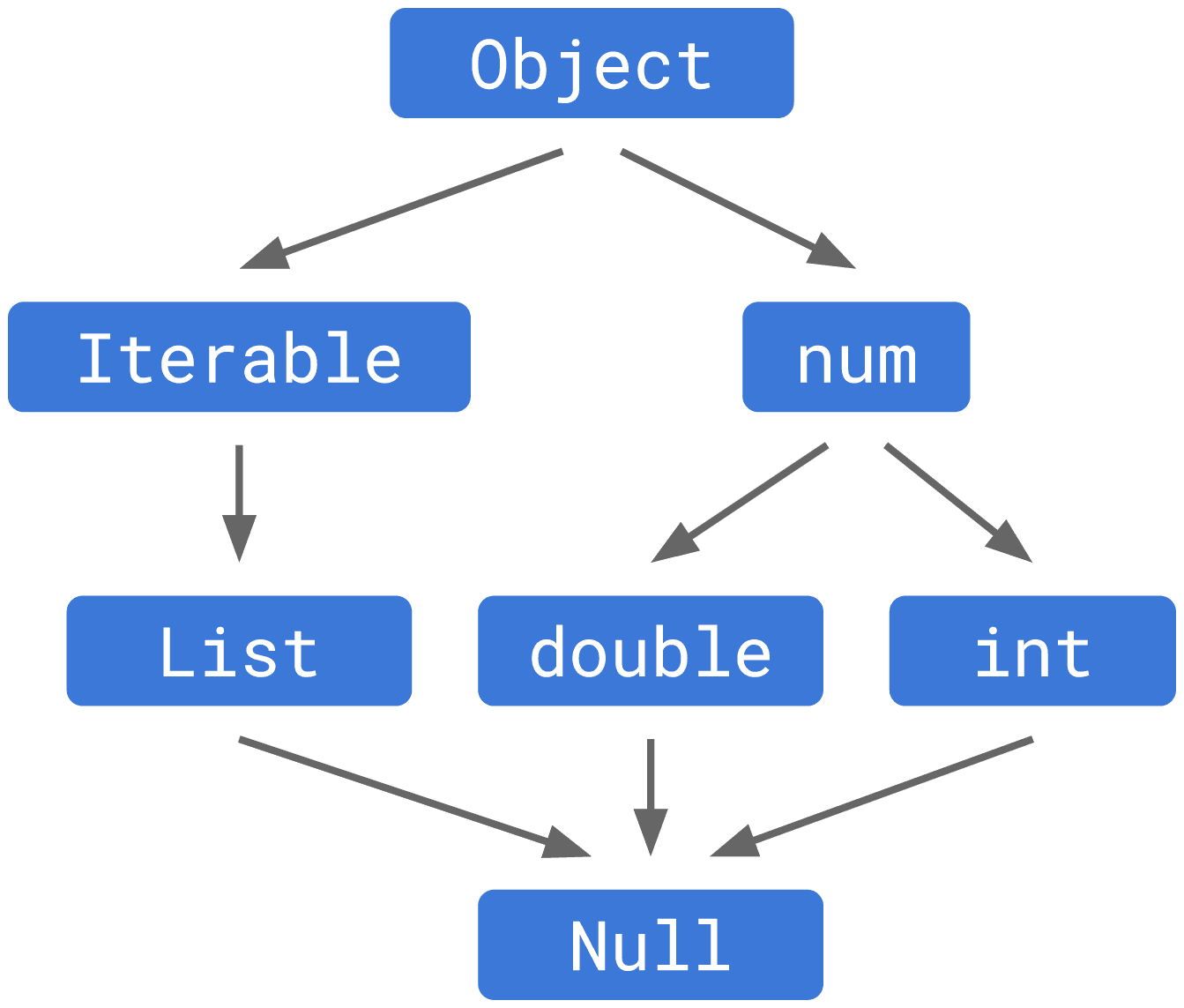
Describe Dart's null-aware ?. and null assertion ! operators
Tests Dart null safety mechanics: ?. short-circuits member access on null, while ! casts away nullability. A strong answer notes ?. avoids NPEs and ! is a risky opt-out. Red flag: claiming ! is safe or that ?. provides a default value.
Explain Dart positional vs named parameters and write one signature
Tests Dart parameter syntax. A strong answer covers required positional args, optional positional args in square brackets, and named args in curly braces with defaults. Red flag: claiming named parameters are always optional or confusing bracket types.
What is the difference between final and const in Dart?
Tests compile-time versus runtime immutability in Dart. A strong answer: final allows single assignment at runtime, but const requires a compile-time constant and deep immutability.
Flutter Performance Overlay
Flutter's Performance Overlay is a real-time EKG for frame budgets. Two graphs reveal whether Dart UI work or GPU rasterization is causing jank during animations. The footgun is rewriting widget logic when the raster thread is actually the bottleneck.
Tree Shaking Removes Unused Flutter Code
Tree shaking is the compiler deleting code your app never calls, so importing a massive package only costs the pieces you use. It runs automatically in release builds. Relying on dynamic dispatch or dart:mirrors silently disables it and brings back the bloat.
Legacy Integration Testing with flutter_driver
flutter_driver remotely pilots your app from a host via Dart VM service, common in legacy codebases with host-side scripts. Do not treat it as an in-process widget test because it runs outside the app; you cannot inspect state or use flutter_test matchers.
Repository Pattern: Hide Your Data Sources
A repository is a contract that hides where your data lives. Your Flutter app should not care if a user profile comes from Firebase, SQLite, or a mock. Engineers often leak HTTP clients or database models into UI instead of returning domain models.
Flutter Network Errors: Fail Gracefully
Treat every network call as a promise that might break. In Flutter, catch exceptions at the HTTP boundary and map them to UI states like retry widgets. The footgun is letting Dio or http exceptions bubble up, crashing the app instead of degrading gracefully.
Full-Text Search in Local Flutter Databases
SQLite FTS5 is an inverted index in your app: words map to row IDs, skipping brute-force scans. Use it when local tables exceed thousands of rows and LIKE lags. The footgun is that FTS virtual tables never auto-sync, so stale indexes return wrong rows.
Passing Arguments to Flutter Named Routes
Flutter named routes pass data through an arguments field instead of global variables. Use this when navigating to a route that needs an ID or configuration object. Arguments are untyped by default, so unsafe casts crash at runtime.

Explain R8's shrinking, obfuscation, and optimization phases and how to influence optimization
Separate dead code removal, renaming, and bytecode transformation; cite ProGuard keep rules and selective passes.
Describe staged rollout on Google Play Console, benefits, and metrics to monitor
Tests release engineering and risk mitigation. Covers: set percentage and countries, manually ramp, halt on bad signals; benefits are blast-radius reduction and real-world validation. Flag: auto-ramping claims or ignoring halted users keep the bad build.
Google Play App Signing: upload key versus app signing key
Tests Android signing infrastructure and key escrow knowledge. A strong answer states Google holds the app signing key while you retain an upload key, protecting critical signing material. Red flag: claiming both keys sign the final install artifact.
Release build ClassNotFoundException not in debug: cause and file?
Tests R8 shrinking awareness: release-only obfuscation removes classes loaded by reflection. Check proguard-rules.pro first and add a -keep rule. Red flag: blaming multidex or disabling minification rather than writing a targeted keep rule.
What is an Android App Bundle and its advantages over APK?
Tests knowledge of modern Play distribution. AAB is the publishing format with all code and resources; Play generates device-specific APKs for smaller downloads and supports dynamic features. Red flag: calling it a compressed APK or ignoring dynamic delivery.
Purpose of Android app signing and keystore contents
Signing proves authorship and integrity, enables same-key updates, and binds app identity; a keystore holds private keys and certificates.

How would you use Perfetto and Trace.beginSection to find a non-obvious bottleneck?
Tests correlation beyond CPU sampling. Covers coarse Trace.beginSection to limit 1-10us overhead, recording app ATrace with CPU/scheduling tracks, and correlating slices against scheduler latency. Red flag: omitting overhead or ignoring Perfetto SQL queries.
Explain generational GC in ART and why onDraw must avoid allocations
Covers young-gen nursery, mark-sweep fallback, and why a 5-10ms GC pause misses 16ms frame deadline.

Use Android Keystore to secure a database encryption key
Tests Android Keystore key generation and hardware trust boundaries. Strong answers: KeyGenParameterSpec with AES/GCM, TEE vs StrongBox isolation, setIsStrongBoxBacked on API 28+ with fallback, wrapping the database key. Red flag: claims Keystore encrypts DBs.
What is certificate pinning and what are its trade-offs?
Pinning hardcodes a server key to block rogue CA MITM; trade-offs are breakage on cert rotation and forced updates.
We are hiring for this. Every open role lists the topics its interview covers, so you can prepare for the real thing rather than guessing.
See open roles