Affine Transformations: Move, Scale, and Rotate Without Bending
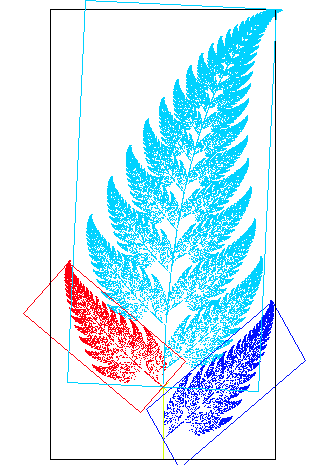
An affine transformation is a way to move, scale, rotate, or shear an object while keeping all lines straight and parallel lines parallel. It's used everywhere in computer graphics.
WHY IT EXISTS: Affine transformations exist to provide a single, unified mathematical framework for common geometric operations. Instead of having separate functions for translation, rotation, and scaling, they can all be combined into a single matrix multiplication, which is efficient for computer hardware to process. This simplifies complex sequences of manipulations in graphics and vision tasks.
THE MENTAL MODEL: Think of an affine transformation as a set of rules for moving every point in a shape. It's a combination of a linear transformation (like scaling or rotating around the origin) followed by a translation (shifting the entire shape). The key guarantee is that it preserves collinearity (points on a line stay on a line) and parallelism (parallel lines remain parallel). It can stretch, squeeze, or slant a shape, but it can't bend straight lines into curves.
HOW IT WORKS: An affine transformation is represented by a matrix. In 2D, a point (x, y) is often expressed in homogeneous coordinates as a vector (x, y, 1). This allows a 3x3 matrix to represent not just scaling, rotation, and shearing, but also translation. Applying the transformation is as simple as multiplying the point's vector by the transformation matrix. Multiple transformations, like a rotation followed by a translation, can be composed by multiplying their matrices together into a single, combined transformation matrix.
WHEN TO USE IT: Use affine transformations for the vast majority of 2D object manipulations in computer graphics, such as moving sprites in a game or resizing a UI element. They are also fundamental in computer vision for image registration (aligning two photos of the same scene) and as a data augmentation technique in machine learning (creating new training examples by slightly rotating or shearing images).
WHEN NOT TO USE IT: Do not use an affine transformation when you need to model perspective. If you're rendering a 3D scene onto a 2D screen and want objects farther away to appear smaller and parallel lines to converge at a vanishing point, you need a more general projective (or perspective) transformation. An affine transform keeps parallel lines parallel, so it cannot create this effect.
ONE CANONICAL EXAMPLE: Imagine a square with corners at (0,0), (1,0), (1,1), and (0,1). Applying a shearing transformation with a factor of 1 in the x-direction transforms the point (x,y) to (x+y, y). The square's corners become (0,0), (1,0), (2,1), and (1,1). The result is a parallelogram. Notice the top and bottom edges are still parallel, but the shape is skewed and right angles are gone.
Read the original → en.wikipedia.org
Get five bites like this every day.
Tezvyn delivers a daily feed of 60-second tech bites with quizzes to lock in what you learn.