Dask: Parallel Computing with Familiar APIs
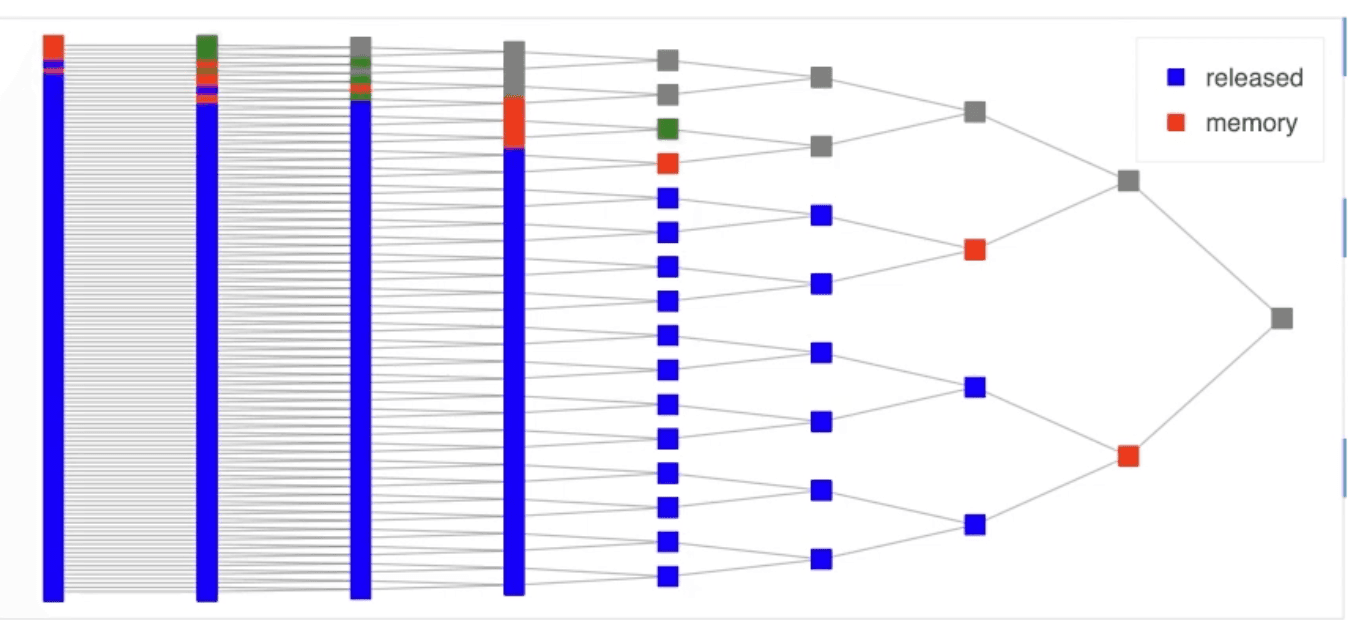
Dask parallelizes Python analytics by breaking data into chunks and building a task graph of operations. It's like giving Pandas and NumPy superpowers for data too big for RAM. The footgun: its lazy evaluation means you must explicitly call `.compute()`.
WHY IT EXISTS: Python data tools like Pandas and NumPy are powerful, but they assume all data fits in your computer's RAM. When datasets grow to hundreds of gigabytes or terabytes, these tools fail. Dask was created to scale these familiar APIs to larger-than-memory datasets and distributed clusters.
THE MENTAL MODEL: Think of Dask not as a data container, but as a recipe builder. When you write Dask code, you aren't running computations immediately. Instead, you are building a "task graph"—a plan of all the steps needed to get to your final result. The data is kept in smaller, manageable chunks. Dask only executes this graph and produces a result when you explicitly tell it to with a command like .compute().
HOW IT WORKS: Dask provides collections—Dask DataFrame, Dask Array, and Dask Bag—that mimic the APIs of Pandas, NumPy, and Python iterators. Each Dask collection is composed of many smaller pieces; for example, a Dask DataFrame is a collection of many Pandas DataFrames. When you apply an operation, Dask adds it to the task graph. The Dask scheduler then intelligently executes this graph, running tasks in parallel on available cores or workers in a cluster, handling dependencies and data movement.
WHEN TO USE IT: Use Dask when your dataset is too large to fit into memory. It's excellent for parallelizing ETL, feature engineering, and analysis on large tabular data (e.g., Parquet, CSV). It's also used for large-scale numerical computations with Dask Array and for parallelizing machine learning workflows with Dask-ML. You can deploy it on a single laptop to use all its cores, or on a large cluster using Kubernetes or SSH.
WHEN NOT TO USE IT: If your data fits comfortably in RAM, using Pandas or NumPy directly will be faster. The overhead of Dask's task scheduling is unnecessary for small data. Dask is also not a database; for applications requiring many small, low-latency queries, a proper database system is a better choice.
ONE CANONICAL EXAMPLE: A common task is calculating the mean of a column in a massive CSV file. With Pandas, you'd run out of memory. With Dask, you would write dd.read_csv('huge_file.csv').my_column.mean(). This builds a task graph that reads the file in chunks, calculates the mean for each chunk in parallel, and then combines those results. The final value is only computed when you call .compute() on the expression.
Read the original → docs.dask.org
Get five bites like this every day.
Tezvyn delivers a daily feed of 60-second tech bites with quizzes to lock in what you learn.