WAI-ARIA: A Script for Custom UI Accessibility
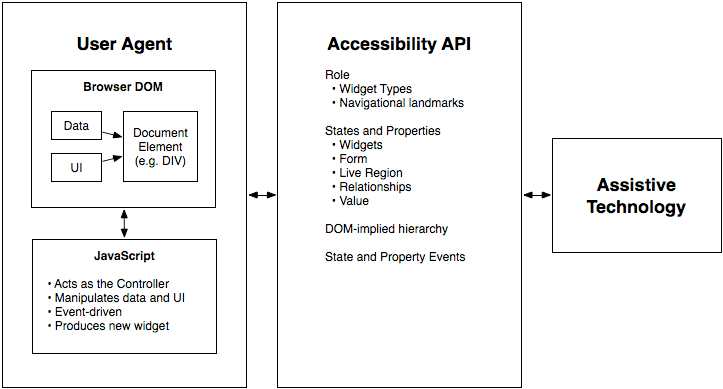
WAI-ARIA gives custom UI a voice for assistive tech. It's the script telling a screen reader what a `<div>` acting as a button is and if it's "pressed." Use it for custom widgets when native HTML can't.
WHY IT EXISTS Standard HTML elements have built-in accessibility; a <button> is known to be a button. But as web apps became more complex, developers built custom components using generic s and s. These custom widgets are often invisible or confusing to assistive technologies like screen readers, creating barriers for users with disabilities.
THE MENTAL MODEL WAI-ARIA is a set of attributes you add to HTML to provide semantics where they are missing. Think of it like adding labels and instructions to a custom-built machine. A native <button> comes with instructions; a you've styled to look like a button does not. ARIA provides those missing instructions, telling assistive tech: "This is a button" (role), "it is currently pressed" (state), and "it controls that other element" (property).
HOW IT WORKS ARIA works through three main types of attributes. First, ROLES define the type of widget, like role="button", role="tablist", or role="dialog". This tells a screen reader what the element is. Second, STATES describe the current condition of an element, like aria-pressed="true", aria-expanded="false", or aria-disabled="true". These are dynamic and change with user interaction. Third, PROPERTIES define relationships or extra characteristics, such as aria-controls="panel-id" to link a button to the panel it opens, or aria-labelledby="label-id" to associate an element with its visible label.
WHEN TO USE IT Use ARIA when you are building a custom interactive component that has no native HTML equivalent. Examples include a custom-designed dropdown menu, a tree view, a tabbed interface built from s, or a complex data grid. It's for bridging the gap between a component's visual appearance and its underlying semantic meaning for assistive tech.
WHEN NOT TO USE IT Do not use ARIA to "fix" poorly structured HTML. If a native element exists for your purpose, use it. For example, don't use ; use <button>. Using ARIA incorrectly can create more confusion and accessibility problems than it solves. This is the first rule of ARIA use: if you can use a native element or attribute, do so. Also, avoid adding ARIA to elements where it creates a conflict, like role="presentation" on an element that needs to be focusable.
ONE CANONICAL EXAMPLE Imagine a custom-built accordion widget. The container would get role="tablist". Each header that you click would get role="tab" and aria-expanded="false". The associated content panel would get role="tabpanel". When a user clicks the header, you'd use JavaScript to change its state to aria-expanded="true" and make the panel visible. This combination of roles and states allows a screen reader user to navigate the accordion just like a sighted user.
Read the original → w3.org
Get five bites like this every day.
Tezvyn delivers a daily feed of 60-second tech bites with quizzes to lock in what you learn.