Everything in Frontend Dev, page 12
Vue 3 ref() vs reactive(): differences and when to use each
Tests Vue 3 Composition API reactivity primitives. Strong answer: ref() wraps any value in a .value wrapper and is the recommended default; reactive() returns a proxy accessed directly. Red flag: saying ref() is only for primitives or omitting .value entirely.

How would you create a custom *appDelay structural directive?
This tests Angular rendering internals. A strong answer covers: TemplateRef as the embedded template, ViewContainerRef as insertion anchor, and a setter that creates the embedded view after a delay. Mention OnDestroy cleanup.
In Vue 3, what problem does Teleport solve?
This tests DOM hierarchy and CSS stacking context. A strong answer covers how Teleport moves markup to a target like body to escape ancestor transforms and z-index ceilings trapping fixed modals. Red flag: claiming it is only for cleaner HTML.
How does Angular OnPush change detection affect rendering?
This tests change detection tree knowledge. OnPush skips checks unless inputs change by reference, events fire, or async pipes mark for check. Mutated objects or manual subscriptions without markForCheck cause silent misses.
What's the difference between Angular property and attribute binding?
Tests whether you know Angular binds to DOM properties by default. [disabled] sets a DOM property; [attr.role] sets an HTML attribute. Use attribute binding when no DOM property exists, such as SVG attributes or role. Red flag: claiming they are equivalent.
Why does todos.push miss Svelte updates but spread works?
Tests compile-time versus runtime reactivity. Answer: Svelte's compiler instruments assignments, not method calls, so push is invisible; Vue Proxies and Angular Zone.js both intercept push to trigger updates.
How do you pass markup from a parent to a child component?
This tests declarative composition for UI reuse. A strong answer covers default and named slot syntax in Vue/Svelte (slot outlet, v-slot) or Angular ng-content with select for named projection.
Explain key or trackBy in list rendering and index key risks
Your understanding of virtual DOM reconciliation and stable element identity. A good answer covers that key binds DOM state to data identity, and that index keys break reordering by recycling wrong components.
Explain two-way data binding and provide input binding syntax
Tests whether you see two-way binding as sugar for value binding plus an input event. Strong answer: show one syntax, then explain the prop-out, event-in pattern. Red flag: syntax only with no mention of change detection or unidirectional flow.
How do you conditionally render Login/Logout with isLoggedIn in Vue or Angular?
This tests DOM lifecycle awareness versus CSS toggling. A strong answer uses v-if/*ngIf for infrequent changes that need cleanup, and v-show/[hidden] for frequent toggles that should stay mounted. A red flag is treating them as interchangeable.
How do Vue and Angular detect nested object mutations?
Tests deep reactivity vs reference-based detection. Vue 3 Proxies catch nested mutations; Angular Default checks on zone ticks and OnPush misses same-reference changes. Fix via immutability, deep watchers, or ngDoCheck.
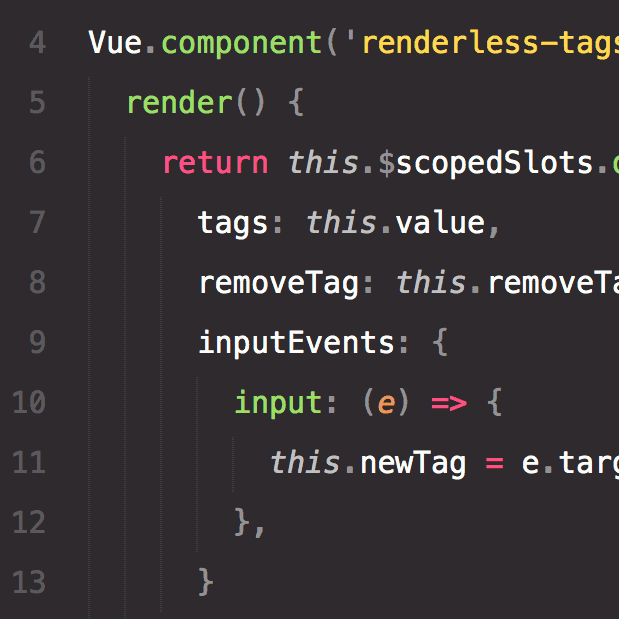
Architect a headless Toggle with scoped slots
This tests decoupling logic from markup via scoped slots. A strong answer exposes on and toggle through a single default scoped slot, renders no DOM, and cites UI flexibility. A red flag is using config props or CSS classes to control layout.
Implement a scoped slot pattern in a reusable DataList
It tests delegating rendering while keeping data ownership in the child. A strong answer covers a DataList that fetches internally and exposes rows via slot props, plus Angular TemplateRef via let-item. Red flag: parent loops or slots inheriting child scope.

Compare multiple boolean props versus a single status string prop
Booleans let callers pass conflicting flags like isLoading plus isError, leaking implementation priority; a single status enum makes invalid states unrepresentable.
What bindings do v-model and ngModel sugar, and why?
V-model sugars value and input; ngModel sugars [value] and (ngModelChange). This enforces one-way data flow for predictable state.
How do you emit events from a child to parent component?
This probes unidirectional data flow and child-to-parent event emission. In Vue, call $emit with a named event and payload; in Angular, use @Output with EventEmitter and emit the query. A red flag is suggesting two-way binding or direct parent mutation.
Primary mechanism for passing data from parent to child component
Tests unidirectional parent-to-child data flow and explicit component contracts. A strong answer names props or inputs, explains one-way binding, and warns against direct child mutation. Red flag: confusing props with global state or events.
Design the public API for a reusable Button component
Variant, size, disabled, type props; forward click; slots for content/icons; no router/form coupling.

How do you configure Vite Library Mode for ESM and UMD outputs?
Tests Vite Library Mode multi-format packaging. Strong answer: build.lib entry, formats es and umd, fileName function, and rollupOptions.output.globals for Vue. Red flag: multiple configs or omitting UMD global name.
How would you implement lazy loading for an Angular feature module?
This tests route-level code splitting and CLI workflows. A great answer hits: ng generate module, loadChildren in the route config, and excluding the feature from AppModule. A red flag is suggesting manual chunking instead of router-driven lazy loading.
We are hiring for this. Every open role lists the topics its interview covers, so you can prepare for the real thing rather than guessing.
See open roles