Everything in TypeScript & Web APIs, page 3

How do you create a smooth Canvas 2D loop with requestAnimationFrame?
Tests render pipeline timing. Outline: queue rAF per refresh; derive delta from timestamp for frame-rate independence; recurse each frame; cancel via cancelAnimationFrame. Red flag: claiming rAF locks 60fps, ignoring timestamp, or setInterval is fine.
Write a TypeScript async/await function that requests webcam access and handles errors
This tests async/await error handling for getUserMedia and stream attachment. A good answer uses try/catch, sets video.srcObject, and branches on NotAllowedError and NotFoundError. A red flag is omitting catch or using src instead of srcObject.
Get canvas 2D context and draw a filled circle
This tests Canvas API coordinates and context acquisition. A strong answer selects the canvas, calls getContext("2d"), uses path functions for circles, sets color style, and fills. A red flag is ignoring the top-left origin or using SVG instead.
How do you programmatically play, pause, and dynamically set a video source?
Your grasp of HTMLMediaElement's imperative API and the play() Promise. Query the video, attach play() and pause() to buttons, and set src or swap source children then call load(). Treating play() as synchronous or changing src without load().

Design a Service Worker caching strategy for a news app
Cache First for the app shell, Stale-While-Revalidate for static assets, and Network First for article APIs.
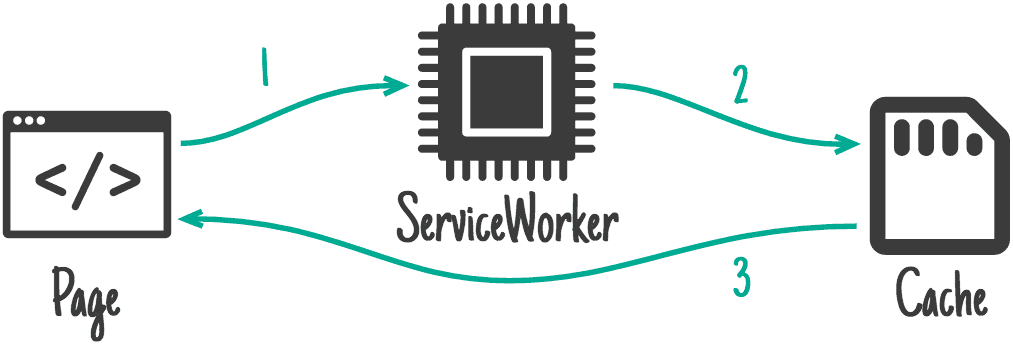
Explain Network First vs Cache First caching and when to use each
Tests matching caching strategy to asset freshness. Cache First serves static assets from the Cache API, falling back to network. Network First fetches fresh content, falling back to cache offline.
Describe the Service Worker lifecycle and cache versioning
Tests your grasp of the Service Worker lifecycle and cache versioning. A strong answer sequences register, install, activate, and fetch; notes install precaches assets while activate purges old caches and finalizes takeover.
Pass data to a Web Worker and transfer an ArrayBuffer efficiently
Tests postMessage clone versus transferable objects for zero-copy transfer. Good answers note postMessage copies by default, but ArrayBuffer can move via transfer list, neutering the original.
SPA back button: what event fires and how do you handle it?
Tests History API literacy. Strong answer: popstate event, PopStateEvent type, restore UI via event.state, and zero-delay setTimeout for DOM sync. Red flag: confusing popstate with pushState or using hashchange for modern History API routing.
What is a Service Worker's role and key PWA capability?
Tests understanding of the Service Worker as a network proxy and its core PWA benefit. A strong answer states it intercepts requests as a proxy and enables offline use via granular caching. Red flag: confusing it with Web Workers or DOM manipulation.
Which Web API offloads expensive work from the main UI thread?
Cite Web Workers, instantiate new Worker(url), and communicate via postMessage and onmessage.
Programmatically change SPA URL without reload and what is state for?
This tests History API fluency. Answer: use pushState or replaceState to change the URL silently; the state object is serializable data tied to the history entry, surfaced through popstate on back or forward navigation.
Why access IndexedDB exclusively from a Web Worker?
Tests whether you know IndexedDB in workers keeps the main thread free from serialization and transaction overhead, while recognizing that postMessage copying and request-response coordination add real architectural complexity.
How do you query IndexedDB products by price range?
Tests IndexedDB indexing and range query APIs. You need a price index created in onupgradeneeded, then IDBKeyRange.bound(50, 100) with index.getAll or openCursor. Red flag: fetching all records and filtering in JavaScript.
How do you add a new index to an existing IndexedDB store?
Tests production schema migration discipline. Bump the integer version in open(), handle onupgradeneeded before onsuccess, use event.oldVersion for incremental changes, and guard against duplicate index creation.
Write an IndexedDB add function with transaction error handling
Tests IndexedDB request-transaction lifecycle and event-driven error propagation. Answers open a transaction, call add(), and wire onsuccess/onerror on the request plus onabort/onerror on the transaction. Red flag: ignoring onabort or duplicate-key throws.
Explain IndexedDB transactions and readonly vs readwrite modes
Every operation needs a transaction; readonly allows concurrent readers, readwrite is exclusive; they auto-commit when idle.
Design a type-safe generic localStorage wrapper in TypeScript
Generic getItem<T> returns T|null via JSON.parse, setItem<T> stringifies, and a key-to-type map enforces safety.
What are localStorage's capacity and synchronous blocking limitations?
This tests Web Storage API trade-offs and main-thread blocking. A strong answer notes synchronous calls block the main thread; cites a finite per-origin quota; and names IndexedDB for async needs. Red flag: calling it a database or ignoring UI freezes.
How do you store and retrieve a TypeScript object in localStorage?
This tests your knowledge of Web Storage string constraints and JSON serialization. A strong answer covers JSON.stringify on write, JSON.parse on read, and typing the result with a TypeScript interface.
We are hiring for this. Every open role lists the topics its interview covers, so you can prepare for the real thing rather than guessing.
See open roles