All bites
The whole library, newest first. Filter by what you are here for, or pick a topic if you already know.
4247 bites
Page 7
Static Members: Belong to the Class, Not the Instance
A static member is shared across all instances of a class, belonging to the class itself. Use it for constants or utility functions that don't depend on an instance's state, like a global counter. The footgun: you cannot use this inside a static context.
Dart's Lazy Iterable Methods: map() and where()
Think of map() or where() not as instant transformations, but as recipes for a new list. They're lazy, only doing work when you iterate. Use them to chain operations without creating intermediate lists.
Dart's Specialized Constructors: Named, Factory, and Constant
Dart constructors offer more than one way to create an object. Use named constructors for clarity (e.g., fromJSON), factory for caching or returning subtypes, and const for compile-time constant objects.
Dart: Abstract Classes & Implicit Interfaces
An abstract class is a blueprint that other classes must follow, but it can't be instantiated itself. Dart also lets any class act as an 'implicit interface,' forcing other classes to implement its public API without inheritance.
Why hashCode and operator== Must Be Overridden Together
Overriding == without hashCode breaks collections like Set and Map. If two objects are equal, they MUST have the same hash code. This is vital for custom classes used as map keys or set elements.
Dart's Enhanced Enums: More Than Just Constants
An enhanced enum is a class with a fixed set of instances. It lets you add fields, methods, and constructors to your enums, turning them from simple labels into powerful objects with attached data and behavior.
Dart Mixins: Constraining Reusable Code with `on`
A Dart mixin is like a plugin of methods for a class. The on keyword acts as a gatekeeper, ensuring the class using the mixin already has specific base features. This is used for sharing UI logic only among Widget subclasses.
Extension Methods: Add to Classes You Don't Own
Extension methods let you add functionality to existing classes you don't control. Use them to create fluent APIs, like calling '42'.parseInt() instead of int.parse('42').
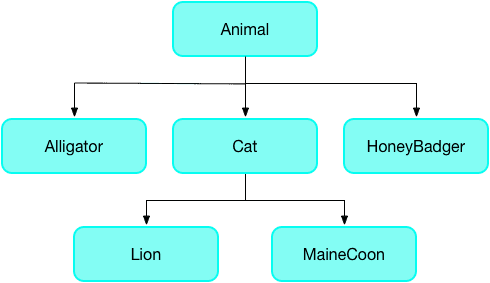
The `covariant` Keyword: Loosening Type Rules
The covariant keyword tells Dart's analyzer to relax its strict rules for method overriding, letting a subclass method accept a more specific parameter type. It's often used in Flutter widgets.

The Dart Event Loop: Your App's Task Manager
The event loop is Dart's single-threaded task manager. It processes one event at a time from a queue (like user taps or network responses), preventing the UI from freezing. Use async/await to avoid blocking it with long operations.
Dart Futures: Chaining Async Work with .then()
A Dart Future is a promise for a value that isn't ready yet. Chain actions onto it with .then() for success and .catchError() for failure. This is key for network requests or file I/O. The footgun is forgetting .catchError(), causing silent failures.
Future.wait: Run Concurrent Dart Operations
Run multiple async operations concurrently and collect their results in a single list. Use it to fire off independent tasks, like multiple network requests, and wait for them all to finish. The footgun: if one future fails, you lose all results by default.
Dart's Stream: Asynchronous Data Pipelines
Think of a Dart Stream as a conveyor belt for asynchronous data, delivering events over time. It's ideal for handling sequences like user input or file I/O.
StreamController: The Faucet for Your Data Stream
A StreamController is the faucet handle for your data stream. Use it to create a custom stream from any data source and push events to it. The main footgun is that a default controller only allows one listener; use StreamController.broadcast for multiple.
Completer: Manually Control a Future's Lifecycle
A Completer gives you a Future now but lets you decide when and how it finishes later. It's essential for converting old callback-based APIs into modern async/await code. The main footgun is trying to complete it more than once, which throws an error.
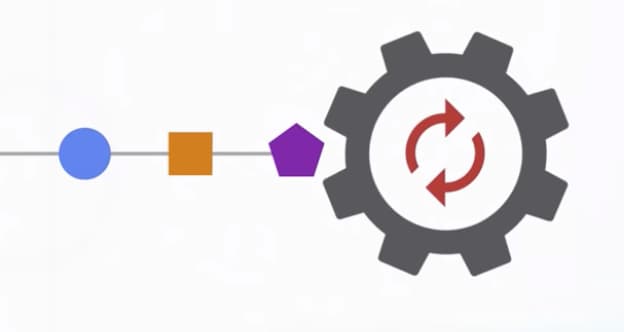
Dart's Microtask Queue vs. Event Queue
Dart's event loop prioritizes a 'microtask' queue for immediate async tasks over the main 'event' queue for I/O and user input. This ensures high-priority code runs first, but risks starving the event queue and freezing the UI if overused.
Dart Streams: Single-Subscription vs. Broadcast
A single-subscription stream is a private channel for one listener; a broadcast stream is a public radio station for many. Use single-subscription for one-off data like a file download and broadcast for shared events like UI updates.
StreamTransformer: Building Custom Stream Operators
A StreamTransformer is a factory for custom stream operators like map or where. Use it to build reusable logic, like parsing data chunks, that can be applied to any stream.
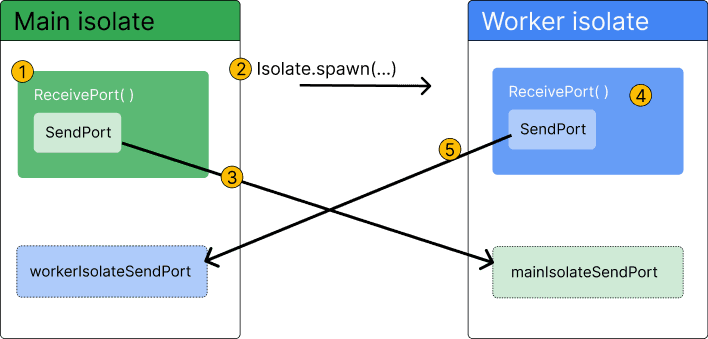
Dart Isolates: True Parallelism Without Shared Memory
Dart isolates provide true parallelism by running code in a separate thread with its own memory. Use them to offload heavy tasks like parsing huge JSON files or complex calculations that would otherwise freeze your Flutter UI.
Declarative UI: Describe the 'What', Not the 'How'
Declarative UI means you describe your desired UI for a given state, and the framework figures out how to display it. It's the core of modern frameworks like Flutter. The footgun is manually changing UI instead of updating the state that drives it.