Dart Isolates: True Parallelism Without Shared Memory
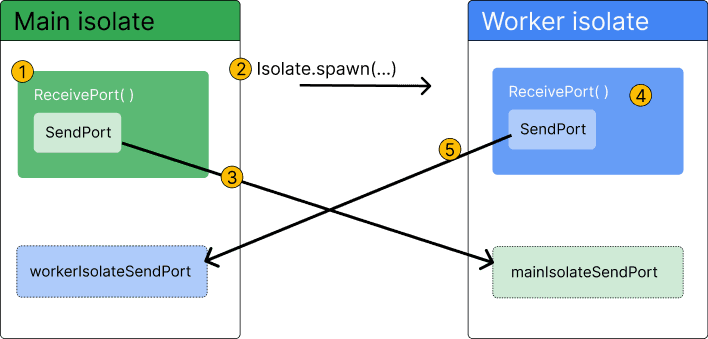
Dart isolates provide true parallelism by running code in a separate thread with its own memory. Use them to offload heavy tasks like parsing huge JSON files or complex calculations that would otherwise freeze your Flutter UI.
Why it exists
Most user interfaces, including Flutter's, run on a single thread. If you perform a long-running task like complex math or parsing a large file on this main thread, the UI freezes because it can't draw new frames or respond to user input. Isolates were created to solve this by moving heavy work to a different thread.
The mental model
Think of an isolate as a separate workshop with its own tools and materials (memory). Workers can't just grab things from each other's benches; they must send messages back and forth through a pneumatic tube system (Ports). This "share-nothing" concurrency model prevents data corruption and race conditions by its very structure, removing the need for manual locking.
How it works
When you spawn an isolate, the Dart VM creates a new thread with its own memory heap and event loop. You provide it a function to execute. To communicate back to the main isolate, you use SendPort and ReceivePort objects. You send a message through the SendPort, and the receiving isolate listens for it on its ReceivePort. The data sent is copied, not shared, ensuring total isolation.
When to use it
Use isolates for any CPU-intensive task that could block the main thread for more than a few milliseconds. The canonical use case is in Flutter, to prevent "jank" or unresponsiveness while processing data. Examples include parsing and decoding exceptionally large JSON objects, image processing, cryptography, or running complex algorithms.
When not to use it
Do not use isolates for I/O-bound operations like network requests; async/await is designed for that and is more lightweight. A major limitation is that multiple isolates are not supported in Flutter web applications, which operate in a single-threaded browser environment. For very small computations, the overhead of creating an isolate and copying data may also be slower than just running the code on the main thread.
One canonical example
A Flutter app needs to parse a 50MB JSON file. Parsing it on the main thread would freeze the UI for several seconds. The correct approach is to use Isolate.run() to perform the JSON decoding on a background thread. The isolate takes the raw string data, parses it into Dart objects, and sends the final result back to the main thread, which can then safely update the UI without ever dropping a frame.
Interview question
For which scenario would using a Dart Isolate be the most appropriate solution?
- a.Executing a background task in a Flutter application deployed to the web.
- b.Decoding a large, complex JSON payload received from a server.Correct
- c.Performing a simple mathematical operation on two integers.
- d.Fetching a user's profile data from a backend API.
Why? this is the answer
The card specifies isolates are for CPU-intensive tasks like decoding large JSON to prevent UI jank. Fetching data is I/O-bound, simple calculations incur too much overhead, and isolates are not supported in Flutter web applications.
Just read this? Test yourself on what you have been reading.
Read the original → dart.dev
- #dart
- #flutter
- #concurrency
- #parallelism
Put your scrolling time to good use
Learn one idea, try a quiz and save useful cards for revision. Tezvyn makes it easy to learn and stay current in your tech field, a few minutes at a time.
The iPhone app is on the way
We are building it. Until it lands, nothing here is held back from you: every interview card, your saved cards, streaks and the job board all work in Safari, plus hundreds of free practice quizzes of thirty questions each. Sign in and it all carries over to the app the day it arrives.
Want it as an icon? Tap Share at the bottom of Safari, then Add to Home Screen. It opens full screen and the cards you have read stay available offline.
We are hiring for this. Open roles that interview on dart — each one lists the topics its interview covers.
See open roles