All bites
The whole library, newest first. Filter by what you are here for, or pick a topic if you already know.
4247 bites
Page 9
AspectRatio: Forcing a Widget's Proportions
AspectRatio forces a child widget to maintain a specific width-to-height ratio, like a 16:9 video player. Use it for image placeholders or video frames. The footgun: it fails in unconstrained parents like FittedBox; use SizedBox there instead.
CustomSingleChildLayout: Parent-Driven Layout
CustomSingleChildLayout lets a parent widget dictate its child's size and position, ignoring the child's intrinsic size. Use it for layouts where the parent's dimensions are independent, like a custom overlay.
CustomMultiChildLayout: A Delegate for Complex Layouts
CustomMultiChildLayout gives a delegate total control to size and position multiple children. It's for complex layouts where widgets relate to each other, like a radial menu. The key footgun: the parent's size cannot depend on the sizes of its children.
IntrinsicHeight/Width: Sizing by 'Natural' Dimensions
IntrinsicHeight/Width tells a child widget to size itself to its "natural" dimensions, rather than expanding to fill available space. It's useful for making all items in a Row match the tallest item's height, but it's expensive and should be avoided.
GestureDetector: Making Any Widget Interactive
GestureDetector is an invisible wrapper that makes any widget interactive. Use it to add an onTap to a Container or custom widget. The biggest footgun: when nested, only the innermost detector's callback for a given gesture will fire.
Flutter's Three Main Material Buttons
Flutter's Material buttons signal emphasis. Use ElevatedButton for primary actions (Save), OutlinedButton for secondary (Next), and TextButton for tertiary (Cancel). The footgun is choosing a button for its looks, not its place in the action hierarchy.
Flutter's TextField: Capturing User Input
Flutter's TextField is the standard widget for user text input. Use it for search bars or login forms, and manage its state with a TextEditingController for full control. The biggest footgun is forgetting to dispose its controller, causing memory leaks.
TextEditingController: Syncing UI and Code for Text Fields
A TextEditingController is the two-way link between your code and a text field's state. Use it to read user input, set initial text, or move the cursor. A common footgun is forgetting to call dispose() on the controller, which leads to memory leaks.
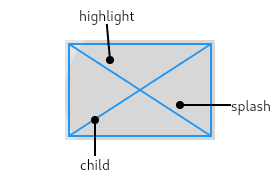
InkWell: Adding Material Splash Effects
InkWell adds a Material Design 'splash' effect to any widget on tap. Think of it as ink spreading inside the surface you touch. Use it to make non-interactive widgets like images respond to taps. The splash won't appear if an opaque widget is between it.
Flutter's Form Widget: Grouping and Validating Input
A Flutter Form acts as a supervisor for multiple input fields, letting you validate and save them all at once. Use it for login screens or user profiles. The footgun is forgetting the GlobalKey, which makes it impossible to trigger validation.
FocusNode: Programmatically Managing Widget Focus
A FocusNode is your handle to a widget's focus state, letting you programmatically request focus or listen for changes. It's essential for forms, like moving focus from one TextField to the next.
Dismissible: The Swipe-to-Remove Widget in Flutter
A Dismissible widget lets you swipe away list items, like clearing notifications. Use it for to-do lists or email inboxes. The key footgun: you MUST provide a unique Key and remove the item from your data source in onDismissed, or it will reappear on…
Flutter's Gesture Arena: Who Wins the Touch Event?
The Gesture Arena is a contest where multiple gesture detectors compete for one touch event. This happens when a tappable button is inside a scrollable list. The biggest footgun is a gesture not firing because an unexpected detector won the competition.
Build Custom Inputs with Flutter's FormField Widget
FormField is a state wrapper, not a UI widget, that turns any widget into a validatable form input. Use it for custom inputs like sliders or star ratings that must integrate with a Form. The footgun is forgetting to supply the UI via its builder.
RawKeyboardListener: Deprecated Hardware Key Events in Flutter
This is a deprecated Flutter widget for capturing raw hardware keyboard events, bypassing text input systems. It was for games or custom shortcuts, but the biggest mistake is using it now. Use KeyboardListener instead.
MaterialPageRoute: The Page in Your Navigator Stack
Think of Navigator as a stack of screens. MaterialPageRoute wraps your new screen widget, defining its platform-specific transition (slide on iOS, zoom on Android). You use it with Navigator.push to show a new screen.
Imperative Navigation: Pushing and Popping Screens
Think of app screens as a stack of cards. You push a new screen onto the top to show it and pop it off to go back. It's ideal for linear flows like list-to-detail. The footgun: popping the last screen closes the app.
Flutter Named Routes: Navigate with Strings, Not Widgets
Think of named routes as URL paths for your app's screens. Instead of building a screen widget on the spot, you just tell Flutter "go to '/profile'". This is ideal for centralizing navigation in large apps and for enabling deep linking.
Passing Arguments to Flutter Named Routes
Flutter named routes pass data through an arguments field instead of global variables. Use this when navigating to a route that needs an ID or configuration object. Arguments are untyped by default, so unsafe casts crash at runtime.
GoRouter: URL-Based Navigation for Flutter Apps
GoRouter treats your app's screens like web pages with URLs. This declarative approach simplifies deep linking and passing data via paths like /users/123. The footgun is forgetting its declarative nature and trying to manage state imperatively.