InkWell: Adding Material Splash Effects
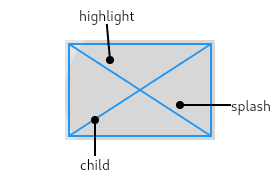
InkWell adds a Material Design 'splash' effect to any widget on tap. Think of it as ink spreading inside the surface you touch. Use it to make non-interactive widgets like images respond to taps. The splash won't appear if an opaque widget is between it.
Why it exists
Flutter needs a standard way to provide touch feedback consistent with Material Design. While GestureDetector handles taps, it provides no visual cue. InkWell fills this gap by providing the characteristic 'ink splash' ripple effect, making apps feel responsive and native to the Material ecosystem.
The mental model
Think of InkWell as a transparent layer that listens for taps. When a tap occurs, it tells its ancestor Material widget to 'paint' an ink splash at that location. The key is that the splash appears to spread within the material itself, like ink soaking into paper, not on top of other widgets.
How it works
InkWell must be a descendant of a Material widget. When you wrap InkWell around a child widget (like a Container or Icon), it detects gestures like onTap or onLongPress. It then triggers an InteractiveInkFeature, which paints the ripple effect directly onto the nearest ancestor Material's canvas. By default, this effect is clipped to the InkWell's rectangular bounds.
When to use it
Use InkWell whenever you want to make a widget tappable and provide standard Material feedback. It's ideal for creating custom buttons from Containers, Cards, or Rows, or for making list items in a ListView respond to taps with a visual ripple.
When not to use it
If you need gesture detection without any visual feedback, use GestureDetector instead. For non-rectangular splash effects that conform to a shape, use its sibling, InkResponse. Crucially, avoid using InkWell within a Material widget whose size animates, as the splash effect will not clip correctly to the changing bounds.
One canonical example
The most common footgun is wrapping an InkWell around a Container with a set color. The Container's color is opaque and is painted on top of the Material widget. The ink splash, which is painted on the Material itself, is therefore hidden. The fix is to apply the color to the Material widget directly, or to use an Ink widget instead of a Container for decoration, which paints on the same Material canvas.
Interview question
What is a common reason an InkWell's visual splash effect might not be seen upon tapping?
- a.An opaque widget is positioned between the InkWell and its ancestor Material widget.Correct
- b.The parent Material widget's size is animating, causing the splash to clip incorrectly.
- c.The InkWell widget is not a direct child of a GestureDetector.
- d.The InkWell's onTap callback is not defined, making it non-interactive.
Why? this is the answer
The card explicitly states that "The splash won't appear if an opaque widget is between it" and details how an opaque widget like a colored Container can hide the splash, which is painted on the ancestor Material. While an undefined onTap (option D) would prevent the splash from being triggered, the card's 'footgun' example specifically addresses the splash being hidden despite a tap occurring.
Just read this? Test yourself on what you have been reading.
Read the original → api.flutter.dev
Put your scrolling time to good use
Learn one idea, try a quiz and save useful cards for revision. Tezvyn makes it easy to learn and stay current in your tech field, a few minutes at a time.
The iPhone app is on the way
We are building it. Until it lands, nothing here is held back from you: every interview card, your saved cards, streaks and the job board all work in Safari, plus hundreds of free practice quizzes of thirty questions each. Sign in and it all carries over to the app the day it arrives.
Want it as an icon? Tap Share at the bottom of Safari, then Add to Home Screen. It opens full screen and the cards you have read stay available offline.
We are hiring for this. Open roles that interview on flutter — each one lists the topics its interview covers.
See open roles