All bites
The whole library, newest first. Filter by what you are here for, or pick a topic if you already know.
8664 bites
Page 18

Flutter's Container: The Ultimate Box Widget
Think of Container as a customizable box for your UI. It's Flutter's multi-tool for combining layout, styling, and positioning in a single widget. Use it to add padding, margins, borders, or background colors.
Custom fade-and-scale transition with PageRouteBuilder and GoRoute
Tests bridging imperative transitions to declarative routers. Use PageRouteBuilder with FadeTransition and ScaleTransition, set globally in theme or per route via GoRoute pageBuilder with CustomTransitionPage. Red flag: omitting child rebuilds the page.
Expanded & Flexible: Claiming Space in Flutter Layouts
Expanded and Flexible widgets manage space in a Row or Column. Expanded is greedy, forcing its child to fill all available space. Flexible is polite, allowing its child to grow but not requiring it. Use them to prevent overflow errors.
Explain ephemeral vs app state and when to use setState
This tests state scoping judgment. Ephemeral state is local to one widget, like a page index or checkbox value, and setState fits perfectly. App state is shared, like a user profile or cart, and needs a state management solution.
SingleChildScrollView: When One Widget Needs to Scroll
SingleChildScrollView is an emergency scrollbar for one widget that usually fits on screen. Use it when a layout might overflow on small devices. The footgun: it renders its entire child at once, so never use it for long lists—use ListView instead.
Provider package versus raw InheritedWidget
It removes boilerplate, adds lifecycle disposal and scoped reads, and exposes select for granular rebuilds.
Flutter's Box Constraint System: Parents Rule
In Flutter, parents tell children their size limits, not their size. A widget must obey its parent's constraints (min/max width/height), but it chooses its own size within those bounds. The footgun is trying to size a child widget against its parent's rules.
Difference between context.watch, context.read, and Selector in Provider and Riverpod
Tests rebuild granularity in Flutter. A strong answer distinguishes listening versus one-time lookup, explains that Selector filters rebuilds by comparing sub-values, and warns that context.read inside build causes missed updates.
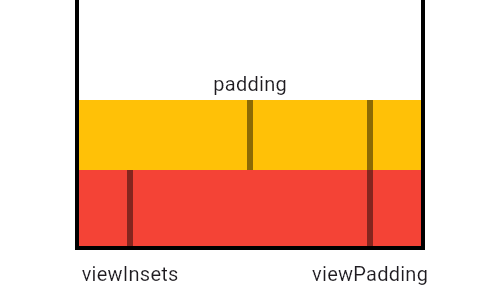
MediaQuery: Reading Device Properties Efficiently
MediaQuery is your widget's window to the device, providing screen size, orientation, and safe areas. Use it to build responsive UIs that avoid system elements like notches or the keyboard. The footgun: MediaQuery.of(context) rebuilds on any change.
How do you manage product list and favorite state without full rebuilds?
This tests granular rebuild control in Flutter lists. A strong answer isolates item state with ValueNotifier or ChangeNotifier per item plus const constructors with keys. Red flag: calling setState on the parent list rebuilds every ListTile on each tap.
LayoutBuilder: Build Widgets Based on Parent Size
LayoutBuilder lets your widget ask its parent "how much space do I have?" before deciding what to build. Use it for responsive layouts, like showing a Row on wide screens and a Column on narrow ones.
Explain lifting state up in Flutter and how Provider simplifies it
Tests declarative state ownership and prop-drilling cost. A strong answer names the lowest common ancestor, contrasts callback threading with Provider lookup, and avoids root-level state.
Flutter's Wrap Widget: The Row That Won't Overflow
Flutter's Wrap widget is like text-wrapping for your UI. It arranges children in a row or column, automatically flowing them onto a new line when space runs out. It's perfect for dynamic lists of tags or chips.
Immutable bloc state versus mutable ChangeNotifier
Immutable gives predictable diffs, easy debugging and replayability at the cost of boilerplate; mutable is terse but error-prone.
Flutter's FittedBox: Scale Any Widget to Fit
FittedBox scales its single child to fit an allocated space, like CSS's object-fit but for any widget. It's perfect for making an icon fill a button or ensuring text fits a container. The footgun: it fails in unconstrained parents like a Row or Column.
Make a GET request with http and parse JSON in Dart
Practical Dart async networking with package:http and dart:convert. Import http, await get(Uri.parse(url)), verify statusCode is 200, then jsonDecode(response.body) as List<Map<String, dynamic>>. Skipping status checks or decoding without a cast.
AspectRatio: Forcing a Widget's Proportions
AspectRatio forces a child widget to maintain a specific width-to-height ratio, like a 16:9 video player. Use it for image placeholders or video frames. The footgun: it fails in unconstrained parents like FittedBox; use SizedBox there instead.
Explain FutureBuilder and how it manages async UI states
This tests declarative async UI state management. Obtain the Future before build, pass it to FutureBuilder, and branch on snapshot.connectionState and hasError to render loading, data, or error states.
CustomSingleChildLayout: Parent-Driven Layout
CustomSingleChildLayout lets a parent widget dictate its child's size and position, ignoring the child's intrinsic size. Use it for layouts where the parent's dimensions are independent, like a custom overlay.
Purpose of factory fromJson constructor in Dart models
Factory fromJson centralizes deserialization, preprocesses Map values before instantiation, and keeps the primary constructor clean.