MediaQuery: Reading Device Properties Efficiently
MediaQuery is your widget's window to the device, providing screen size, orientation, and safe areas. Use it to build responsive UIs that avoid system elements like notches or the keyboard. The footgun: MediaQuery.of(context) rebuilds on any change.
Why it exists
Apps need to adapt to a huge variety of devices. A layout that works on a small phone might look empty on a tablet, and content can be hidden by system UI like a notch or a pop-up keyboard. MediaQuery provides a standard way for widgets to query these device characteristics and adjust their layout accordingly.
The mental model
Think of MediaQuery as a live data feed from the device's operating system to your widget tree. It tells your widgets about the environment they are running in, such as the screen dimensions, pixel density, and areas obscured by system UI. Your widgets can listen to this feed and rebuild themselves when the environment changes.
How it works
MediaQuery is an InheritedWidget that makes a MediaQueryData object available to all widgets below it. This object holds properties like size, padding, and viewInsets. When you call MediaQuery.of(context), your widget subscribes to changes in the entire MediaQueryData object. This is inefficient. For example, your widget will rebuild when the on-screen keyboard appears, even if it only cares about the screen's width. The performant approach is to use specific methods like MediaQuery.sizeOf(context), which subscribes your widget to changes for only the size property.
When to use it
Use MediaQuery any time your layout depends on the device's state. This includes building responsive layouts for different screen sizes, adjusting padding to keep content out of system-owned areas (like the status bar or a display notch), and moving UI elements up when the on-screen keyboard appears.
When not to use it
Avoid using the general MediaQuery.of(context) when you only need a single piece of information. This is a common performance pitfall. To get the screen width, use MediaQuery.sizeOf(context).width instead of MediaQuery.of(context).size.width. If a MediaQuery might not be present in the widget tree, use the maybe... variants like MediaQuery.maybeSizeOf(context) to get null instead of an exception.
One canonical example
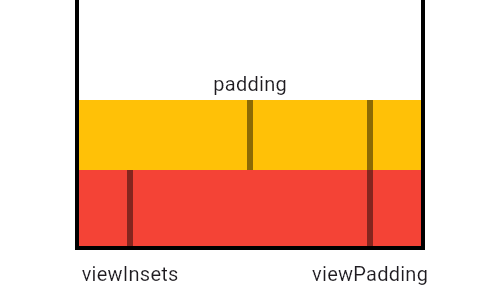
MediaQuery differentiates between various screen obstructions. viewInsets describes transient obstructions like the keyboard. viewPadding describes persistent ones like a phone's notch. The padding property, which SafeArea uses, is the final usable space, calculated as max(0.0, viewPadding - viewInsets). This ensures your UI is never drawn under system elements.
Interview question
According to the card, what is the primary performance concern when using `MediaQuery.of(context)`?
- a.It causes the widget to rebuild whenever any property within the MediaQueryData object changes.Correct
- b.It performs a costly deep copy of the MediaQueryData object on every access, consuming excessive memory.
- c.It requires traversing the entire widget tree to locate the MediaQuery InheritedWidget, which is slow.
- d.It only provides a static snapshot of device properties, failing to update on runtime changes.
Why? this is the answer
The card explicitly states that `MediaQuery.of(context)` is inefficient because it subscribes your widget to changes in the entire `MediaQueryData` object, causing a rebuild on any property change. Option D is incorrect because `MediaQuery.of(context)` does react to runtime changes; the issue is that it reacts to *all* changes, even irrelevant ones.
Just read this? Test yourself on what you have been reading.
Read the original → api.flutter.dev
Put your scrolling time to good use
Learn one idea, try a quiz and save useful cards for revision. Tezvyn makes it easy to learn and stay current in your tech field, a few minutes at a time.
The iPhone app is on the way
We are building it. Until it lands, nothing here is held back from you: every interview card, your saved cards, streaks and the job board all work in Safari, plus hundreds of free practice quizzes of thirty questions each. Sign in and it all carries over to the app the day it arrives.
Want it as an icon? Tap Share at the bottom of Safari, then Add to Home Screen. It opens full screen and the cards you have read stay available offline.
We are hiring for this. Open roles that interview on flutter — each one lists the topics its interview covers.
See open roles