All bites
The whole library, newest first. Filter by what you are here for, or pick a topic if you already know.
8664 bites
Page 19
CustomMultiChildLayout: A Delegate for Complex Layouts
CustomMultiChildLayout gives a delegate total control to size and position multiple children. It's for complex layouts where widgets relate to each other, like a radial menu. The key footgun: the parent's size cannot depend on the sizes of its children.
Describe a robust error handling strategy for network requests
Tests whether you classify failures by layer rather than catching everything generically. Inspect DioExceptionType for connectivity, check HTTP status before parsing, and isolate JSON decode errors. Never show the same message for timeouts and 500s.
IntrinsicHeight/Width: Sizing by 'Natural' Dimensions
IntrinsicHeight/Width tells a child widget to size itself to its "natural" dimensions, rather than expanding to fill available space. It's useful for making all items in a Row match the tallest item's height, but it's expensive and should be avoided.
Compare manual JSON serialization versus json_serializable
It tests build automation versus manual control in Dart serialization. Manual methods avoid build steps but risk drift; code generation cuts boilerplate but adds compile latency. Claiming code gen slows runtime or that manual is always simpler.
GestureDetector: Making Any Widget Interactive
GestureDetector is an invisible wrapper that makes any widget interactive. Use it to add an onTap to a Container or custom widget. The biggest footgun: when nested, only the innermost detector's callback for a given gesture will fire.
How would you manage network request state in a Flutter widget?
This tests whether you separate ephemeral widget state from business logic. A good answer defines a state class, uses setState in initState, then shows how a library moves logic out for testing and reuse. Red flag: fetch inside build or using boolean flags.
Flutter's Three Main Material Buttons
Flutter's Material buttons signal emphasis. Use ElevatedButton for primary actions (Save), OutlinedButton for secondary (Next), and TextButton for tertiary (Cancel). The footgun is choosing a button for its looks, not its place in the action hierarchy.
Explain Dio interceptors and automatic token refresh
Define interceptors as hooks; queue concurrent 401s during refresh; retry with Bearer header via token manager.
Flutter's TextField: Capturing User Input
Flutter's TextField is the standard widget for user text input. Use it for search bars or login forms, and manage its state with a TextEditingController for full control. The biggest footgun is forgetting to dispose its controller, causing memory leaks.

Implement an API caching layer with offline support and storage trade-offs
Use in-memory for hot data and disk for offline, pick Hive or SQLite by shape, and use TTL with a sync queue.
TextEditingController: Syncing UI and Code for Text Fields
A TextEditingController is the two-way link between your code and a text field's state. Use it to read user input, set initial text, or move the cursor. A common footgun is forgetting to call dispose() on the controller, which leads to memory leaks.
Why are stale search requests problematic and how do you cancel them?
This tests race conditions and resource waste in async UI. Strong answers note stale requests waste bandwidth and overwrite newer results; cancel the previous call with a CancelToken before issuing the next.
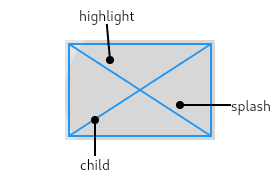
InkWell: Adding Material Splash Effects
InkWell adds a Material Design 'splash' effect to any widget on tap. Think of it as ink spreading inside the surface you touch. Use it to make non-interactive widgets like images respond to taps. The splash won't appear if an opaque widget is between it.
When to use SQLite over key-value storage?
Tests structured-vs-flat storage judgment. Good answers cite relational data, complex queries, or multi-table schemas, then list adding the dependency, getting a path, opening with onCreate, and keeping a singleton.
Flutter's Form Widget: Grouping and Validating Input
A Flutter Form acts as a supervisor for multiple input fields, letting you validate and save them all at once. Use it for login screens or user profiles. The footgun is forgetting the GlobalKey, which makes it impossible to trigger validation.
Why is Flutter local storage async and how do you use shared_preferences?
Tests why disk I/O must avoid blocking Dart's UI thread. A strong answer shows async/await with getInstance and setters, notes legacy getters are sync-after-cache, and warns writes may not persist instantly.
Key difference between shared_preferences and flutter_secure_storage for tokens
Tests at-rest encryption: shared_preferences stores plain text XML/plist, while secure storage uses iOS Keychain and Keystore with RSA OAEP plus AES-GCM. Answers cite backup risks and hardware keys. Red flag: calling prefs safe or relying on obfuscation.
FocusNode: Programmatically Managing Widget Focus
A FocusNode is your handle to a widget's focus state, letting you programmatically request focus or listen for changes. It's essential for forms, like moving focus from one TextField to the next.
What is an sqflite transaction? Provide a practical example.
Tests atomicity in SQLite and isolate safety. A strong answer defines all-or-nothing execution, gives a fund-transfer example updating both, and warns sqflite transactions are not cross-isolate safe. Red flag: omitting rollback or multi-isolate writes.
Dismissible: The Swipe-to-Remove Widget in Flutter
A Dismissible widget lets you swipe away list items, like clearing notifications. Use it for to-do lists or email inboxes. The key footgun: you MUST provide a unique Key and remove the item from your data source in onDismissed, or it will reappear on…