Android Debug Bridge (ADB): A Developer's Remote Control
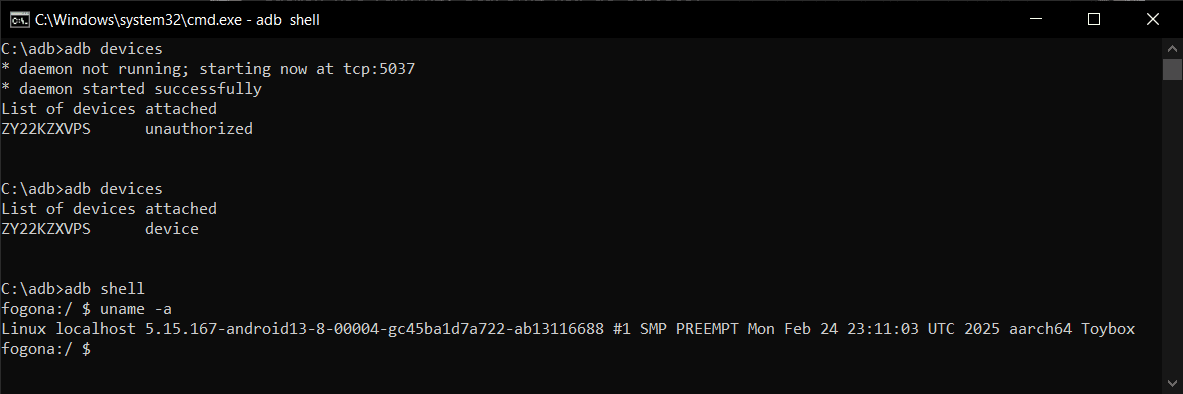
Android Debug Bridge (ADB) is a developer's universal remote for an Android device. This command-line tool lets you install apps, view logs, and run shell commands, bypassing the UI. It's used for debugging, file transfers, and automation.
Why it exists
Developers need a way to communicate with and control an Android device at a lower level than the touch interface allows. ADB provides this essential command-line channel for debugging, installing apps, and accessing system internals during development.
The mental model
Think of ADB as a secure, direct line between your development computer and an Android device. It's a command-line tool that lets you issue commands from your PC that are executed directly on the device, as if you had a terminal open on the phone itself.
How it works
ADB uses a three-part, client-server architecture. First, the 'client' runs on your development machine when you type an 'adb' command. Second, a 'server' process runs in the background on that same machine, managing communication. Third, a 'daemon' (adbd) runs on the Android device. The client talks to the server, which forwards the command over USB or a TCP network connection to the daemon on the device for execution.
When to use it
Use ADB for core development tasks: installing an app with 'adb install', pulling device logs with 'adb logcat', pushing or pulling files to the device's filesystem, and getting a full command-line shell on the device with 'adb shell'. It's also used for making full device backups.
When not to use it
ADB is a powerful developer tool, not for everyday use. The biggest footgun is security. Never leave ADB enabled over TCP/IP on an untrusted network, like public Wi-Fi. This could expose your device to being controlled by malware or botnets. Always disable it after use.
One canonical example
To get an interactive Linux shell on your connected Android device, you run the command 'adb shell' from your computer's terminal. This gives you direct access to the device's filesystem and allows you to run various system commands for advanced debugging and inspection.
Interview question
In the Android Debug Bridge (ADB) architecture, which component is responsible for executing commands directly on the target Android device?
- a.The ADB server, which manages communication between the client and the device
- b.The ADB client, which initiates commands from the development machine
- c.The ADB daemon (adbd), which runs on the device and processes commandsCorrect
- d.The Android operating system's core services, which interpret commands from the server
Why? this is the answer
The card states that the 'daemon' (adbd) runs on the Android device and is responsible for executing commands. The client and server components operate on the development machine, handling command initiation and communication management, respectively.
Just read this? Test yourself on what you have been reading.
Read the original → en.wikipedia.org
Put your scrolling time to good use
Learn one idea, try a quiz and save useful cards for revision. Tezvyn makes it easy to learn and stay current in your tech field, a few minutes at a time.
The iPhone app is on the way
We are building it. Until it lands, nothing here is held back from you: every interview card, your saved cards, streaks and the job board all work in Safari, plus hundreds of free practice quizzes of thirty questions each. Sign in and it all carries over to the app the day it arrives.
Want it as an icon? Tap Share at the bottom of Safari, then Add to Home Screen. It opens full screen and the cards you have read stay available offline.
We are hiring for this. Open roles that interview on android — each one lists the topics its interview covers.
See open roles