AWS Dedicated Hosts: Your Own Physical Server in the Cloud
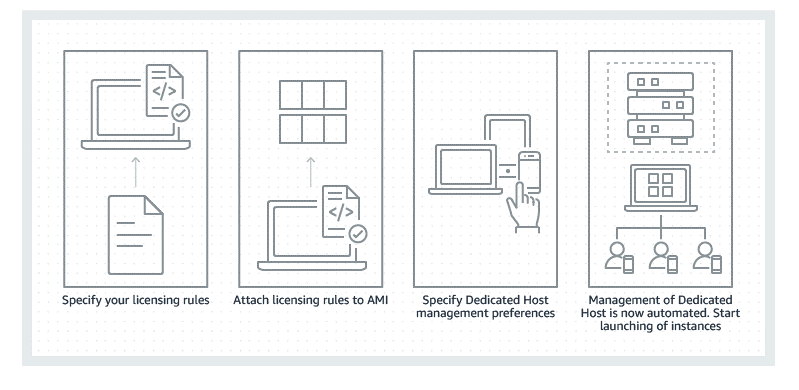
An AWS Dedicated Host is your own physical server in the cloud, providing single-tenant hardware. Use it for "bring your own license" (BYOL) software tied to physical cores, or for compliance rules that forbid multi-tenancy.
Why it exists
Standard cloud computing is multi-tenant, which creates two problems. First, some expensive software licenses are tied to physical hardware like cores or sockets, making them incompatible with shared servers. Second, certain industries have strict compliance rules requiring physical workload isolation. Dedicated Hosts solve both.
The mental model
A Dedicated Host is like renting an entire apartment building instead of just one apartment. You get exclusive use of the building, can bring your own specific furniture (software licenses), and meet privacy rules (compliance). You have control over which rooms (instances) are used, but you pay rent on the whole building, even the empty rooms.
How it works
You provision a physical server from AWS that is not shared with any other customer. You then launch EC2 instances onto this host. AWS License Manager integrates with Dedicated Hosts to help track your software licenses against the host's physical cores and sockets. You gain visibility into the underlying hardware and can control instance placement with affinity rules. AWS still manages the physical hardware maintenance, automatically migrating your instances to a new host if the original one fails.
When to use it
Use Dedicated Hosts for two main reasons. First, when you need to use existing per-socket or per-core software licenses in the cloud, a strategy called "Bring Your Own License" (BYOL). This is common for Oracle or Microsoft software. Second, when you must meet corporate compliance or regulatory requirements that explicitly forbid running workloads on multi-tenant hardware.
When not to use it
Avoid Dedicated Hosts for general-purpose workloads. Standard, multi-tenant EC2 instances are far more cost-effective as you only pay for the capacity you use. If you only need instance-level isolation but not a whole server for licensing, EC2 Dedicated Instances can be a simpler alternative, though they lack the hardware visibility of Dedicated Hosts.
One canonical example
A financial services company needs to migrate an on-premises database running Microsoft SQL Server Enterprise Edition, licensed per-core. To remain compliant with their license terms in the cloud, they provision an EC2 Dedicated Host. They can see the exact number of physical cores, assign their SQL Server licenses accordingly using AWS License Manager, and launch their database instance onto that specific host, ensuring both license compliance and single-tenancy.
Interview question
What unique capability does an AWS Dedicated Host offer that is essential for specific software licensing and strict regulatory compliance?
- a.Automated migration of instances to a new host if the original one fails.
- b.Exclusive use of an entire physical server, with visibility into its underlying hardware.Correct
- c.Instance-level isolation from other customers on a shared physical server.
- d.Cost-effective scaling of general-purpose workloads.
Why? this is the answer
Dedicated Hosts provide exclusive use of a physical server and visibility into its hardware, which is critical for 'bring your own license' (BYOL) software tied to physical cores and for meeting compliance requiring physical isolation. Option C describes EC2 Dedicated Instances, which offer isolation but lack the full server control and hardware visibility for per-core licensing.
Just read this? Test yourself on what you have been reading.
Read the original → aws.amazon.com
- #aws
- #ec2
- #compliance
- #licensing
- #cloud-computing
You just looked this up. Could you explain it out loud?
That is the part interviews actually test. Tezvyn takes questions like this one and gives you what the interviewer is really checking, the answer that lands, and the mistake that ends the conversation, in the four minutes before your next meeting.
The iPhone app is on the way
We are building it. Until it lands, nothing here is held back from you: every interview card, your saved cards, streaks and the job board all work in Safari, plus hundreds of free practice quizzes of thirty questions each. Sign in and it all carries over to the app the day it arrives.
Want it as an icon? Tap Share at the bottom of Safari, then Add to Home Screen. It opens full screen and the cards you have read stay available offline.
We are hiring for this. Open roles that interview on aws — each one lists the topics its interview covers.
See open roles