AWS DMS: Your Managed Database Migration Engine
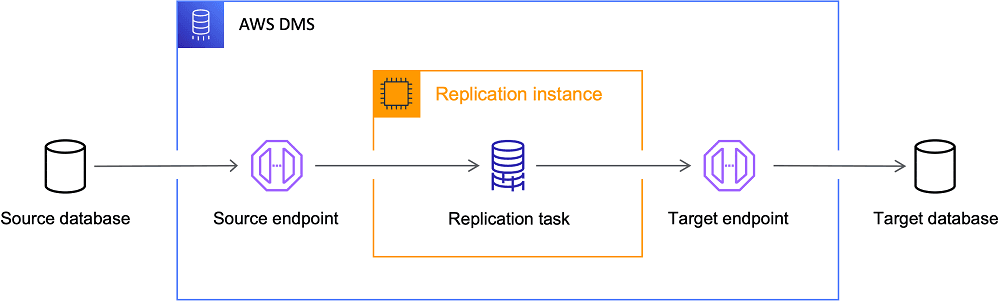
AWS DMS is a managed service for migrating databases. It acts like a replication server you point at a source and target, handling the data transfer. It's used for one-time migrations to AWS or for continuous replication.
Why it exists
Traditional database migrations are complex and slow. They require provisioning hardware, installing and patching replication software, and manually managing failover. This process is expensive, error-prone, and requires significant operational overhead. AWS DMS was created to automate and manage this entire process as a cloud service.
The mental model
Think of AWS DMS as a dedicated, managed server running replication software. You don't manage the server itself; you just provide credentials for a source database and a target database. DMS then creates a replication instance that connects to both and runs a task to move the data, either as a one-time full load or continuously.
How it works
The process involves three main components. First, you define endpoints for your source and target data stores. Second, you create a replication instance, which is the compute resource that will perform the migration; AWS manages this for you. Third, you create a migration task that uses the endpoints and instance to move the data. This task can be a full load, a full load plus ongoing changes (Change Data Capture, or CDC), or just CDC.
When to use it
Use DMS for three primary scenarios. First, migrating on-premises databases to the AWS cloud (e.g., an on-prem SQL Server to Amazon RDS). Second, heterogeneous migrations, where you change database engines (e.g., Oracle to Amazon Aurora PostgreSQL). Third, continuous data replication for tasks like feeding a data warehouse or maintaining a live reporting database without impacting the primary.
When not to use it
DMS is not an ETL (Extract, Transform, Load) tool. While it can do minor transformations, it's designed for replication, not complex data manipulation. For heavy transformations, use a dedicated ETL service like AWS Glue. Also, for very simple database dumps and restores where downtime is acceptable, a native tool like pg_dump might be simpler.
One canonical example
A company wants to migrate its on-premises Oracle database to Amazon Aurora PostgreSQL to reduce licensing costs. They first use the DMS Schema Conversion Tool (SCT) to analyze and convert the Oracle schema, stored procedures, and functions to be compatible with PostgreSQL. Once the new schema is applied to the target Aurora database, they configure a DMS task to perform a full load of the data from Oracle to Aurora, followed by ongoing replication of changes. This allows them to switch over with minimal downtime.
Interview question
Which scenario best illustrates a primary use case for AWS Database Migration Service (DMS)?
- a.Manually setting up and maintaining a dedicated server for real-time data synchronization.
- b.Migrating an on-premises Oracle database to Amazon Aurora PostgreSQL with continuous replication.Correct
- c.Executing a simple database dump and restore operation for a small, non-critical database.
- d.Performing extensive data cleansing and transformation before loading data into a new system.
Why? this is the answer
The correct answer (B) directly aligns with DMS's primary use cases, specifically heterogeneous migrations and continuous data replication, as detailed in the card's 'WHEN TO USE IT' section and canonical example. Option D describes an ETL task, which the card explicitly states DMS is not designed for, making it a tempting but incorrect distractor.
Just read this? Test yourself on what you have been reading.
Read the original → docs.aws.amazon.com
Put your scrolling time to good use
Learn one idea, try a quiz and save useful cards for revision. Tezvyn makes it easy to learn and stay current in your tech field, a few minutes at a time.
The iPhone app is on the way
We are building it. Until it lands, nothing here is held back from you: every interview card, your saved cards, streaks and the job board all work in Safari, plus hundreds of free practice quizzes of thirty questions each. Sign in and it all carries over to the app the day it arrives.
Want it as an icon? Tap Share at the bottom of Safari, then Add to Home Screen. It opens full screen and the cards you have read stay available offline.
We are hiring for this. Open roles that interview on aws — each one lists the topics its interview covers.
See open roles