Design Tokens: Automating UI with a Build Pipeline
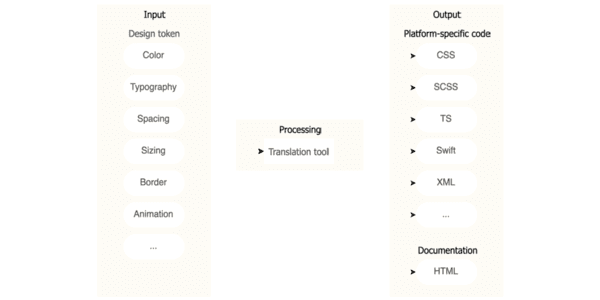
Think of design tokens as design decisions stored as data. A build pipeline consumes this data to auto-generate code for multiple platforms, ensuring consistency. The footgun is exposing all raw 'option' tokens instead of curated 'decision' tokens.
Why it exists
In large projects, especially with micro-frontends, multiple teams often introduce undocumented 'magic numbers' into the codebase for things like spacing or z-index. This leads to UI inconsistencies and bugs that require slow, cross-team collaboration to fix. Design tokens were created to solve this scaling problem by establishing a single, verifiable source of truth.
The mental model
Think of design tokens as design decisions captured as data. Instead of a designer telling a developer 'use hex code #0A74DA', the design system provides a token named 'color-background-interactive'. This token is defined once in a central file (e.g., JSON) and acts as a contract between design and engineering. The pipeline then handles the translation to platform-specific code.
How it works
A build pipeline automates the distribution of these design decisions. When a token file is updated and committed to version control, the pipeline triggers a code generator. This tool transforms the abstract tokens into concrete code formats needed by each application: CSS custom properties for web, XML resources for Android, or Swift enums for iOS. This process ensures that a single change to a token, like updating the brand color, is propagated consistently across all platforms automatically.
When to use it
Use a token pipeline in large-scale projects, especially those with multiple platforms (web, iOS, Android) or a micro-frontend architecture. It's essential for organizations that need to maintain design consistency across many teams and products. It also accelerates development when designs change frequently, as updates can be rolled out system-wide from one place.
When not to use it
The setup overhead may not be justified for small, single-platform projects with a stable design. If you are a solo developer on a simple website, manually managing a handful of CSS variables is likely more efficient than building and maintaining an entire token pipeline.
One canonical example
To prevent 'z-index wars' where developers use arbitrary high numbers to stack elements, a token file can define the application's layers. For example: { "z-index": { "default": { "value": 1 }, "sticky": { "value": 100 }, "navigation": { "value": 200 }, "modal": { "value": 500 } } }. A developer would use var(--z-index-modal) instead of a magic number like 9999, creating a predictable and conflict-free stacking order.
Interview question
What is the primary benefit of using a design token build pipeline in a large, multi-platform project?
- a.It allows designers to directly implement UI components without writing any code.
- b.It ensures design consistency and automates code generation across diverse platforms and teams.Correct
- c.It simplifies the design process by reducing the total number of unique design values.
- d.It eliminates the need for front-end developers by fully automating UI component creation.
Why? this is the answer
The card states that design tokens solve scaling problems by establishing a single source of truth, and the pipeline automates the translation of these decisions into platform-specific code, ensuring consistency across platforms and teams. Option C is tempting but incorrect because while tokens centralize values, their primary goal isn't to reduce the total count of unique values, but to formalize and consistently apply decided values, replacing arbitrary 'magic numbers'.
Just read this? Test yourself on what you have been reading.
Read the original → martinfowler.com
- #design systems
- #css
- #automation
- #front-end
Put your scrolling time to good use
Learn one idea, try a quiz and save useful cards for revision. Tezvyn makes it easy to learn and stay current in your tech field, a few minutes at a time.
The iPhone app is on the way
We are building it. Until it lands, nothing here is held back from you: every interview card, your saved cards, streaks and the job board all work in Safari, plus hundreds of free practice quizzes of thirty questions each. Sign in and it all carries over to the app the day it arrives.
Want it as an icon? Tap Share at the bottom of Safari, then Add to Home Screen. It opens full screen and the cards you have read stay available offline.
We are hiring for this. Open roles that interview on design systems — each one lists the topics its interview covers.
See open roles