FastAPI Behind a Reverse Proxy: Fixing Docs URLs
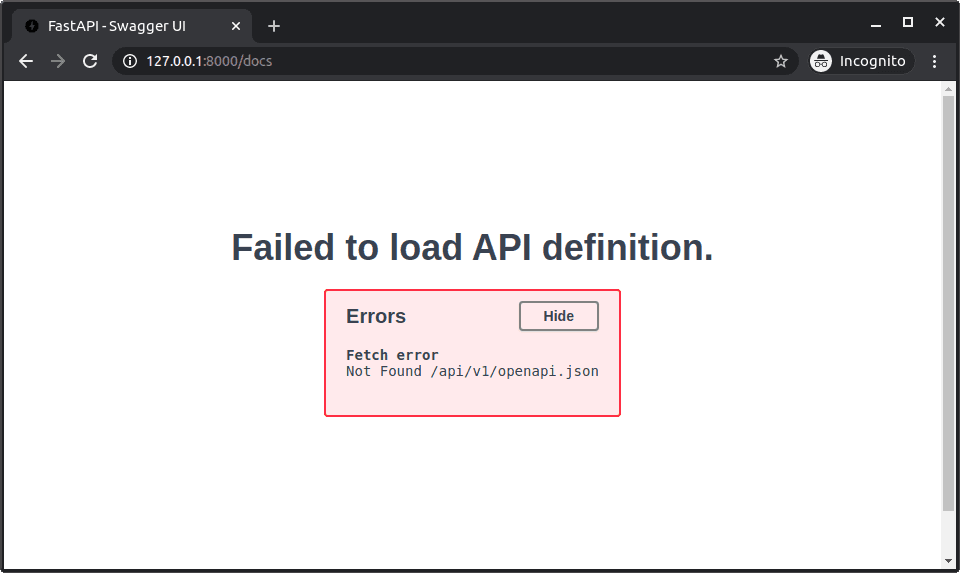
When a proxy exposes FastAPI under a path prefix it strips before forwarding, configure that public prefix with root_path so OpenAPI and docs links use the external URL. The proxy must still route that prefix correctly.
root_path tells FastAPI the public URL prefix an upstream proxy removed before forwarding a request.
Example
from fastapi import FastAPI

app = FastAPI(root_path='/api/v1')

@app.get('/users')
async def users():
    return []
A public /api/v1/users request may reach the app as /users; the generated OpenAPI and docs URLs can then include /api/v1.
Watch out for
root_path does not configure Nginx, Traefik, TLS, or load balancing. The proxy must route the prefix consistently, and forwarded headers or an ASGI server setting may also be needed. If the proxy only maps a hostname and leaves the path unchanged, omit it.
Interview question
When deploying a FastAPI application behind a reverse proxy, what problem does configuring root_path primarily solve?
- a.To inform FastAPI about the public URL prefix that the proxy might remove, ensuring all generated URLs are accurate.Correct
- b.To optimize the reverse proxy's caching strategies for improved API performance.
- c.To enable the reverse proxy to handle SSL termination and secure client connections.
- d.To configure the reverse proxy's load balancing algorithm for distributing requests to FastAPI instances.
Why? this is the answer
FastAPI's root_path parameter is used to tell the application about the public-facing URL prefix that a reverse proxy might strip before forwarding requests. This ensures that FastAPI generates correct URLs for clients, particularly for OpenAPI documentation and 'Try it out' features. Other options describe functions of a reverse proxy itself, not what root_path configures within FastAPI.
Keep this idea fresh
Try a few questions or explore another bite in Python & FastAPI.
Read the original → fastapi.tiangolo.com
- #fastapi
- #python
- #reverse-proxy
- #networking
- #openapi
Put your scrolling time to good use
Learn one idea, try a quiz and save useful cards for revision. Tezvyn makes it easy to learn and stay current in your tech field, a few minutes at a time.
The iPhone app is on the way
We are building it. Until it lands, nothing here is held back from you: every interview card, your saved cards, streaks and the job board all work in Safari, plus hundreds of free practice quizzes of thirty questions each. Sign in and it all carries over to the app the day it arrives.
Want it as an icon? Tap Share at the bottom of Safari, then Add to Home Screen. It opens full screen and the cards you have read stay available offline.
We are hiring for this. Open roles that interview on fastapi — each one lists the topics its interview covers.
See open roles