How do you add a title, description, and version to FastAPI auto-docs?
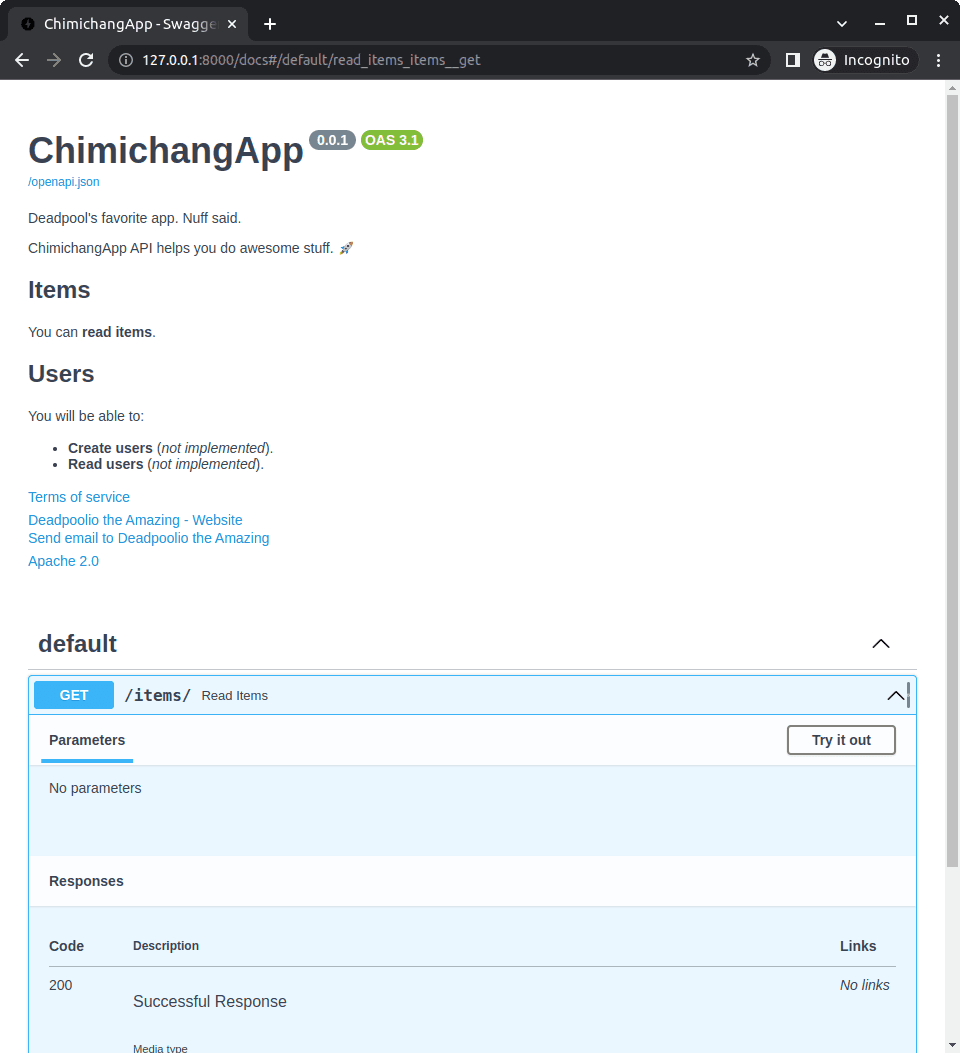
Tests if you know FastAPI's metadata kwargs for OpenAPI docs. Pass title, description, and version to the FastAPI() constructor; Swagger UI and ReDoc render them automatically.
What's really being asked
This question checks whether you know that FastAPI exposes first-class metadata configuration through the application constructor rather than forcing you to manipulate the OpenAPI schema manually. Interviewers want to see that you understand the framework's convention-over-configuration philosophy for API documentation and that you can configure docs without unnecessary boilerplate.
The full answer
First, the candidate should state that title, description, and version are keyword arguments passed directly to the FastAPI class when creating the app instance. Second, they should mention that these values automatically appear in the generated OpenAPI schema and therefore render in both Swagger UI and ReDoc without additional code. Third, a strong answer notes that the description field supports Markdown formatting for rich text. Fourth, the candidate might mention related metadata fields like terms_of_service, contact, or license_info to show deeper familiarity with the API surface and the OpenAPI specification.
The mistakes people make
A red flag is suggesting that you must manually edit the OpenAPI schema dictionary or override the openapi method to inject metadata. Another mistake is proposing external documentation tools or static HTML as the primary solution. Some candidates incorrectly confuse the API version parameter with the OpenAPI specification version, which are separate concerns. A weaker answer might also omit any mention of where the metadata actually appears, suggesting the candidate has not looked at the generated docs.
What usually comes next
The interviewer might ask how to customize the docs URL path, how to add metadata for specific tags, or how to disable the auto-generated documentation entirely in production. They may also probe whether you know how to add a license identifier or contact information using the same metadata pattern. A senior candidate might be asked how to serve custom static assets for the docs UI or how to conditionally expose the schema based on environment.
A concrete example
A solid code sketch would show importing FastAPI and writing app = FastAPI with title set to Inventory Service, description set to Manages warehouse stock levels and supports Markdown, and version set to 2.5.0. After starting the server, navigating to the docs endpoint displays the title and version in the Swagger UI header and renders the description text accordingly. The candidate should emphasize that no additional decorators or route configuration are required because the framework handles OpenAPI generation natively.
Interview question
You need to set the API title and version so they render automatically in Swagger UI and ReDoc. Which approach follows FastAPI's convention-over-configuration philosophy?
- a.Pass title, description, and version as keyword arguments to the FastAPI() constructorCorrect
- b.Add metadata decorators to every route handler in the application
- c.Configure a separate static openapi.json file and mount it manually
- d.Manually edit the generated OpenAPI schema dictionary after each app startup
Why? this is the answer
FastAPI accepts title, description, and version directly in the FastAPI() constructor, automatically injecting them into the OpenAPI schema and both doc UIs without extra code. Manually editing the schema dictionary is a common misconception that ignores the framework's built-in metadata support.
Just read this? Test yourself on what you have been reading.
Read the original → fastapi.tiangolo.com
Put your scrolling time to good use
Learn one idea, try a quiz and save useful cards for revision. Tezvyn makes it easy to learn and stay current in your tech field, a few minutes at a time.
The iPhone app is on the way
We are building it. Until it lands, nothing here is held back from you: every interview card, your saved cards, streaks and the job board all work in Safari, plus hundreds of free practice quizzes of thirty questions each. Sign in and it all carries over to the app the day it arrives.
Want it as an icon? Tap Share at the bottom of Safari, then Add to Home Screen. It opens full screen and the cards you have read stay available offline.
We are hiring for this. Open roles that interview on fastapi — each one lists the topics its interview covers.
See open roles