How do you split a Column 1/3 and 2/3 using Expanded?
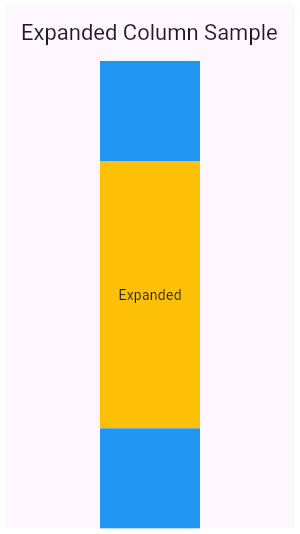
Tests understanding of flex allocation in Flutter layouts. Strong answers wrap both containers in Expanded, assign flex values of 1 and 2, and note that Expanded forces children to fill the Column's main axis. Red flag: proposing fixed heights instead of flex.
What's really being asked
This question tests whether you understand Flutter's flex layout model, specifically how Expanded allocates free space inside a Column. The interviewer wants to see that you know Expanded only works inside Flex descendants, that flex factors are integers defining proportional shares, and that the child is forced to fill the assigned space. They also care whether you can articulate why this approach is preferable to hardcoded sizes.
The full answer
A strong response hits four points in order. First, state that both children must be wrapped in Expanded widgets so the Column can distribute leftover vertical space between them. Second, assign flex values of 1 to the first container and 2 to the second container, because the Column divides space according to the ratio of each child's flex to the total flex sum. Third, clarify that Expanded forces each child to fill the space it is given, unlike Flexible which allows the child to remain smaller. Fourth, mention the ancestor constraint: Expanded must be inside a Row, Column, or Flex, and the path upward can only contain StatelessWidget or StatefulWidget ancestors.
The mistakes people make
Red flags include proposing a fixed height like SizedBox with a hardcoded pixel value, using MediaQuery to calculate one third of screen height, or wrapping only one child in Expanded while leaving the other unwrapped. Another mistake is suggesting FractionallySizedBox; while it can produce a one third split, it does not use the Expanded mechanism the question explicitly asks for. Candidates who say flex should be 33 and 67 also reveal confusion, because flex factors are relative integers, not percentages.
What usually comes next
The interviewer may ask what happens if you wrap only the first child in Expanded and leave the second as a normal widget, expecting you to say the second child takes only its intrinsic height and the first consumes all remaining space. They might also ask how Flexible differs from Expanded, in which case you should say Flexible lets the child shrink to its intrinsic size while Expanded forces it to fill the allocated space. A third follow-up could involve what happens when the Column is inside a ListView or an unbounded parent, breaking the space allocation entirely.
A concrete example
You can describe a Column containing two Expanded widgets. The first Expanded has flex 1 and contains a Container with a red background. The second Expanded has flex 2 and contains a Container with a blue background. When the Column has 300 logical pixels of available vertical space, the red container receives 100 pixels and the blue container receives 200 pixels. If the user rotates the device and the available space becomes 600 pixels, the split automatically adjusts to 200 and 400 pixels without any rebuild logic or MediaQuery calculations.
Interview question
Which widget configuration correctly splits a Column's available space into one-third and two-thirds using Expanded?
- a.Wrap both children in Expanded with flex values of 33 and 67
- b.Wrap only the first child in Expanded with flex 1 and leave the second unwrapped
- c.Wrap both children in Expanded with flex values of 1 and 2Correct
- d.Wrap both children in Flexible with flex values of 1 and 2
Why? this is the answer
Expanded allocates a Column's leftover space proportionally by flex ratio, so values 1 and 2 produce a 1/3 and 2/3 split. Option A is tempting but wrong because flex factors are relative integers, not percentages, and option D is incorrect because Flexible lets children shrink rather than forcing them to fill their share.
Just read this? Test yourself on what you have been reading.
Read the original → api.flutter.dev
Put your scrolling time to good use
Learn one idea, try a quiz and save useful cards for revision. Tezvyn makes it easy to learn and stay current in your tech field, a few minutes at a time.
The iPhone app is on the way
We are building it. Until it lands, nothing here is held back from you: every interview card, your saved cards, streaks and the job board all work in Safari, plus hundreds of free practice quizzes of thirty questions each. Sign in and it all carries over to the app the day it arrives.
Want it as an icon? Tap Share at the bottom of Safari, then Add to Home Screen. It opens full screen and the cards you have read stay available offline.
We are hiring for this. Open roles that interview on flutter — each one lists the topics its interview covers.
See open roles