How do you type-hint repeated query params in FastAPI?
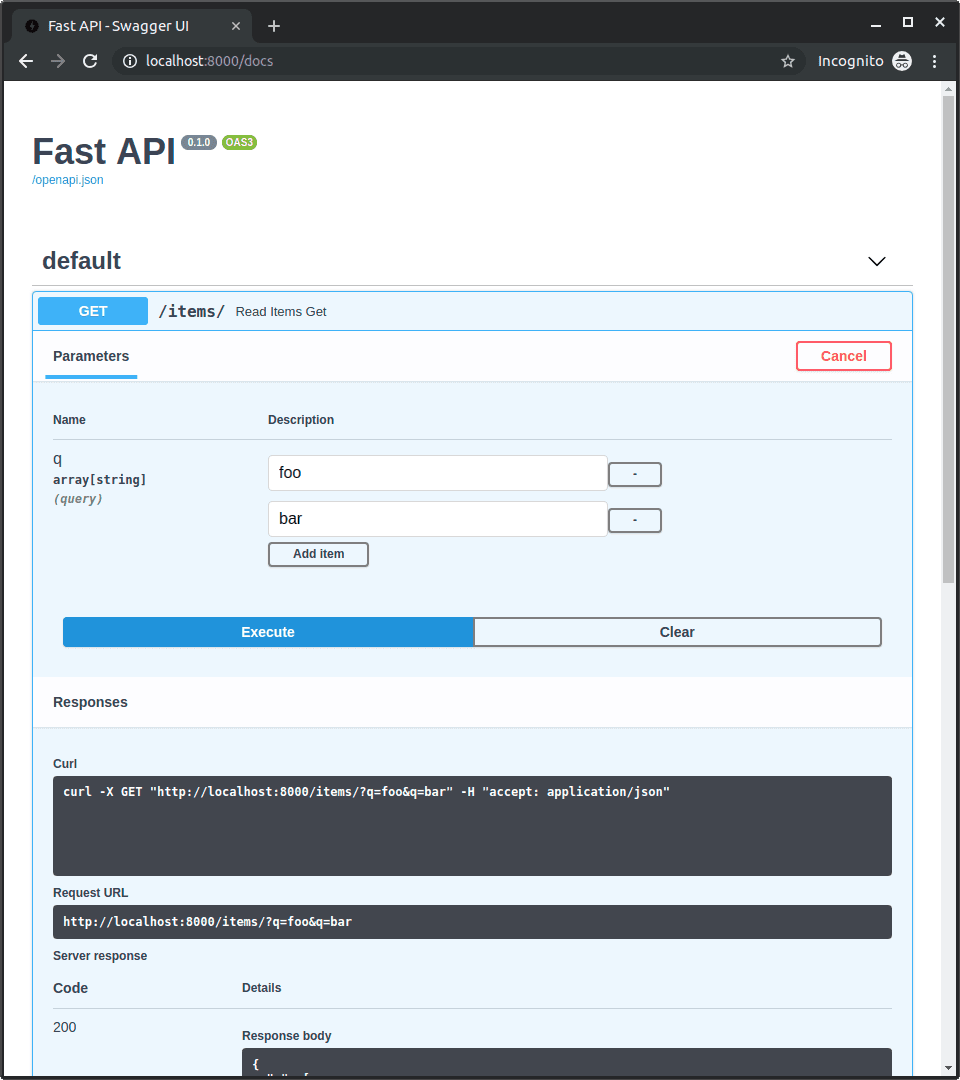
Tests FastAPI's Annotated pattern for multi-value query strings. A great answer uses Annotated[list[str], Query()] = [] to collect repeated keys, and notes the old Query-as-default alternative. Red flag: manual parsing or typing it as str.
What's really being asked
This question checks your command of FastAPI's modern dependency injection and type declaration system, specifically how it handles multiple values for a single query key. The interviewer is looking for knowledge of the Annotated syntax, awareness of how FastAPI coerces repeated URL parameters into Python collections, and the ability to distinguish between single-value and multi-value query parameters. It also reveals whether you keep up with current FastAPI conventions or rely on outdated patterns.
The full answer
First, import Annotated from typing and Query from fastapi. Second, declare the parameter as keyword: Annotated[list[str], Query()] = [] so FastAPI automatically aggregates every occurrence of the keyword key into a single Python list. Third, explain the concrete behavior: a request to /search?keyword=python&keyword=fastapi results in the function receiving ["python", "fastapi"]. Fourth, acknowledge the older alternative where Query was used as a default value, like keyword: list[str] = Query(default=[]), but emphasize that Annotated is now preferred because it separates validation metadata from the default value and avoids mutable default pitfalls.
The mistakes people make
Using str as the type hint, which only captures the last occurrence and silently drops earlier values. Suggesting manual inspection of Request.query_params, which bypasses FastAPI's automatic validation, serialization, and OpenAPI generation. Declaring list[str] without Query or Annotated, which may function but prevents you from adding constraints such as min_length or max_length on individual items. Using a mutable default like = [] directly in the function signature without Annotated, which is a well-known Python anti-pattern even though FastAPI handles it safely in many cases.
What usually comes next
How would you enforce that at least one keyword must be provided, or set a maximum of five keywords? The answer is to keep Annotated[list[str], Query(min_length=1, max_length=5)] or similar validation arguments. Another follow-up is what happens if the parameter appears only once; FastAPI still wraps the single value in a list because the type hint declares list[str]. They might also ask how to provide default values inside Query versus in the assignment, which tests your understanding of Annotated scoping.
A concrete example
from typing import Annotated
from fastapi import FastAPI, Query
app = FastAPI()@app.get("/search")
async def search(keyword: Annotated[list[str], Query()] = []):
return {"results_for": keyword}
When a client calls /search?keyword=python&keyword=fastapi, the endpoint receives keyword as ["python", "fastapi"]. If the client omits the parameter entirely, keyword defaults to an empty list.
Interview question
To accept multiple values for a single query key and allow per-item length constraints in current FastAPI, which parameter declaration should you use?
- a.tag: list[str] = Query(default=[])
- b.tag: str = Query(...)
- c.tag: Annotated[list[str], Query()] = []Correct
- d.tag: list[str] = []
Why? this is the answer
Annotated[list[str], Query()] = [] is the modern pattern that separates validation metadata from the default value, enabling per-item constraints. tag: list[str] = Query(default=[]) is the outdated alternative that mixes the default with validation metadata.
Just read this? Test yourself on what you have been reading.
Read the original → fastapi.tiangolo.com
Put your scrolling time to good use
Learn one idea, try a quiz and save useful cards for revision. Tezvyn makes it easy to learn and stay current in your tech field, a few minutes at a time.
The iPhone app is on the way
We are building it. Until it lands, nothing here is held back from you: every interview card, your saved cards, streaks and the job board all work in Safari, plus hundreds of free practice quizzes of thirty questions each. Sign in and it all carries over to the app the day it arrives.
Want it as an icon? Tap Share at the bottom of Safari, then Add to Home Screen. It opens full screen and the cards you have read stay available offline.
We are hiring for this. Open roles that interview on fastapi — each one lists the topics its interview covers.
See open roles