Model-View-Controller (MVC): Separating App Logic from UI
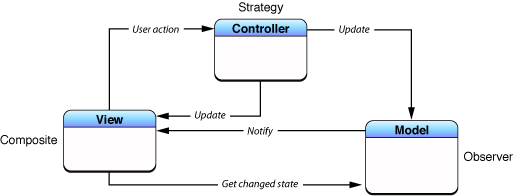
MVC organizes code by separating data (Model) from the user interface (View), using a Controller as the go-between. This is the foundational pattern for many UI frameworks, like Cocoa and UIKit. The main footgun is the "Massive View Controller."
Why it exists
MVC was created to impose a high-level architecture on applications, separating their core functions into distinct roles. This separation makes code more reusable, interfaces better defined, and the entire application more adaptable to changing requirements. Without a pattern like MVC, data logic and presentation code become tightly coupled, making the system brittle and hard to maintain.
The mental model
Think of MVC like a restaurant. The Model is the kitchen, holding the ingredients (data) and recipes (business logic). The View is the dining room, presenting the food to the customer and displaying the menu. The Controller is the waitstaff, taking orders from the customer (View), relaying them to the kitchen (Model), and bringing the finished dish back to the table (updating the View).
How it works
The pattern defines three distinct object types with clear boundaries.
Model
This object encapsulates the application's data and the logic to manipulate it. It is the single source of truth. Crucially, the Model has no direct knowledge of the user interface. A Person model might store a birthdate, but not the string format for displaying it.
View
This object is responsible for presenting the Model's data to the user and capturing user input. It should not contain business logic. A View can be a simple button or an entire screen. It observes the Model (usually via the Controller) for changes so it can update its appearance.
Controller
This object acts as the intermediary. It receives user actions from the View, processes them by interacting with the Model, and then updates the View with any new data. It's the glue that connects the other two layers.
When to use it
MVC is the default architectural pattern for many UI frameworks, especially in Apple's ecosystem (Cocoa, UIKit, AppKit). It's a solid choice for applications where there is a clear distinction between data, presentation, and the logic that connects them. It provides a strong foundation for organizing your code from the start.
When not to use it
As applications grow, the Controller can become a dumping ground for any logic that doesn't cleanly fit in the Model or View. This leads to the "Massive View Controller" anti-pattern, which is difficult to test and maintain. For these complex cases, other patterns like MVVM or VIPER may provide better separation of concerns.
One canonical example
In an iOS contacts app, a Contact struct is the Model, holding properties like name and phoneNumber. The ContactDetailViewController.swift class is the Controller. Its associated user interface, defined in a Storyboard or SwiftUI, is the View. When a user taps an 'Edit' button (View), the Controller receives the event, presents an editing screen, and upon saving, updates the Contact object (Model) and tells its View to refresh.
Interview question
In the Model-View-Controller (MVC) pattern, what is the primary role of the Controller?
- a.To encapsulate the application's data and business logic.
- b.To mediate between the Model and View, translating user actions into Model updates and View refreshes.Correct
- c.To present data to the user and capture user input.
- d.To prevent the "Massive View Controller" anti-pattern by offloading complex logic.
Why? this is the answer
The Controller's primary role is to act as the intermediary, receiving user actions from the View, interacting with the Model, and then updating the View. Options A and B describe the Model and View respectively, while option D refers to a common anti-pattern and a goal for improving MVC, not the Controller's fundamental function.
Just read this? Test yourself on what you have been reading.
Read the original → developer.apple.com
- #ios & swift
- #architecture
- #design patterns
- #mvc
Put your scrolling time to good use
Learn one idea, try a quiz and save useful cards for revision. Tezvyn makes it easy to learn and stay current in your tech field, a few minutes at a time.
The iPhone app is on the way
We are building it. Until it lands, nothing here is held back from you: every interview card, your saved cards, streaks and the job board all work in Safari, plus hundreds of free practice quizzes of thirty questions each. Sign in and it all carries over to the app the day it arrives.
Want it as an icon? Tap Share at the bottom of Safari, then Add to Home Screen. It opens full screen and the cards you have read stay available offline.
We are hiring for this. Every open role lists the topics its interview covers, so you can prepare for the real thing rather than guessing.
See open roles