Progressive Delivery: Ship Faster by Reducing Blast Radius
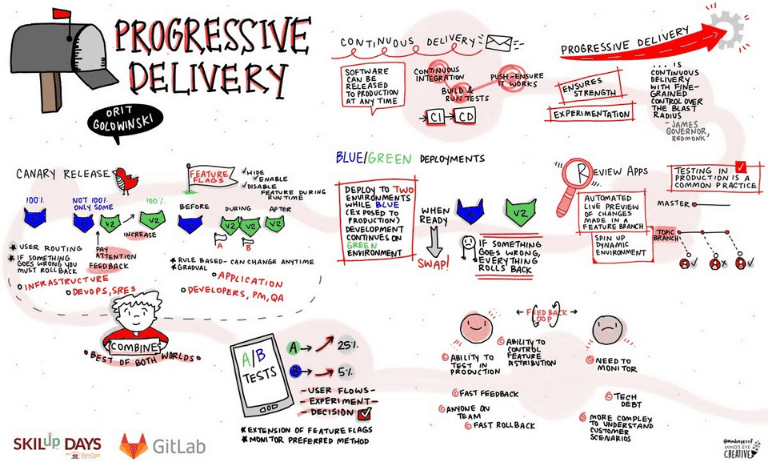
Progressive Delivery reduces release risk by shipping to small user groups before a full rollout, like a soft-opening for new code. It uses canary releases and feature flags to catch issues before they impact everyone.
Why it exists
Deploying new code to 100% of users at once is inherently risky. Even with perfect testing, a subtle bug can cause a major outage. Progressive Delivery was created to solve this by minimizing the "blast radius" of any potential failure, allowing teams to validate changes on real users in a production environment with a built-in escape hatch.
The mental model
Think of Progressive Delivery as a phased clinical trial for your software. You don't give a new drug to the entire population at once. You start with a small, monitored group (a canary release), check for side effects (errors, latency), and only expand its availability after it's proven safe and effective. This controlled exposure minimizes harm while gathering real-world data.
How it works
Progressive Delivery is a collection of strategies that decouple code deployment from feature release. Four common methods are: First, Canary Releases: Route a small percentage of traffic, like 2%, to servers with the new code. You monitor these "canary" servers for issues before rolling out to everyone. Second, Blue/Green Deployments: Maintain two identical production environments ("blue" and "green"). Deploy the new version to the inactive green environment, test it, then switch all traffic over. This allows for an instant rollback by simply switching traffic back to blue. Third, Feature Flags: Use conditional logic in your code to turn features on or off at runtime for specific users or groups. This enables a "canary for features," allowing you to test a single change in production without a full deployment. Fourth, Review Apps: Automatically create a temporary, live environment for every feature branch, allowing stakeholders to review changes in a production-like setting before merging.
When to use it
Use Progressive Delivery when you practice Continuous Delivery but want an extra layer of safety. It's ideal for high-traffic applications where even a small bug has a large impact. It's the key to enabling "testing in production" safely, allowing you to validate changes with real user traffic.
When not to use it
For simple, low-risk internal tools with a high tolerance for downtime, the overhead of setting up traffic routing and advanced monitoring may not be justified. Some methods, like canary releases, are also less effective for monolithic applications where a rollback is already an all-or-nothing operation.
One canonical example
A team wants to release a new checkout service. A big-bang release is too risky. Using a canary release, they route 1% of checkout traffic to the new service. They monitor error rates and conversion for this 1% cohort. Seeing no issues, they increase traffic to 5%, then 20%, 50%, and finally 100% over several hours. If an issue had occurred, they would have immediately routed all traffic back to the old service, impacting only a fraction of users.
Interview question
Which of the following best describes the core benefit of adopting Progressive Delivery?
- a.It guarantees zero downtime during software updates by maintaining redundant environments.
- b.It allows developers to completely bypass traditional testing phases by relying on real user feedback.
- c.It minimizes the scope of potential issues by introducing new code to a limited user base before a full rollout.Correct
- d.It ensures that all new features are instantly accessible to the entire user population upon release.
Why? this is the answer
Progressive Delivery's primary goal is to reduce the 'blast radius' of potential failures by gradually exposing changes to a small user group first. While some strategies like Blue/Green deployments (option A) can contribute to high availability, the core benefit of Progressive Delivery as a whole is risk mitigation through controlled exposure, not solely guaranteeing zero downtime or bypassing all prior testing.
Just read this? Test yourself on what you have been reading.
Read the original → devopsinstitute.com
- #ci/cd
- #devops
- #deployment
- #release management
Put your scrolling time to good use
Learn one idea, try a quiz and save useful cards for revision. Tezvyn makes it easy to learn and stay current in your tech field, a few minutes at a time.
The iPhone app is on the way
We are building it. Until it lands, nothing here is held back from you: every interview card, your saved cards, streaks and the job board all work in Safari, plus hundreds of free practice quizzes of thirty questions each. Sign in and it all carries over to the app the day it arrives.
Want it as an icon? Tap Share at the bottom of Safari, then Add to Home Screen. It opens full screen and the cards you have read stay available offline.
We are hiring for this. Open roles that interview on ci/cd — each one lists the topics its interview covers.
See open roles