Security Groups: Stateful Firewalls for Your Cloud Resources
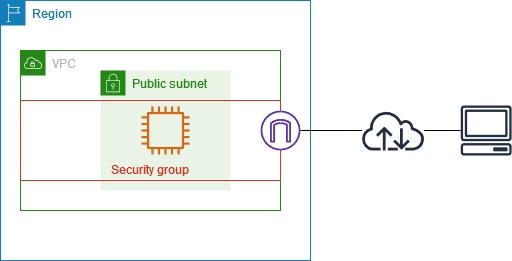
A security group is a stateful firewall for your cloud resources, like a bouncer with an allow-list. Use it to let a web server accept traffic or a database talk to app servers. The footgun: opening SSH to the entire internet (0.0.0.0/0).
Why it exists
Cloud resources like virtual machines are just computers on a network. Without protection, they are exposed to any traffic on that network. Security groups solve this by providing a fundamental, resource-level firewall to enforce the principle of least privilege, ensuring only intended traffic can reach a resource.
The mental model
Think of a security group as a bouncer standing at the door of an exclusive club (your cloud instance). The bouncer has a specific guest list (the inbound rules). If you're on the list, like an HTTP request on port 80, you get in. If not, you're denied. It's also "stateful": if someone from inside the club initiates a conversation with the outside, the bouncer automatically lets the reply back in, even if the sender wasn't on the original guest list.
How it works
A security group is a set of allow-only rules applied to a cloud resource like a virtual machine. You cannot create "deny" rules; traffic is denied by default unless a rule explicitly allows it. Rules specify a protocol (TCP, UDP), a port range (e.g., 80, 443), and a source (for inbound rules) or destination (for outbound rules). The source can be an IP address range, a specific IP, or even another security group, which is useful for creating tiers (e.g., allow traffic from the "web-servers" group to the "databases" group).
When to use it
Use security groups as your first line of network defense for any cloud resource. They are essential for segmenting your application architecture. For example, create one group for web servers allowing ports 80/443 from the internet, another for application servers allowing traffic only from the web servers' security group, and a third for databases allowing traffic only from the application servers' group.
When not to use it
Security groups are not the tool for creating explicit "deny" rules; for that, you would use a Network Access Control List (NACL), which is stateless and operates at the subnet level. Security groups also don't filter certain internal cloud provider traffic like DNS resolution or instance metadata service requests. They are for controlling traffic to and from your application resources.
One canonical example
To allow an administrator to connect to a Linux virtual machine via SSH, you add an inbound rule to the instance's security group. The rule would specify Protocol: TCP, Port Range: 22, and Source: the administrator's specific office IP address (e.g., 203.0.113.5/32). The most common and dangerous mistake is setting the source to 0.0.0.0/0, which allows anyone on the internet to attempt to connect.
Interview question
Which statement accurately describes a key aspect of a security group's 'stateful' behavior?
- a.It remembers the source IP addresses of previously blocked malicious attempts.
- b.It allows administrators to define explicit 'deny' rules based on traffic patterns.
- c.It maintains a persistent record of all network connections for forensic analysis.
- d.It automatically allows inbound response traffic for connections initiated from within the protected resource.Correct
Why? this is the answer
A stateful firewall tracks active connections, automatically allowing return traffic for connections initiated from within the resource, even if no explicit inbound rule exists for that return traffic. Option B is incorrect because security groups are allow-only and do not support explicit deny rules.
Just read this? Test yourself on what you have been reading.
Read the original → docs.aws.amazon.com
- #cloud
- #networking
- #security
- #aws
- #firewall
You just looked this up. Could you explain it out loud?
That is the part interviews actually test. Tezvyn takes questions like this one and gives you what the interviewer is really checking, the answer that lands, and the mistake that ends the conversation, in the four minutes before your next meeting.
The iPhone app is on the way
We are building it. Until it lands, nothing here is held back from you: every interview card, your saved cards, streaks and the job board all work in Safari, plus hundreds of free practice quizzes of thirty questions each. Sign in and it all carries over to the app the day it arrives.
Want it as an icon? Tap Share at the bottom of Safari, then Add to Home Screen. It opens full screen and the cards you have read stay available offline.
We are hiring for this. Open roles that interview on cloud — each one lists the topics its interview covers.
See open roles