Socket.IO Adapters: Scaling Beyond One Server
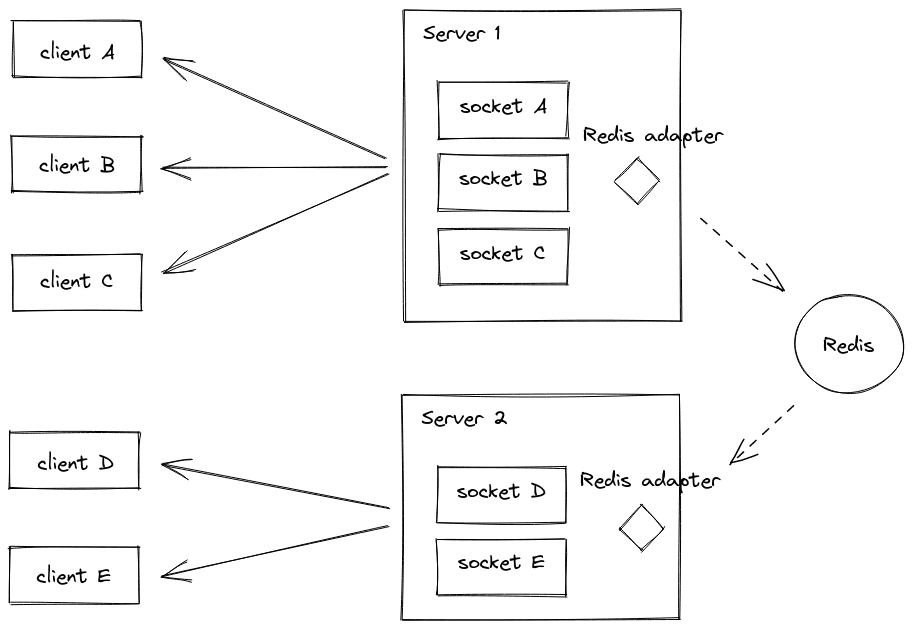
Socket.IO adapters let you scale beyond one server. They use a backend like Redis Pub/Sub to broadcast messages across all your instances, so a user on Server A gets events from Server B. The footgun is assuming this handles everything; you still need a load.
Why it exists
A single Node.js process can only handle a finite number of WebSocket connections. To scale, you run multiple instances of your application. However, a client connected to Server A is invisible to Server B, meaning a broadcast message like io.emit() from Server B would never reach it.
The mental model
Think of an adapter as a central post office for your Socket.IO servers. Without it, each server is an isolated island. With an adapter, when a server wants to send a broadcast, it sends the message to the post office (Redis). The post office then delivers it to all other servers, which pass it to their connected clients.
How it works
The Redis adapter uses Redis's native Pub/Sub feature. When a server executes a broadcast (e.g., io.to("room1").emit()), it performs two actions: first, it sends the packet to all matching clients connected directly to it. Second, it publishes the packet to a Redis channel. All other Socket.IO servers in your cluster are subscribed to that channel. Upon receiving the packet from Redis, they forward it to their own connected clients that match the broadcast criteria. This requires two Redis client connections per server: one for publishing (pub) and one for subscribing (sub).
When to use it
Use an adapter any time you run your Socket.IO application on more than one process or server. This is standard practice for production environments to achieve high availability and horizontal scaling. Without it, broadcasts and room-based communication will fail unpredictably depending on which server a client is connected to.
When not to use it
An adapter is unnecessary for simple single-process applications or local development. A key limitation is that the standard Redis adapter does not support the connection state recovery feature. If your application must gracefully handle temporary client disconnects, this adapter may not be suitable. Also, the official documentation recommends using the ioredis package over the redis package due to potential reconnection bugs.
One canonical example
The recommended setup uses the ioredis library. First, install the dependencies: npm install @socket.io/redis-adapter ioredis. Then, configure the server:
import { Server } from "socket.io";
import { Redis } from "ioredis";
import { createAdapter } from "@socket.io/redis-adapter";
const pubClient = new Redis();
const subClient = pubClient.duplicate();
const io = new Server({ adapter: createAdapter(pubClient, subClient) });
io.listen(3000);
Interview question
Under which scenario is a Socket.IO adapter most crucial for a production application?
- a.To manage persistent user sessions and authentication across different client devices.
- b.To enable automatic reconnection and state recovery for clients after a network interruption.
- c.To provide real-time data synchronization for a single-server application.
- d.To ensure broadcast messages reach clients connected to any server in a multi-instance setup.Correct
Why? this is the answer
The card states that an adapter is essential "any time you run your Socket.IO application on more than one process or server" to prevent broadcasts from failing across instances. Option B is a tempting distractor because the card explicitly mentions that the standard Redis adapter *does not* support connection state recovery, making it an incorrect function for this specific adapter.
Just read this? Test yourself on what you have been reading.
Read the original → socket.io
You just looked this up. Could you explain it out loud?
That is the part interviews actually test. Tezvyn takes questions like this one and gives you what the interviewer is really checking, the answer that lands, and the mistake that ends the conversation, in the four minutes before your next meeting.
The iPhone app is on the way
We are building it. Until it lands, nothing here is held back from you: every interview card, your saved cards, streaks and the job board all work in Safari, plus hundreds of free practice quizzes of thirty questions each. Sign in and it all carries over to the app the day it arrives.
Want it as an icon? Tap Share at the bottom of Safari, then Add to Home Screen. It opens full screen and the cards you have read stay available offline.
We are hiring for this. Every open role lists the topics its interview covers, so you can prepare for the real thing rather than guessing.
See open roles