Socket.IO Namespaces: Channels on One Connection
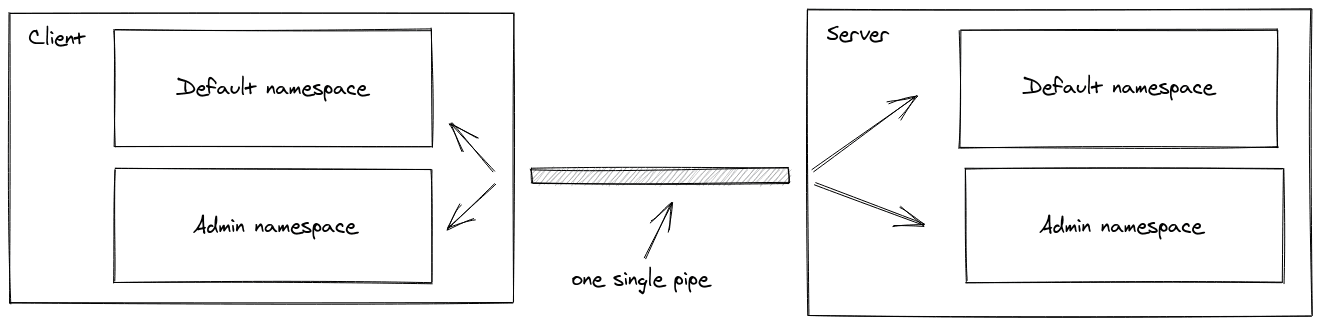
Socket.IO namespaces are virtual channels over a single WebSocket connection, letting you split app logic without multiple connections. Use them for separate areas like /admin or for multi-tenancy.
Why it exists
Real-time applications often need to partition communication logic. For example, you might have general user events and separate, privileged admin events. Opening a new WebSocket connection for each logical division is inefficient and resource-intensive. Namespaces were created to provide this separation over a single, shared connection.
The mental model
Think of a single WebSocket connection as an apartment building's main entrance. A namespace is like a specific apartment inside (/admin, /orders). Each apartment has its own set of rules (middleware), private rooms, and dedicated event handlers, but everyone uses the same front door to get in. This is called multiplexing: routing different types of traffic over one channel.
How it works
On the server, you define a namespace with io.of('/your-namespace'). This creates a channel that is completely separate from the default / namespace. It has its own event handlers, rooms, and can have its own middleware for tasks like authentication. On the client, you connect to it with io('/your-namespace'). Socket.IO handles routing the packets sent over the single underlying connection to the correct namespace logic on the server.
When to use it
Use namespaces for broad, architectural separation in your application. The two primary use cases are: first, creating a privileged area for specific users, like an /admin namespace with its own authentication logic. Second, for multi-tenant applications, where you can dynamically create a separate namespace for each customer or workspace, ensuring their data and events are isolated.
When not to use it
Do not use namespaces for simple, transient groupings of sockets. That is what rooms are for. If you just need to broadcast a message to a subset of connected clients within the same logical context (like users in a specific chat session), use socket.join('room-name'). Using a namespace for this is overkill and adds unnecessary complexity.
One canonical example
To create a separate, protected area for administrators:
Server-side:
const adminNamespace = io.of('/admin');
adminNamespace.use((socket, next) => {
// Your authentication logic here
next();
});
adminNamespace.on('connection', socket => {
socket.on('delete user', () => { /* ... */ });
});
Client-side:
const adminSocket = io('/admin');
adminSocket.emit('delete user', userId);
This ensures only authenticated clients can connect to the /admin channel and access its specific events.
Interview question
What is the primary architectural advantage of using Socket.IO namespaces?
- a.They offer a more efficient way to broadcast messages to specific user groups than rooms.
- b.They establish entirely separate WebSocket connections for each isolated channel.
- c.They simplify client-side event listener organization for improved code structure.
- d.They enable applying separate authentication and middleware logic to distinct application sections.Correct
Why? this is the answer
Namespaces provide broad architectural separation, allowing distinct middleware and authentication for different application areas (like /admin) over a single connection. Option B is incorrect because namespaces explicitly operate over a single WebSocket connection, not multiple ones, to improve efficiency.
Just read this? Test yourself on what you have been reading.
Read the original → socket.io
- #nodejs
- #socket.io
- #websockets
- #networking
You just looked this up. Could you explain it out loud?
That is the part interviews actually test. Tezvyn takes questions like this one and gives you what the interviewer is really checking, the answer that lands, and the mistake that ends the conversation, in the four minutes before your next meeting.
The iPhone app is on the way
We are building it. Until it lands, nothing here is held back from you: every interview card, your saved cards, streaks and the job board all work in Safari, plus hundreds of free practice quizzes of thirty questions each. Sign in and it all carries over to the app the day it arrives.
Want it as an icon? Tap Share at the bottom of Safari, then Add to Home Screen. It opens full screen and the cards you have read stay available offline.
We are hiring for this. Open roles that interview on nodejs — each one lists the topics its interview covers.
See open roles