Socket.IO Rooms: Broadcasting to Subsets of Clients
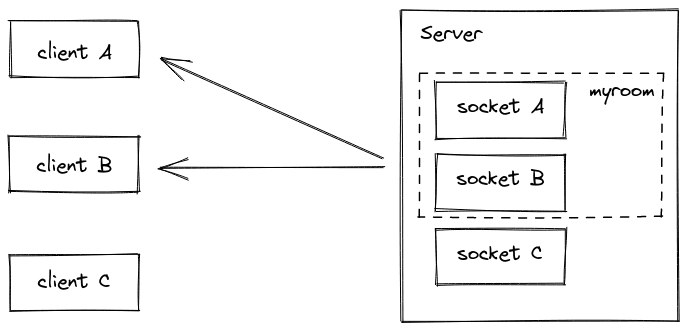
Think of Socket.IO Rooms as server-side channels for grouping clients. They let you broadcast messages to a specific subset, like a private chat or users following a topic. Remember rooms are a server-only concept; a client can't see which rooms it has joined.
Why it exists
Broadcasting an event to every single connected client is often too broad and inefficient. Real-time applications need a way to send targeted messages to specific groups, like participants in a private chat or users following a particular stock, without manually managing complex lists of individual socket IDs.
The mental model
A Socket.IO Room is like a server-side mailing list for your clients. Instead of sending a message to every connected socket, you send it to a named list, and only the sockets that have "subscribed" (joined the room) will receive it. This is purely a server-side abstraction; the client doesn't know what lists it's on.
How it works
The default Socket.IO Adapter maintains two internal maps: one mapping each socket ID to a set of room names it has joined, and another mapping each room name to a set of socket IDs within it. When you call socket.join('my-room'), the server updates both maps. When you call io.to('my-room').emit(...), the server looks up 'my-room' in its map and sends the message to every socket ID in the corresponding set. Upon disconnection, a socket automatically leaves all rooms it was a part of.
When to use it
Use rooms whenever you need to broadcast to a subset of clients. A common pattern is creating a room per user ID to message all of a user's connected devices (e.g., laptop and phone). Another is creating a room per resource, like 'project:123', to send updates about that specific resource to anyone interested.
When not to use it
Do not use the default room implementation if you are running multiple Socket.IO servers. The default adapter is in-memory and is not shared between server instances. A message sent from server A to a room will only reach clients connected to server A. For scaled applications, you must use a shared adapter, like the official Redis Adapter, to synchronize room state across all servers.
One canonical example
A common use case is creating a private channel for each user to notify all their connected devices. On connection, the server identifies the user and joins their socket to a room named with their unique user ID.
io.on("connection", (socket) => {
const userId = getUserIdFromSocket(socket);
socket.join(userId);
});
Later, to send a private notification to that user on all their devices, you emit to their room:
io.to(userId).emit("new-message", { from: "server" });This sends the event only to sockets that have joined the room corresponding to that userId.
Interview question
What is a critical limitation of the default Socket.IO room implementation when scaling an application?
- a.It consumes excessive server memory when managing many rooms and clients.
- b.Clients cannot directly query which rooms they have joined, hindering client-side logic.
- c.It automatically removes clients from all rooms upon any temporary network disconnection.
- d.Room membership and messages are not synchronized across multiple Socket.IO server instances.Correct
Why? this is the answer
The card states that the default room implementation is in-memory and not shared across multiple Socket.IO servers, making synchronization a critical limitation for scaled applications. Other options describe general characteristics or less critical issues for scaling.
Just read this? Test yourself on what you have been reading.
Read the original → socket.io
- #socket.io
- #nodejs
- #websockets
- #real-time
You just looked this up. Could you explain it out loud?
That is the part interviews actually test. Tezvyn takes questions like this one and gives you what the interviewer is really checking, the answer that lands, and the mistake that ends the conversation, in the four minutes before your next meeting.
The iPhone app is on the way
We are building it. Until it lands, nothing here is held back from you: every interview card, your saved cards, streaks and the job board all work in Safari, plus hundreds of free practice quizzes of thirty questions each. Sign in and it all carries over to the app the day it arrives.
Want it as an icon? Tap Share at the bottom of Safari, then Add to Home Screen. It opens full screen and the cards you have read stay available offline.
We are hiring for this. Every open role lists the topics its interview covers, so you can prepare for the real thing rather than guessing.
See open roles