Sticky Sessions: Pinning a User to a Server
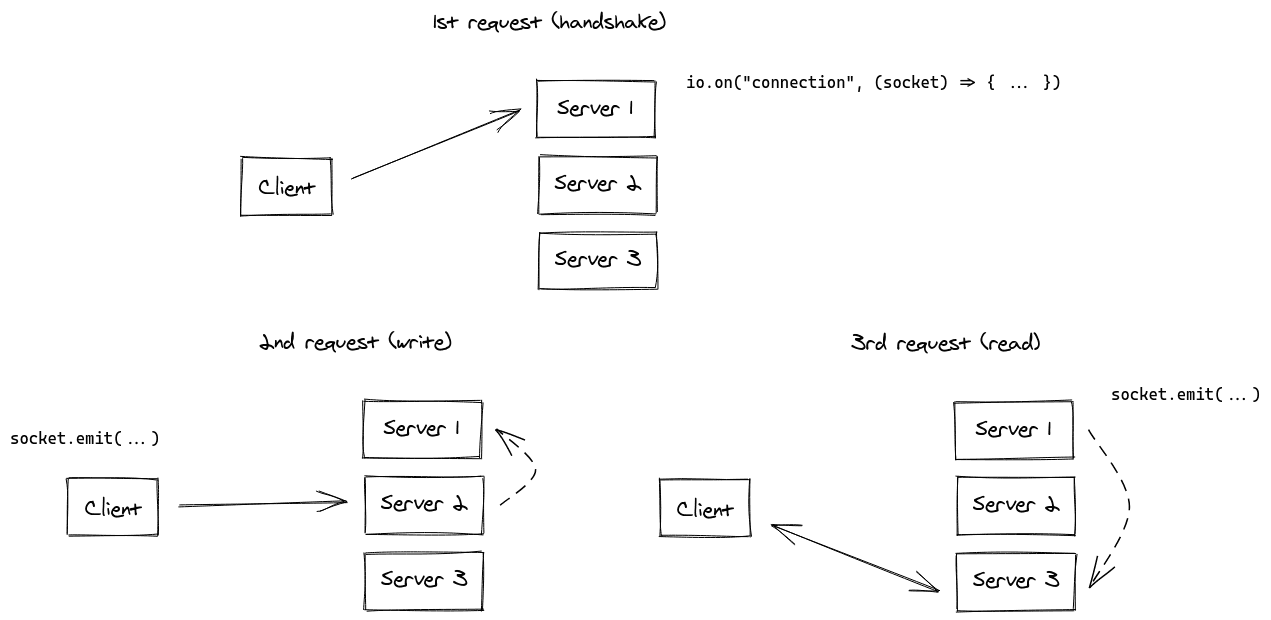
Sticky sessions pin a user's requests to a single server in a multi-server setup. This is crucial for stateful apps like Socket.IO, where a user's session lives on one machine.
Why it exists
When you scale a stateful application horizontally, you have multiple identical servers. If a user connects to Server A, but their next request is routed to Server B by a load balancer, Server B won't have their session information. This breaks the user's experience. Sticky sessions were created to solve this routing problem for stateful services.
The mental model
Think of a multi-counter post office. If you start a complex transaction with one clerk (Server A), you don't want to be sent to a different clerk (Server B) halfway through and have to start over. Session affinity is like a ticket that tells the floor manager (the load balancer) to always send you back to the same clerk for your entire visit.
How it works
A load balancer sits in front of your application servers. When a client makes its first request, the load balancer chooses a server and creates a mapping. For all future requests from that same client, it uses this mapping to route them to the same server. This mapping is typically based on one of two methods: first, using the client's IP address to consistently route them; second, setting a unique cookie in the client's browser that identifies which server they belong to.
When to use it
Use sticky sessions when your application servers hold state that is specific to a user's session and not stored in a shared database. This is essential for real-time applications using WebSockets or HTTP long-polling, like those built with Socket.IO. Any application where a server needs to remember things about a client from one request to the next is a candidate.
When not to use it
Avoid sticky sessions for purely stateless applications. If any server can handle any request because all necessary state is in a shared database or cache (like Redis), then you don't need session affinity. In fact, using it can lead to imbalanced loads if one server gets all the 'heavy' users. For stateless services, simple round-robin or random load balancing is more efficient.
One canonical example
In an NGINX configuration for a Node.js cluster, you define an upstream block listing your servers. To enable sticky sessions, you add a directive like ip_hash. This tells NGINX to use a hash of the client's IP address to determine which server to route to. This ensures that every request from that IP, including the HTTP long-polling requests used by Socket.IO, is consistently sent to the same Node.js process that holds the original connection state.
Interview question
For which application architecture would implementing sticky sessions be most advantageous?
- a.A microservices backend where each service is designed to be entirely independent and stateless.
- b.A real-time collaborative document editor relying on WebSocket connections to maintain live user presence.Correct
- c.A static website hosting service where content is served from a global CDN.
- d.A distributed e-commerce platform storing all user carts in a shared Redis cluster.
Why? this is the answer
Sticky sessions are crucial for stateful applications where servers hold user-specific session data, such as real-time applications using WebSockets. In this scenario, the server needs to remember the client's connection state. Options A, B, and D describe stateless architectures or scenarios where state is managed externally, making sticky sessions unnecessary and potentially inefficient.
Just read this? Test yourself on what you have been reading.
Read the original → socket.io
- #load-balancing
- #scaling
- #stateful-applications
- #socket.io
- #nginx
You just looked this up. Could you explain it out loud?
That is the part interviews actually test. Tezvyn takes questions like this one and gives you what the interviewer is really checking, the answer that lands, and the mistake that ends the conversation, in the four minutes before your next meeting.
The iPhone app is on the way
We are building it. Until it lands, nothing here is held back from you: every interview card, your saved cards, streaks and the job board all work in Safari, plus hundreds of free practice quizzes of thirty questions each. Sign in and it all carries over to the app the day it arrives.
Want it as an icon? Tap Share at the bottom of Safari, then Add to Home Screen. It opens full screen and the cards you have read stay available offline.
We are hiring for this. Every open role lists the topics its interview covers, so you can prepare for the real thing rather than guessing.
See open roles