User Data Scripts: Day-One Instance Configuration
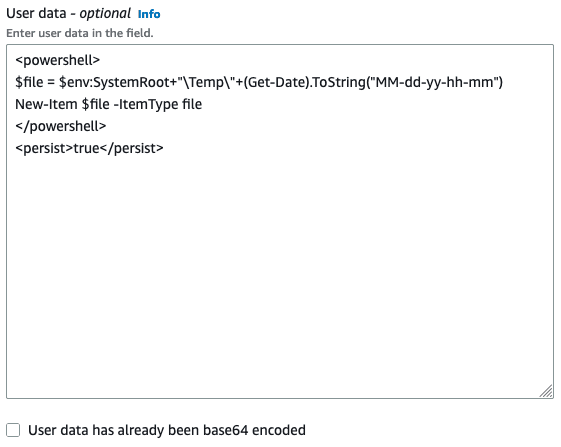
User data scripts are your instance's "Day One" instructions, automatically running commands like package installs on first boot. Use it to set up a web server or install agents without manual SSH.
Why it exists
To solve the problem of manual, repetitive server setup. Instead of launching a vanilla OS instance and then SSHing in to install software and configure settings, you can automate these first steps. This makes server provisioning faster, more consistent, and less error-prone.
The mental model
Think of a user data script as the post-it note you stick on a new computer before turning it on for the first time. The note says "1. Install web server, 2. Download app code, 3. Start service." The computer's OS reads the note and performs those actions automatically, so it's ready to use without you doing it manually.
How it works
When you launch a cloud instance like an EC2, you provide a script as "user data". On Linux, this is typically a shell script. On Windows, it's often a PowerShell script. The cloud platform passes this data to the instance, and the OS's launch agent executes it with root or administrator privileges after the instance boots. The raw script is limited to 16 KB and is often base64-encoded for API calls.
When to use it
Use user data for simple, one-time bootstrapping tasks. Three common uses are: first, installing and updating software packages; second, pulling application code from a repository; and third, setting initial configuration files or environment variables. It's ideal for stateless applications or ensuring all new nodes in an auto-scaling group are identical.
When not to use it
Avoid user data for complex orchestration or managing infrastructure state. If your setup involves multiple instances or requires updates after launch, use a dedicated configuration management tool like Ansible or an Infrastructure as Code service like CloudFormation. A key footgun is that user data is not part of an AMI; if you need the configuration baked into the image, you must create a custom AMI after running your setup.
One canonical example
A common use case is launching a simple web server. On an Amazon Linux EC2 instance, you could provide a user data script that updates all packages (yum update -y), installs the Apache web server (yum install -y httpd), starts the service (systemctl start httpd), and enables it to start on future boots (systemctl enable httpd). This turns a generic Linux instance into a functional web server in a single, automated step.
Interview question
Which task is an ideal use case for a user data script?
- a.Automating the initial installation of a web server and application code on a new instance.Correct
- b.Orchestrating the deployment and inter-service communication of a complex microservices architecture.
- c.Continuously updating software packages and configurations on running servers.
- d.Creating a custom Amazon Machine Image (AMI) with pre-installed applications and settings.
Why? this is the answer
User data scripts are designed for "Day One" instance configuration, such as installing software and pulling application code on first boot. They are not suitable for ongoing updates, creating AMIs with baked-in configurations, or complex multi-service orchestration.
Just read this? Test yourself on what you have been reading.
Read the original → docs.aws.amazon.com
Put your scrolling time to good use
Learn one idea, try a quiz and save useful cards for revision. Tezvyn makes it easy to learn and stay current in your tech field, a few minutes at a time.
The iPhone app is on the way
We are building it. Until it lands, nothing here is held back from you: every interview card, your saved cards, streaks and the job board all work in Safari, plus hundreds of free practice quizzes of thirty questions each. Sign in and it all carries over to the app the day it arrives.
Want it as an icon? Tap Share at the bottom of Safari, then Add to Home Screen. It opens full screen and the cards you have read stay available offline.
We are hiring for this. Open roles that interview on cloud — each one lists the topics its interview covers.
See open roles