WAI-ARIA Roles: Semantics for Custom Components
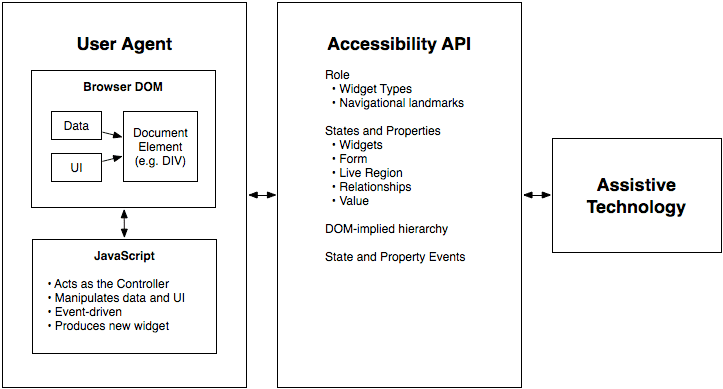
WAI-ARIA roles are job titles for HTML elements, telling assistive tech what a generic <div> is meant to be, like a tab or button. Use them for custom UI components that lack a native HTML equivalent.
Why it exists
Native HTML has semantic elements like <button> and <nav>, but modern web apps often build complex UI from generic s and s. To an assistive technology like a screen reader, these custom components are meaningless black boxes. WAI-ARIA provides the missing semantic layer so these components can be understood.
The mental model
Think of ARIA roles as job titles for your HTML elements. A plain is just a generic container, an intern with no defined responsibilities. Adding role="button" tells a screen reader that this is not just a box; its job is to be a button. The role describes the element's purpose and expected behavior, not its appearance.
How it works
You add a role attribute to an HTML element, like . This signals its function to the browser's accessibility API, which then communicates it to assistive technologies. The WAI-ARIA specification defines an ontology of roles, from simple widget roles (button, checkbox), to composite structural roles (tablist, grid), to document structure roles (navigation, main). Roles often require specific states and properties (like aria-selected or aria-expanded) to be fully functional.
When to use it
Use ARIA roles when you build custom interactive components that have no native HTML equivalent. This is common for complex widgets like custom-built sliders, tab panels, sortable data grids, or tree views where standard HTML tags are insufficient to describe the component's structure and interactivity.
When not to use it
The first rule of ARIA is: don't use ARIA. If a native HTML element already provides the semantics you need, use it. A native <button> element is always superior to a because it comes with built-in keyboard interaction, focus management, and accessibility support from the browser. Overriding native semantics, like adding role="button" to an <h1>, is almost always a mistake and creates confusion.
One canonical example
A custom tab interface is a classic use case. You would have a container element with role="tablist". Inside, each clickable tab control would be an element with role="tab". The content panels that show/hide would each have role="tabpanel". This structure, which is meaningless with plain s, becomes a fully understandable and navigable widget for a screen reader user thanks to ARIA roles.
Interview question
Which of the following scenarios is the most appropriate use case for WAI-ARIA roles?
- a.Ensuring an <img> element with an alt attribute is recognized as an image by screen readers.
- b.Styling a native <button> element to look like a link and then adding role="link".
- c.Replacing a standard <input type="checkbox"> with a custom-styled <span> and role="checkbox".
- d.Building a complex, interactive data grid with custom sorting and filtering using <div> elements.Correct
Why? this is the answer
WAI-ARIA roles are intended for custom interactive components that lack native HTML equivalents, such as complex data grids. Using ARIA to replicate the functionality of existing native HTML elements like buttons or checkboxes (Option C) is discouraged, as native elements provide superior built-in accessibility.
Just read this? Test yourself on what you have been reading.
Read the original → w3.org
- #accessibility
- #html
- #wai-aria
- #frontend
Put your scrolling time to good use
Learn one idea, try a quiz and save useful cards for revision. Tezvyn makes it easy to learn and stay current in your tech field, a few minutes at a time.
The iPhone app is on the way
We are building it. Until it lands, nothing here is held back from you: every interview card, your saved cards, streaks and the job board all work in Safari, plus hundreds of free practice quizzes of thirty questions each. Sign in and it all carries over to the app the day it arrives.
Want it as an icon? Tap Share at the bottom of Safari, then Add to Home Screen. It opens full screen and the cards you have read stay available offline.
We are hiring for this. Open roles that interview on accessibility — each one lists the topics its interview covers.
See open roles