Everything in iOS & Swift, page 6

Implement SwiftUI navigation between list and detail with product ID
Tests modern SwiftUI navigation and clean data flow. Great answer: NavigationStack with NavigationLink(value:) and navigationDestination(for:), plus a bound path for programmatic control.
Outline the key steps and APIs for State Preservation and Restoration
Tests UIKit's automatic state restoration pipeline. Strong answers cover: opting in via AppDelegate, setting restorationIdentifiers, implementing encode/decodeRestorableStateWithCoder, and the system snapshot cycle.

How does the Coordinator pattern decouple navigation, and what are its components?
This tests iOS separation of concerns. Explain that Coordinators extract navigation logic from view controllers for reuse, and describe AppCoordinator tree with child coordinators. A red flag is treating it as a router or ignoring parent-child retention.
How do you complete a file download after the app backgrounds?
This tests iOS background execution and URLSession background transfers. Configure a background URLSession, handle AppDelegate events, and respect the 30-second completion handler limit. Never claim NSTimer or beginBackgroundTask sustains background downloads.
Explain MVVM, its improvements over MVC, and Swift data binding techniques.
Tests architectural separation of concerns and pattern comparison skills. Define ViewModel as state transformer, cite MVC's massive view controller, and list Combine or closures for binding. Red flag: calling MVVM as MVC with no testability.
How do AppDelegate and SceneDelegate responsibilities differ?
AppDelegate owns process events (launch, push); SceneDelegate owns per-window lifecycle and UI.
Integrate SwiftUI into UIKit and wrap UIKit for SwiftUI
Tests bridging architecture between UIKit and SwiftUI using UIHostingController and UIViewRepresentable. A strong answer names hosting controllers for SwiftUI in UIKit, representable protocols for UIKit in SwiftUI, and lifecycle hooks.
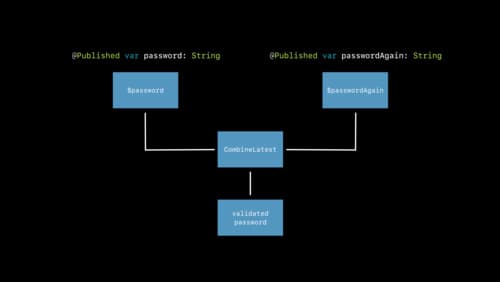
Differences between @State, @Binding, @ObservedObject, and @EnvironmentObject
Tests SwiftUI state ownership and propagation. @State owns local value types; @Binding borrows for two-way edits; @ObservedObject accepts an external ObservableObject; @EnvironmentObject reads one from the environment.
Compare UIKit Auto Layout and SwiftUI layout systems
Tests imperative versus declarative layout paradigms. Contrast UIKit's constraint solver with SwiftUI's two-pass sizing and composition via stacks and modifiers instead of anchors. Red flag: claiming SwiftUI uses Auto Layout under the hood.
How do UITableView and UICollectionView reuse cells?
This tests your understanding of UIKit's flyweight pattern and scroll performance. A strong answer covers the reuse pool, dequeueReusableCell mapping identifiers to new index paths, and registration.
UIViewController lifecycle states: network vs geometry updates
Tests UIViewController lifecycle states and separation of data vs layout. Strong answers list loadView to viewDidDisappear, start network in viewDidLoad or viewWillAppear, and geometry in viewDidLayoutSubviews. Red flag: network calls inside layout methods.
What is @State in SwiftUI and how does it affect the view?
Tests declarative data flow ownership. A strong answer defines @State as private value-type storage owned by the view that triggers a body re-evaluation on mutation. Red flag: confusing it with external data sources like @ObservedObject or @Binding.

When should you use frame-based layout versus Auto Layout?
Frames suit static or high-frequency UI like particle systems; Auto Layout handles rotation, Dynamic Type, localization, and split screen.
How would you use Energy Log to investigate battery drain?
Tests correlating Instruments energy metrics to app behavior. Strong answers profile with Energy Log, map CPU/Location/Network spikes to user flows or background work, and validate fixes with before/after logs. Red flag: blaming the OS without evidence.
What build settings improve Time Profiler symbols in Release builds?
This tests debug symbol control in Xcode Release builds. Set DEBUG_INFORMATION_FORMAT to DWARF with dSYM, avoid stripping, citing larger size and slower links. Red flag: suggesting you disable optimizations, invalidating the performance profile.
How does Debug Memory Graph find leaks and retain cycles?
This tests knowledge of Xcode's heap visualization versus allocation sampling. A strong answer notes the graph shows objects, draws retain cycles as loops, and contrasts with Leaks time-based sampling. Red flag: expecting leak flags without inspection.
Which Instrument diagnoses scroll stuttering and dropped frames?
Tests whether you connect UI jank to Instruments data. A strong answer names the Core Animation or Time Profiler instrument, cites frame duration and hitch ratio, and correlates spikes with main-thread work.
Explain symbolic breakpoints and debug Auto Layout with one
Tests debugging closed-source frameworks without source lines. A strong answer says a symbolic breakpoint stops on UIViewAlertForUnsatisfiableConstraints, then checks the backtrace or log to find the bad view.
What is an Xcode Scheme? How do you configure a custom one?
This tests Xcode build orchestration. A scheme is a blueprint for build, test, run, profile, analyze actions; a strong answer covers duplicating it, setting launch arguments, and staging configs. A red flag is confusing schemes with build configurations.
What LLDB command prints a UIView description versus an Int?
Tests LLDB formatting at breakpoints. Great answers: po invokes description or debugDescription on objects, while p evaluates and prints raw primitive values with type info. Red flag: mixing them up or recommending console print instead of LLDB.
We are hiring for this. Every open role lists the topics its interview covers, so you can prepare for the real thing rather than guessing.
See open roles