All bites
The whole library, newest first. Filter by what you are here for, or pick a topic if you already know.
8664 bites
Page 16
In a Row, how do you space children evenly across the width?
Set mainAxisAlignment to spaceEvenly; contrast with spaceBetween and spaceAround.
Completer: Manually Control a Future's Lifecycle
A Completer gives you a Future now but lets you decide when and how it finishes later. It's essential for converting old callback-based APIs into modern async/await code. The main footgun is trying to complete it more than once, which throws an error.
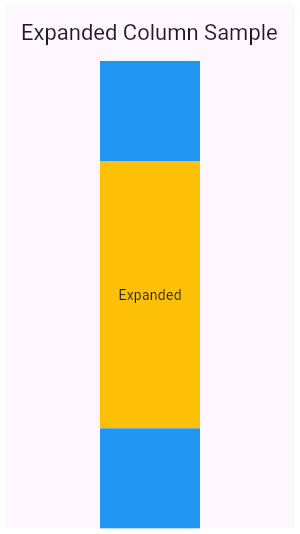
How do you split a Column 1/3 and 2/3 using Expanded?
Tests understanding of flex allocation in Flutter layouts. Strong answers wrap both containers in Expanded, assign flex values of 1 and 2, and note that Expanded forces children to fill the Column's main axis. Red flag: proposing fixed heights instead of flex.
mainAxisAlignment vs crossAxisAlignment in Column, and textDirection in Row
Tests Flutter flex axis awareness. In a Column, mainAxisAlignment is vertical and crossAxisAlignment is horizontal. In a Row, textDirection governs the main axis, not crossAxisAlignment; verticalDirection governs the cross axis.
Dart's Microtask Queue vs. Event Queue
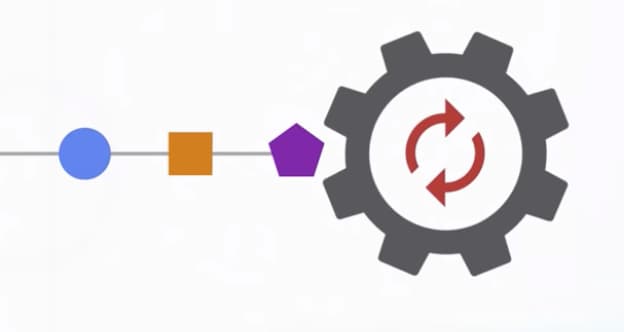
Dart's event loop prioritizes a 'microtask' queue for immediate async tasks over the main 'event' queue for I/O and user input. This ensures high-priority code runs first, but risks starving the event queue and freezing the UI if overused.
How do Flexible and Expanded differ in a Row or Column?
Tests Flutter main-axis flex constraints. Key point: Flexible uses FlexFit.loose so the child may be smaller than its space share; Expanded uses FlexFit.tight so the child must fill its share.
Dart Streams: Single-Subscription vs. Broadcast
A single-subscription stream is a private channel for one listener; a broadcast stream is a public radio station for many. Use single-subscription for one-off data like a file download and broadcast for shared events like UI updates.
Fix RenderFlex overflow in Row with long truncating text
Wrap Text in Expanded; set overflow to TextOverflow.ellipsis and maxLines: 1; leave siblings unwrapped.
StreamTransformer: Building Custom Stream Operators
A StreamTransformer is a factory for custom stream operators like map or where. Use it to build reusable logic, like parsing data chunks, that can be applied to any stream.
Describe a strategy for ListView on phones and GridView on tablets
This tests Flutter adaptive layout skills. Use LayoutBuilder or MediaQuery to read screen width, pick a breakpoint near 600 dp, and return ListView or GridView conditionally.
Dart Isolates: True Parallelism Without Shared Memory
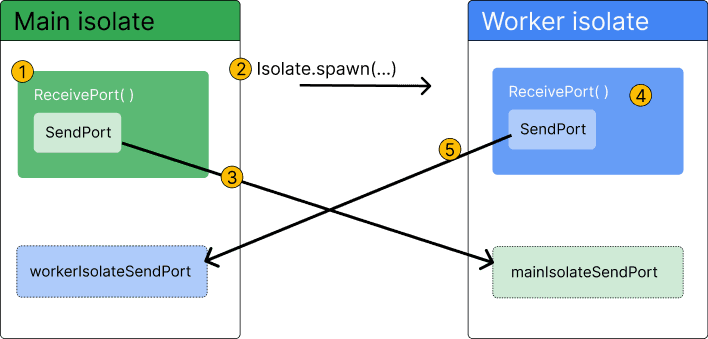
Dart isolates provide true parallelism by running code in a separate thread with its own memory. Use them to offload heavy tasks like parsing huge JSON files or complex calculations that would otherwise freeze your Flutter UI.
Explain Flutter's 'constraints down, sizes up' rule and unbounded height error
Parents constrain down, children size up. ListView in Column throws unbounded height as Column gives infinite maxHeight; fix with Expanded or shrinkWrap.
Declarative UI: Describe the 'What', Not the 'How'
Declarative UI means you describe your desired UI for a given state, and the framework figures out how to display it. It's the core of modern frameworks like Flutter. The footgun is manually changing UI instead of updating the state that drives it.
LayoutBuilder versus MediaQuery for responsive widgets
MediaQuery reports the whole window; LayoutBuilder gives the parent's actual constraints.
runApp(): The Entry Point to Your Flutter UI
runApp() is the starting gun for your Flutter UI, taking your root widget and painting it to the screen. It's the first function called in main(). A common misconception is that calling it again is a slow restart; it actually just updates the UI efficiently.
What problem does IntrinsicWidth solve and what are its performance costs?
This tests Flutter constraints and intrinsic sizing. A great answer covers: capping width to the child's max intrinsic width, aligning Column children, and the speculative pass that costs O(N²) in tree depth. A red flag is omitting performance cost.
Flutter Widgets: Everything is a Widget
Think of Flutter UIs as LEGOs. Every element, from a button to the padding around it, is a self-contained 'widget' you compose to build your screen. This applies to layout, text, and even alignment.
Handle taps on a non-button Container: GestureDetector vs InkWell
This tests gesture propagation and Material feedback. Use GestureDetector for raw taps, drags, or scales; InkWell for Material ripples, which needs a Material ancestor. Red flag: InkWell without Material or ignoring GestureDetector drag support.
StatelessWidget: Flutter's Immutable UI Blueprint
A StatelessWidget is a 'frozen' UI blueprint, built once with its configuration and never changing its own state. Use it for static UI like icons or text labels. The footgun is using it for UI that must react to internal data changes.
How do you retrieve and listen to TextField changes in Flutter?
Use TextEditingController, attach to TextField, listen with addListener, read controller.text, dispose in State.dispose.