Amazon SageMaker Pipelines: Repeatable ML Workflows
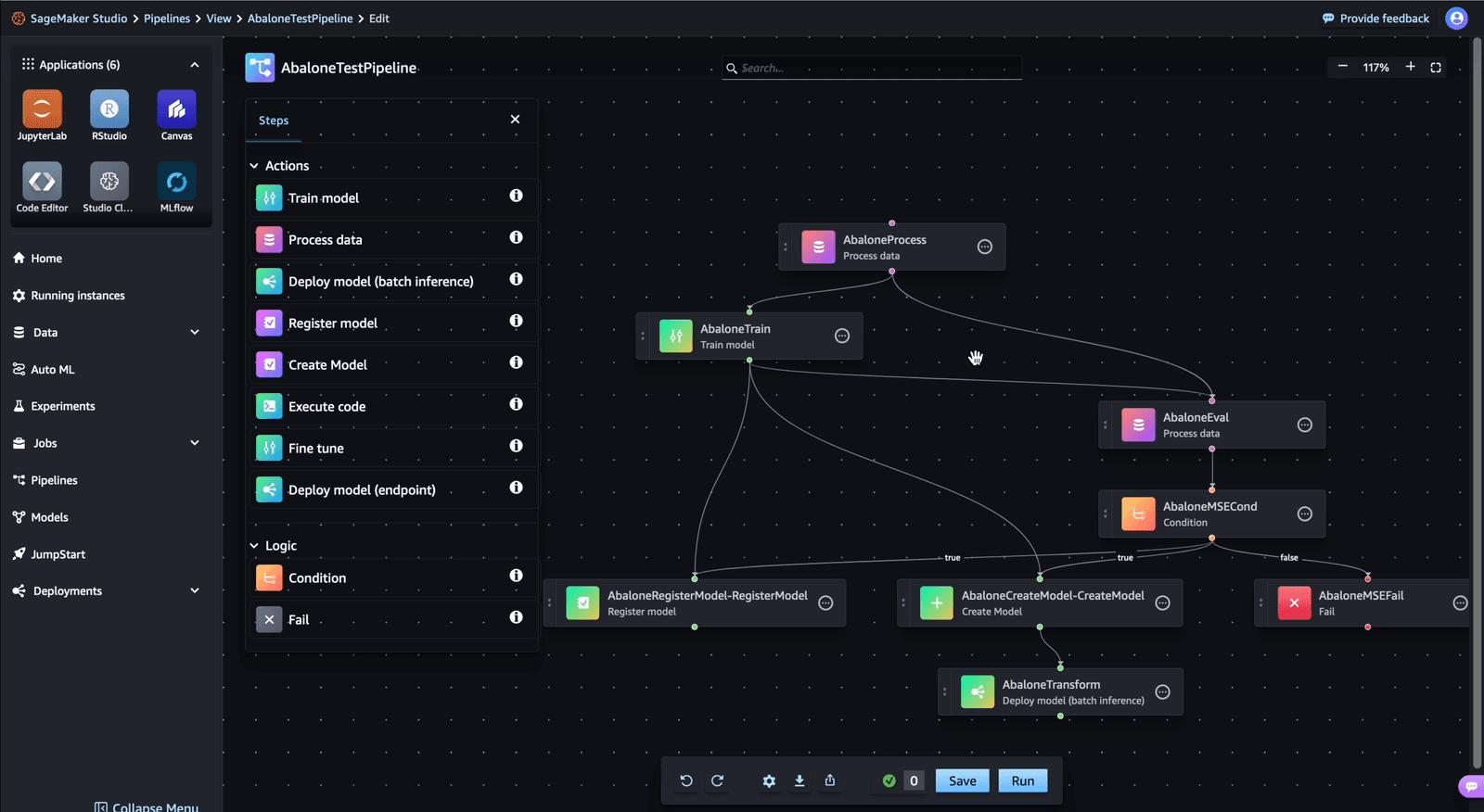
Think of SageMaker Pipelines as a CI/CD pipeline for ML models, automating workflows from data prep to deployment. Use it for reproducible training and automated retraining.
Why it exists
Training a model involves more than one script; it's a sequence of data cleaning, feature engineering, training, evaluation, and registration. Performing these steps manually is slow, error-prone, and nearly impossible to reproduce consistently. SageMaker Pipelines was created to automate and orchestrate these multi-step ML workflows, making them repeatable, shareable, and manageable at scale.
The mental model
Imagine a factory assembly line for your machine learning model. Each station on the line is a distinct 'step,' like data cleaning, model training, or performance evaluation. The raw materials (data) move from one station to the next, and the connections between stations are defined by these data dependencies. The entire assembly line is a Directed Acyclic Graph (DAG), ensuring a logical, one-way flow from raw data to a finished, registered model.
How it works
You define a pipeline using the SageMaker Python SDK, a drag-and-drop UI, or a raw JSON definition. Each pipeline consists of steps, such as Processing, Training, or Condition steps. The relationships between steps form a DAG; for example, the output of a Processing step (a preprocessed dataset) becomes the input for a Training step. When you execute the pipeline, SageMaker orchestrates the execution of these steps, managing the underlying infrastructure and passing data between them. Key features include parameterization (to run the same pipeline with different inputs), step caching (to skip steps whose inputs have not changed), and retry policies for resilience.
When to use it
Use SageMaker Pipelines when you need to productionize an ML workflow. It's ideal for creating reproducible experiments, automating model retraining on a schedule or trigger, and maintaining a clear lineage of how a model was built. It is the standard tool for bringing MLOps practices like CI/CD to your model development lifecycle within the AWS ecosystem.
When not to use it
For initial, highly interactive model exploration in a notebook, a full pipeline can be overkill. The overhead of defining steps and dependencies can slow down rapid, ad-hoc analysis. Stick to notebooks for initial discovery and refactor into a pipeline once the workflow stabilizes and needs to be repeatable.
One canonical example
A common pipeline for a classification model starts with a 'Processing' step to clean and split a dataset. The resulting training data is fed into a 'Training' step. The trained model and test data are then passed to an 'Evaluation' step. A 'Condition' step checks if the model's accuracy exceeds a threshold. If it does, a 'RegisterModel' step adds the model to the SageMaker Model Registry, making it available for deployment. This entire sequence constitutes one pipeline run.
Interview question
Which scenario best highlights the primary advantage of using Amazon SageMaker Pipelines?
- a.Manually executing individual ML scripts for data cleaning, training, and evaluation to maintain granular control.
- b.Deploying a single, pre-trained model quickly without needing to track its lineage or retraining schedule.
- c.Conducting initial, interactive data exploration and model prototyping in a notebook environment.
- d.Automating and ensuring the reproducibility of complex, multi-step ML workflows from data prep to model registration.Correct
Why? this is the answer
SageMaker Pipelines are designed to automate and orchestrate entire ML workflows for reproducibility and productionization, as described in the "WHY IT EXISTS" and "WHEN TO USE IT" sections. Initial interactive exploration (Option C) is explicitly mentioned as a scenario where pipelines would be overkill.
Just read this? Test yourself on what you have been reading.
Read the original → docs.aws.amazon.com
- #mlops
- #aws
- #sagemaker
- #orchestration
Put your scrolling time to good use
Learn one idea, try a quiz and save useful cards for revision. Tezvyn makes it easy to learn and stay current in your tech field, a few minutes at a time.
The iPhone app is on the way
We are building it. Until it lands, nothing here is held back from you: every interview card, your saved cards, streaks and the job board all work in Safari, plus hundreds of free practice quizzes of thirty questions each. Sign in and it all carries over to the app the day it arrives.
Want it as an icon? Tap Share at the bottom of Safari, then Add to Home Screen. It opens full screen and the cards you have read stay available offline.
We are hiring for this. Open roles that interview on mlops — each one lists the topics its interview covers.
See open roles