CIELAB Color Space: Measuring Color Beyond RGB
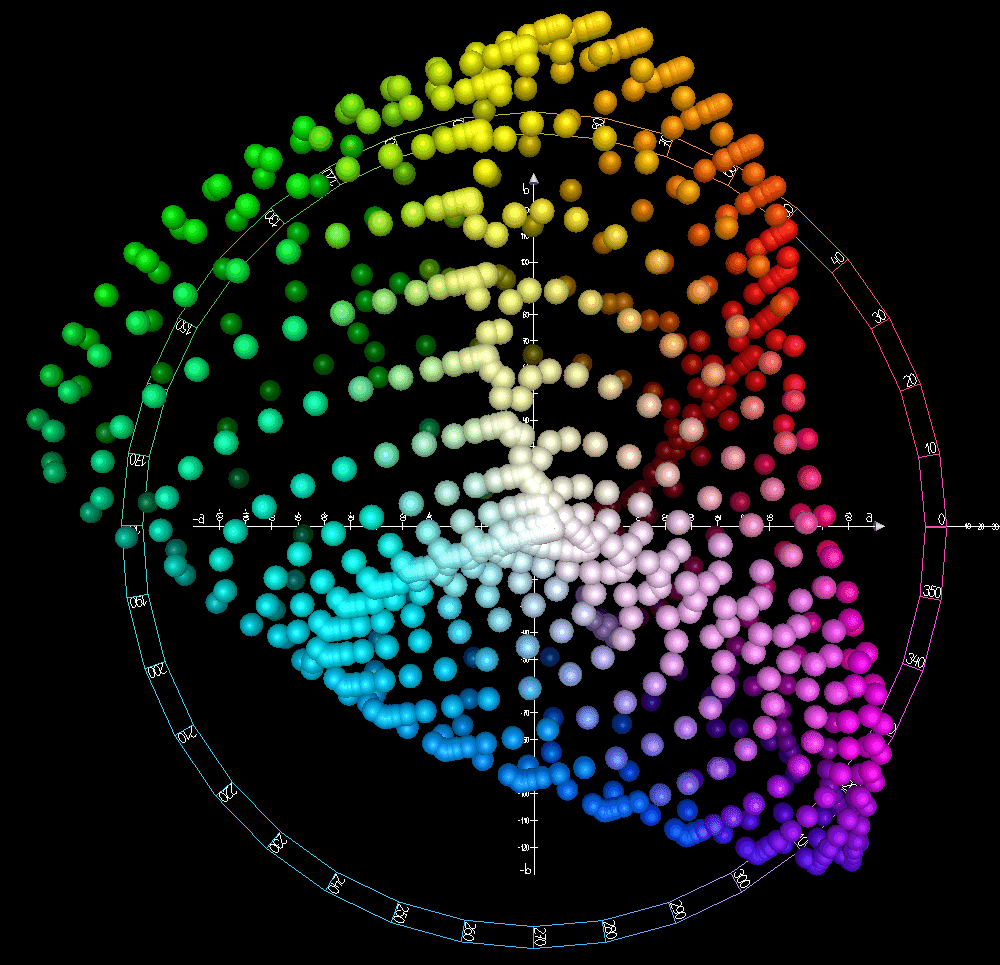
CIELAB models color not by how a screen displays it (like RGB), but by how a human perceives it: lightness, red/green, and yellow/blue. It's used in industry to measure and match colors precisely. The footgun is assuming it's perfectly 'perceptually uniform'.
Why it exists
Color models like RGB are device-dependent; the same RGB values look different on different monitors. CIELAB was created by the International Commission on Illumination (CIE) in 1976 to provide a device-independent way to describe color as the human eye sees it, making color communication reliable across different media.
The mental model
Think of CIELAB not as a recipe for a screen (like RGB), but as coordinates in a 3D 'perception space'. The L axis is a grayscale pole from pure black to pure white. The other two axes, a and b*, represent the color dimensions. A color's position in this space defines how we perceive it, independent of the device used to create it.
How it works
CIELAB expresses color with three values. L represents perceptual lightness, where 0 is pure black and 100 is pure white. The a value indicates the green-to-red component, with negative values for green and positive values for red. The b value indicates the blue-to-yellow component, with negative values for blue and positive for yellow. A value of 0 for both a and b* signifies a neutral gray.
When to use it
Use CIELAB when you need to calculate the perceptual difference between two colors, a metric known as Delta E. It is essential for quality control in manufacturing, printing, and textiles, where you must verify that a product's color precisely matches a standard. It's also used in image editing software for more intuitive color corrections.
When not to use it
CIELAB is a processing and measurement space, not a native output space. Displays use RGB and most printers use CMYK. While you can convert to and from CIELAB, you wouldn't store a final web image or design a UI directly using Lab* values. Its strength is in comparison and manipulation, not final representation.
One canonical example
A car manufacturer needs to ensure a replacement door panel perfectly matches the car's original 'Racing Red' paint. A colorimeter measures the Lab* values of both the car and the new panel. By calculating the numerical difference (Delta E) between these two sets of coordinates, the system can objectively determine if the match is close enough for a human eye not to notice the difference.
Interview question
A textile company needs to ensure fabric colors match a standard precisely, regardless of the display or printer used. Why would they primarily use CIELAB for this task?
- a.CIELAB is the only color model that can be directly converted to CMYK for printing.
- b.It provides a device-independent measure of color perception, allowing for objective comparison and quality control.Correct
- c.Its L*, a*, and b* components are easier for designers to intuitively adjust than RGB values.
- d.CIELAB is specifically designed for physical materials like fabric, unlike RGB which is for light.
Why? this is the answer
CIELAB's primary advantage is its device-independent nature, modeling color based on human perception rather than display output. This allows for objective measurement and comparison of colors, crucial for quality control. Option C is less accurate because while CIELAB can be used for intuitive corrections, its core strength for precise matching lies in its perceptual uniformity and device independence, not just ease of adjustment.
Just read this? Test yourself on what you have been reading.
Read the original → en.wikipedia.org
- #computer vision
- #color theory
- #image processing
You just looked this up. Could you explain it out loud?
That is the part interviews actually test. Tezvyn takes questions like this one and gives you what the interviewer is really checking, the answer that lands, and the mistake that ends the conversation, in the four minutes before your next meeting.
The iPhone app is on the way
We are building it. Until it lands, nothing here is held back from you: every interview card, your saved cards, streaks and the job board all work in Safari, plus hundreds of free practice quizzes of thirty questions each. Sign in and it all carries over to the app the day it arrives.
Want it as an icon? Tap Share at the bottom of Safari, then Add to Home Screen. It opens full screen and the cards you have read stay available offline.
We are hiring for this. Open roles that interview on computer vision — each one lists the topics its interview covers.
See open roles