Component Variants: One Component, Many Forms
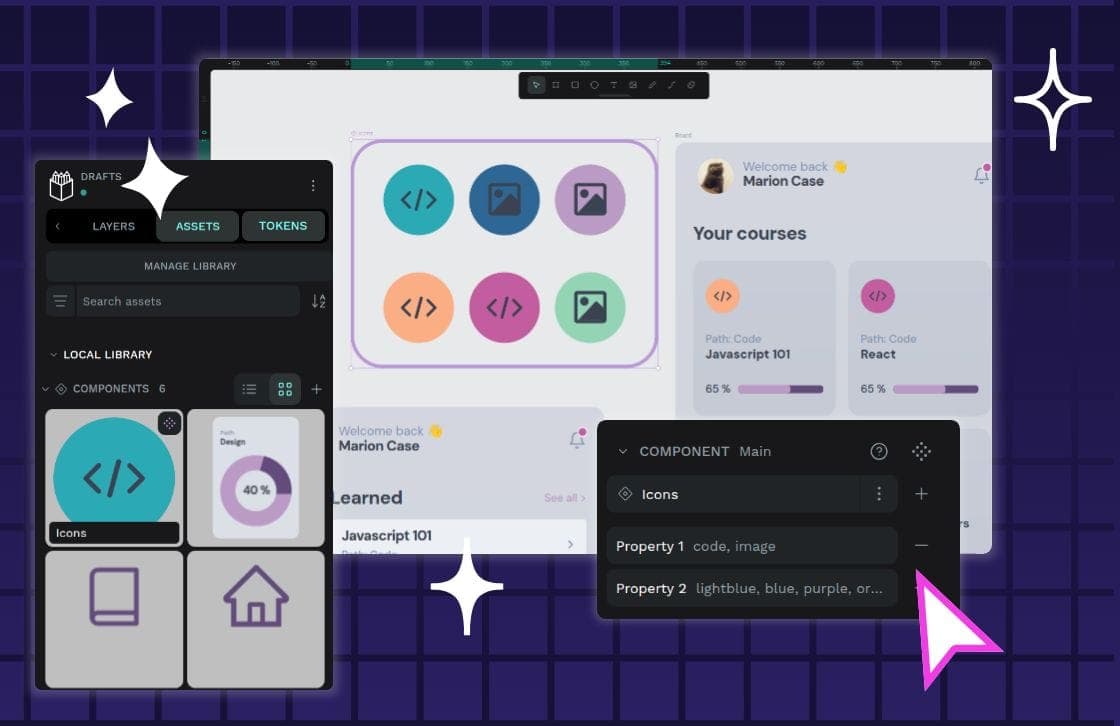
Component variants are like Lego bricks for your UI: one block can build many things. Instead of creating a unique component for every button state or size, you define properties to manage its variations.
Why it exists
As a product scales, its design system can become overwhelmed with hundreds of choices for fonts, colors, and components. Without a strategy for managing variations, teams either create a massive library of rarely-used, inconsistent components or designers detach components to create one-offs, breaking the single source of truth.
The mental model
Think of component variants like Lego bricks. You can use the same standard red rectangular block to build a door for a mini-sized house or a door for a mega-mansion. You don’t need a new, slightly different block for every build; that just creates clutter. Variants allow one core component to serve multiple, predictable purposes in a structured way.
How it works
You start with a base component, like a button. Then, you define properties and their possible values to manage its variations. For example, a button might have a 'Style' property (with values 'Primary', 'Secondary'), a 'Size' property ('Small', 'Large'), and a 'State' property ('Default', 'Hover', 'Active'). Instead of dozens of separate components, a designer selects the single 'Button' component and toggles its properties to get the exact version they need.
When to use it
Use variants for any repeatable design pattern that has multiple, predictable options. They are essential for foundational UI elements like buttons, toggles, form inputs, and cards. They are especially powerful in responsive design, where components need to adapt for different user viewports, operating systems, and devices without becoming entirely new components.
When not to use it
Variants are for managing different options of a single, repeatable component. If a design element is truly a one-off with no foreseeable variations in style, state, or size, creating variants for it is unnecessary overhead. The goal is to manage complexity, not create it.
One canonical example
A button component is the classic case. Instead of designers hunting for Button-Primary-Large-Default, Button-Primary-Large-Hover, and Button-Secondary-Small-Active as separate items in a library, they find one 'Button' component. From there, they use its properties to select Style: 'Secondary', Size: 'Small', and State: 'Active'. This keeps the design consistent and the library clean.
Interview question
What is the main advantage of using component variants in a design system?
- a.They enable designers to quickly build entirely new UI components for unique, non-repeatable design patterns.
- b.They allow a single base component to represent many different forms by adjusting its properties.Correct
- c.They enforce strict design rules by preventing designers from making any custom modifications to components.
- d.They automatically generate the necessary front-end code for all component states, sizes, and styles.
Why? this is the answer
The card states that variants allow "one core component to serve multiple, predictable purposes" by defining "properties and their possible values." This directly aligns with option B. Option A is incorrect because variants are for managing variations of existing components for repeatable patterns, not for creating new or unique, non-repeatable elements.
Just read this? Test yourself on what you have been reading.
Read the original → penpot.app
Put your scrolling time to good use
Learn one idea, try a quiz and save useful cards for revision. Tezvyn makes it easy to learn and stay current in your tech field, a few minutes at a time.
The iPhone app is on the way
We are building it. Until it lands, nothing here is held back from you: every interview card, your saved cards, streaks and the job board all work in Safari, plus hundreds of free practice quizzes of thirty questions each. Sign in and it all carries over to the app the day it arrives.
Want it as an icon? Tap Share at the bottom of Safari, then Add to Home Screen. It opens full screen and the cards you have read stay available offline.
We are hiring for this. Open roles that interview on design systems — each one lists the topics its interview covers.
See open roles