Dark Launch: Test New Code Invisibly in Production
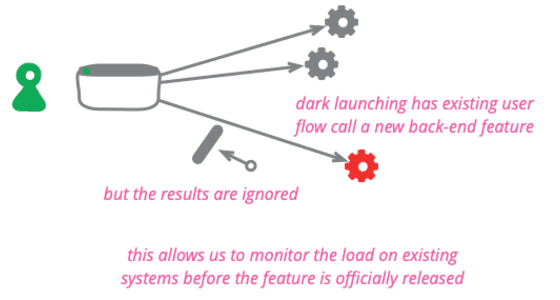
A dark launch tests new backend code on real production traffic without any user ever seeing it. Use it to measure the performance impact of a new recommendation engine or data service before the UI is built.
Why it exists
Releasing new, heavy backend features is risky. They can slow down the entire system or cause unexpected failures under real-world load. We need a way to test the performance and stability of new code with production traffic before users are affected or even aware of the feature.
The mental model
Think of it as a ghost feature. The backend logic runs for real users, triggered by their actions, but the results are never shown in the UI. It's a performance test using live traffic as the test data, completely invisible to the end-user. The system does all the work, but throws the result away before it reaches the interface.
How it works
You integrate the new backend feature into your production codebase, but with no user interface to activate it. You then modify an existing part of your application—like a checkout flow—to call this new code. The call is wrapped in a feature flag. When the flag is on, the new code executes, adding load to your system. You monitor performance, latency, and error rates. If there's a problem, you flip the flag off instantly. Once performance is acceptable, you can build the UI and reveal the feature.
When to use it
Dark launching is ideal for backend changes that enhance an existing user interaction without requiring a user's choice. Two common uses are: first, assessing the performance impact of a new service like a recommendation engine; second, verifying the correctness of a refactored algorithm by running it in parallel with the old one and comparing results, a technique called parallel running.
When not to use it
Avoid dark launching for features that require direct user interaction or choice to be tested. If you need to see how users behave with a new button, form, or workflow, you can't test that invisibly. For that, a Canary Release, where a small subset of users gets the new UI, is the appropriate strategy.
One canonical example
A retail site wants to add product recommendations to its checkout page. Before building the UI, they dark launch the recommendation engine. The checkout process is modified to call the engine for every user. The recommendations are never displayed, but the team can measure the extra milliseconds added to checkout time and the CPU load on the service. They tune the algorithm until the performance impact is negligible, then finally enable the UI for all users.
Interview question
For which scenario is a Dark Launch the most suitable deployment strategy?
- a.Determining which of two different button colors leads to higher click-through rates on a webpage.
- b.Evaluating the performance overhead of a new backend recommendation service using live traffic.Correct
- c.Introducing a new user interface for a checkout process to a small percentage of users.
- d.Validating the core functionality of a refactored data processing algorithm in a test environment.
Why? this is the answer
A Dark Launch is ideal for assessing the performance impact of new backend features on production traffic without affecting user experience. Testing a new UI (Option C) is better suited for a Canary Release, while Option D describes standard testing, and Option A is an A/B test.
Just read this? Test yourself on what you have been reading.
Read the original → martinfowler.com
- #ci/cd
- #release strategy
- #testing in production
- #feature flags
Put your scrolling time to good use
Learn one idea, try a quiz and save useful cards for revision. Tezvyn makes it easy to learn and stay current in your tech field, a few minutes at a time.
The iPhone app is on the way
We are building it. Until it lands, nothing here is held back from you: every interview card, your saved cards, streaks and the job board all work in Safari, plus hundreds of free practice quizzes of thirty questions each. Sign in and it all carries over to the app the day it arrives.
Want it as an icon? Tap Share at the bottom of Safari, then Add to Home Screen. It opens full screen and the cards you have read stay available offline.
We are hiring for this. Open roles that interview on ci/cd — each one lists the topics its interview covers.
See open roles