Design a flexible Table component in Figma with slots
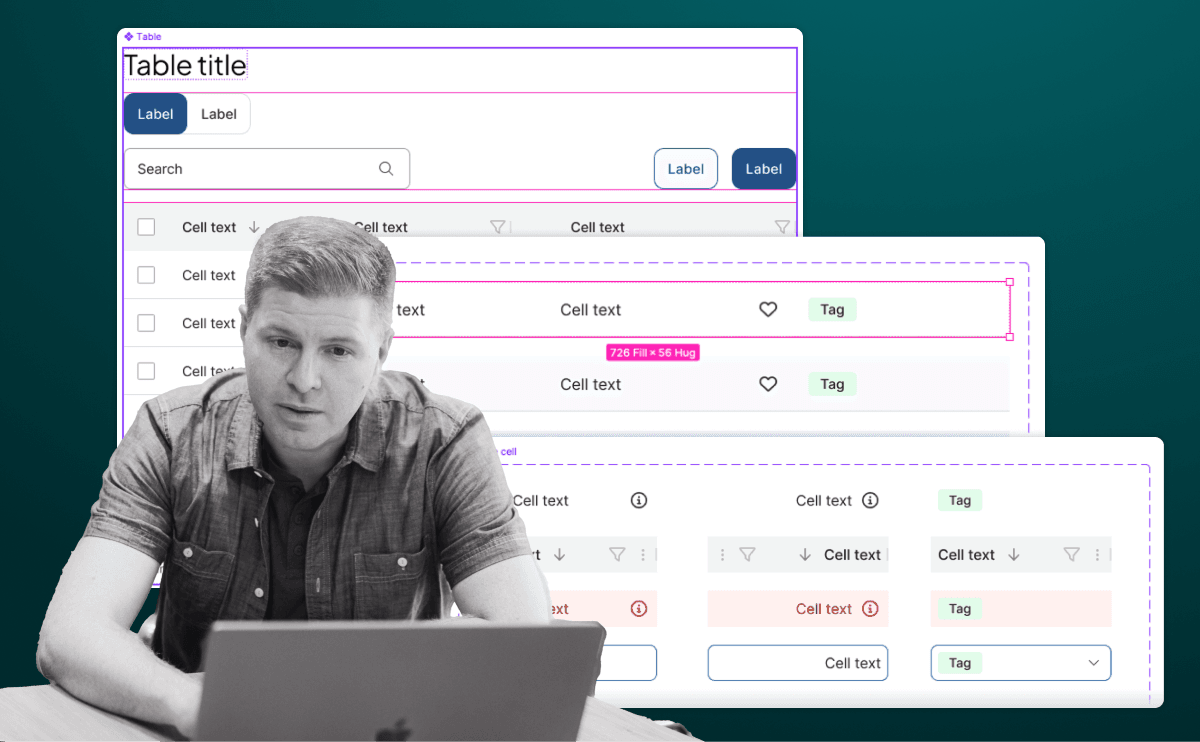
Tests Figma Slots to avoid variant bloat. Answer: Cell variants; Row as a horizontal Slot with zero padding for dividers/hover; Table as a vertical Slot for rows plus a header Slot; componentize the configured row for bulk edits.
What's really being asked
This question evaluates whether you understand Figma's Slot feature as an architectural tool for high-complexity design systems, specifically how to avoid the pre-Slot trap of boolean-variant bloat. The interviewer wants to see separation of concerns between content (what goes in a cell) and layout (how rows and tables behave), plus knowledge of auto layout nesting and instance management at scale.
The full answer
First, the Cell layer. You should describe a base Cell component with variants for different content types like plain text, avatar, or status tag. Alternatively, you can use separate atom components, but the key is keeping cell-level styling encapsulated so the row and table do not need to know what is inside each cell. Second, the Row layer. The Row component should be built around a Slot that uses horizontal auto layout with zero padding and zero margins. This Slot is where consumers place Cell instances. The Row itself owns horizontal dividers, hover state backgrounds, and zebra-striping logic because those are row-level concerns, not cell-level or table-level concerns. Third, the Table layer. The Table component uses a vertical auto layout Slot to hold Row instances. You should also mention a secondary Slot above the table body for global controls like search bars, filter chips, action buttons, or tabs so the table shell remains reusable across contexts. Fourth, the maintenance strategy. Instead of manually inserting individual Row instances into the Table Slot and tweaking each one, you componentize a configured Row instance once it contains the correct cells, column spacing, and alignment. Designers then use that componentized row inside the Table Slot, so future edits to column structure propagate instantly without detaching instances.
The mistakes people make
Proposing a single Table component with dozens or hundreds of boolean variants for every combination of cell type, column count, and state. Suggesting that consumers detach instances to swap cell content, which breaks design system governance. Putting padding or spacing at the Table level instead of the Row level, which makes column alignment fragile. Using fixed widths everywhere instead of a mix of Hug and Fill to let tables adapt to content.
What usually comes next
How would you enforce consistent column widths across rows if each row is an independent Slot? What happens when a table needs a sticky header or frozen first column? How do you handle empty states or loading skeletons without breaking the Slot structure? How does this Figma architecture map to semantic HTML and responsive behavior in code?
A concrete example
Imagine a user directory table with three columns: employee name with avatar, email as plain text, and account status as a colored tag. You build one Cell component with three variants. You drop those three Cell instances into the Row Slot, set the Row to horizontal auto layout with zero padding, and add a bottom divider line. You then turn that configured row into its own component. Inside the Table component, you place three instances of that row component into the vertical body Slot and set the top Slot to hold a search input and an Add User button. When the product team later needs to add a fourth column, you update the componentized row once and all three instances in the table update automatically.
Interview question
Using Figma Slots for a 20-row table with identical cells, what is the most scalable way to ensure a future column width change propagates without detaching instances?
- a.Componentize a configured Row instance once, then place that component inside the Table SlotCorrect
- b.Insert individual Row instances into the Table Slot and adjust the cells in each one separately
- c.Build boolean variants on the Table for every column configuration and toggle them per row
- d.Apply all spacing and dividers at the Table level so rows inherit layout uniformly
Why? this is the answer
Componentizing the configured row lets you place a single reusable component inside the Table Slot, so any column width or spacing edit propagates instantly to all rows without detaching. Building boolean variants for every configuration is the pre-Slot anti-pattern that creates massive variant bloat and violates separation of concerns.
Just read this? Test yourself on what you have been reading.
Read the original → bitovi.com
- #figma
- #design-systems
- #slots
- #auto-layout
- #component-architecture
Put your scrolling time to good use
Learn one idea, try a quiz and save useful cards for revision. Tezvyn makes it easy to learn and stay current in your tech field, a few minutes at a time.
The iPhone app is on the way
We are building it. Until it lands, nothing here is held back from you: every interview card, your saved cards, streaks and the job board all work in Safari, plus hundreds of free practice quizzes of thirty questions each. Sign in and it all carries over to the app the day it arrives.
Want it as an icon? Tap Share at the bottom of Safari, then Add to Home Screen. It opens full screen and the cards you have read stay available offline.
We are hiring for this. Open roles that interview on figma — each one lists the topics its interview covers.
See open roles