FastAPI: Pydantic for Robust Request Bodies
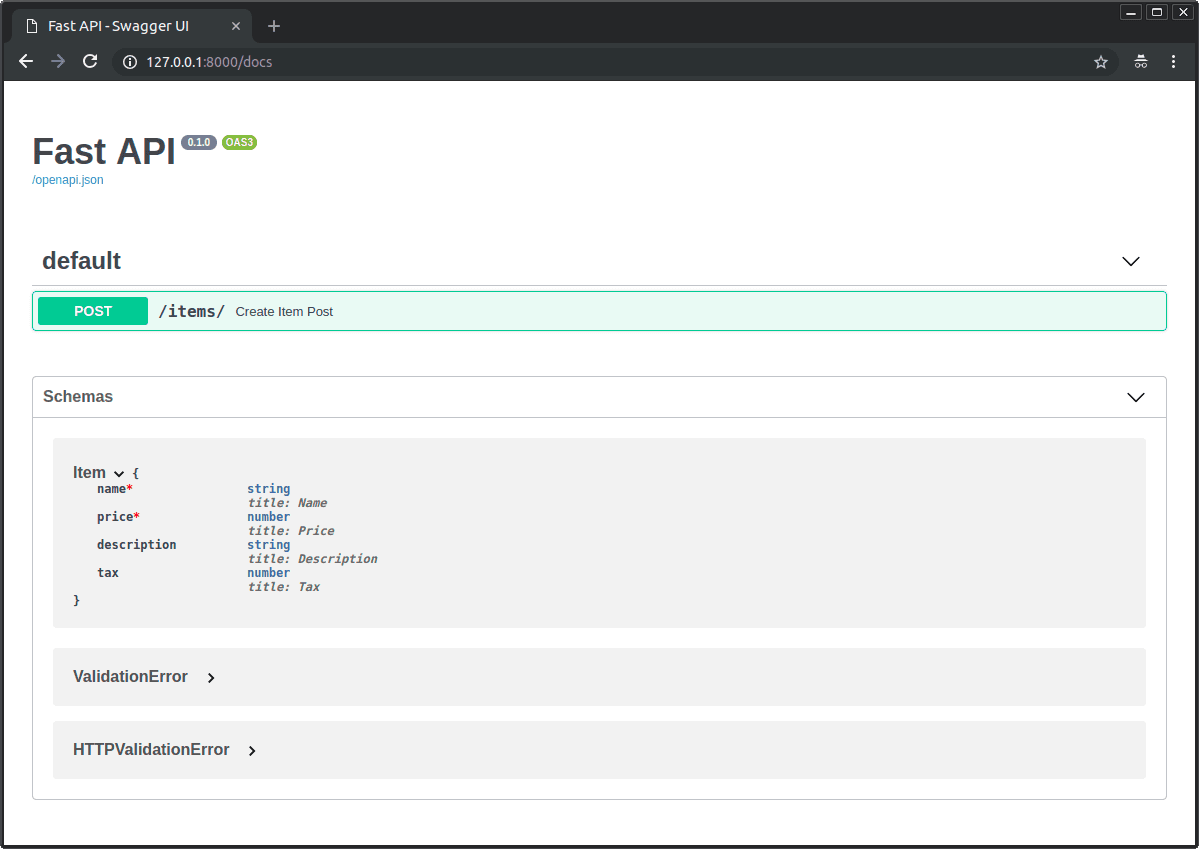
A Pydantic model is a contract for your API's request body. It tells FastAPI what data to expect, automatically converting incoming JSON into a typed Python object. Use this for any POST or PUT endpoint. The footgun is declaring path params in the body model.
Why it exists
APIs often need to receive structured data from clients, like a JSON object to create a new user. Manually parsing this data, validating types, and handling missing fields is repetitive and error-prone. FastAPI needed a declarative way to handle this boilerplate work automatically.
The mental model
Think of a Pydantic model as a 'shape' or a contract for the data your endpoint expects in the request body. You define a Python class with typed attributes, and FastAPI guarantees that any data reaching your function will conform to that shape. It's like putting a bouncer at the door of your function who only lets in perfectly structured data.
How it works
You create a class that inherits from Pydantic's BaseModel. In your path operation function (e.g., for a POST request), you type-hint a parameter with this class. When a request comes in, FastAPI reads the body, parses the JSON, and uses your model to create an instance of your class. It automatically validates data types, checks for required fields, and returns a detailed validation error to the client if the data doesn't match. Inside your function, you interact with a clean, validated Python object, not a raw dictionary.
When to use it
Use a Pydantic model for the request body of any POST, PUT, or PATCH endpoint where the client sends structured data. This is the standard, idiomatic way to handle incoming data in FastAPI. It's especially powerful for complex, nested JSON objects, as Pydantic can handle nested models seamlessly.
When not to use it
Do not use a Pydantic model to define path parameters or query parameters. These are declared as separate, simple arguments to your path operation function (e.g., item_id: int, q: str | None = None). While you can use Pydantic for complex query parameter dependencies, the primary request body model is reserved for the data sent in the body itself. For simple form data (not JSON), you would use Form() instead.
One canonical example
First, import FastAPI and BaseModel. Then, define a class Item(BaseModel) with attributes like name: str and price: float. Finally, create a path operation @app.post("/items/") with a function async def create_item(item: Item):. When a client sends a POST request to /items/ with a JSON body like {"name": "Foo", "price": 42.0}, FastAPI validates the data and passes a full Item object to the create_item function. If the price were a string, FastAPI would automatically return a 422 Unprocessable Entity error.
Interview question
When developing a FastAPI application, for which purpose is a Pydantic BaseModel most effectively utilized?
- a.Specifying validation rules for parameters embedded directly in the URL path.
- b.Declaring optional filtering criteria passed as query parameters in a GET request.
- c.To process simple key-value pairs submitted through an HTML form.
- d.To define the expected structure and types of data within a POST or PUT request's body.Correct
Why? this is the answer
The card states that Pydantic models are used for 'the request body of any POST, PUT, or PATCH endpoint where the client sends structured data.' Options A, B, and D describe scenarios where Pydantic models are explicitly advised not to be used for the primary request body model, as those are handled by other FastAPI mechanisms like path parameters, query parameters, or Form().
Just read this? Test yourself on what you have been reading.
Read the original → fastapi.tiangolo.com
Put your scrolling time to good use
Learn one idea, try a quiz and save useful cards for revision. Tezvyn makes it easy to learn and stay current in your tech field, a few minutes at a time.
The iPhone app is on the way
We are building it. Until it lands, nothing here is held back from you: every interview card, your saved cards, streaks and the job board all work in Safari, plus hundreds of free practice quizzes of thirty questions each. Sign in and it all carries over to the app the day it arrives.
Want it as an icon? Tap Share at the bottom of Safari, then Add to Home Screen. It opens full screen and the cards you have read stay available offline.
We are hiring for this. Open roles that interview on fastapi — each one lists the topics its interview covers.
See open roles