Git LFS: Versioning Large Files Without Bloating Your Repo
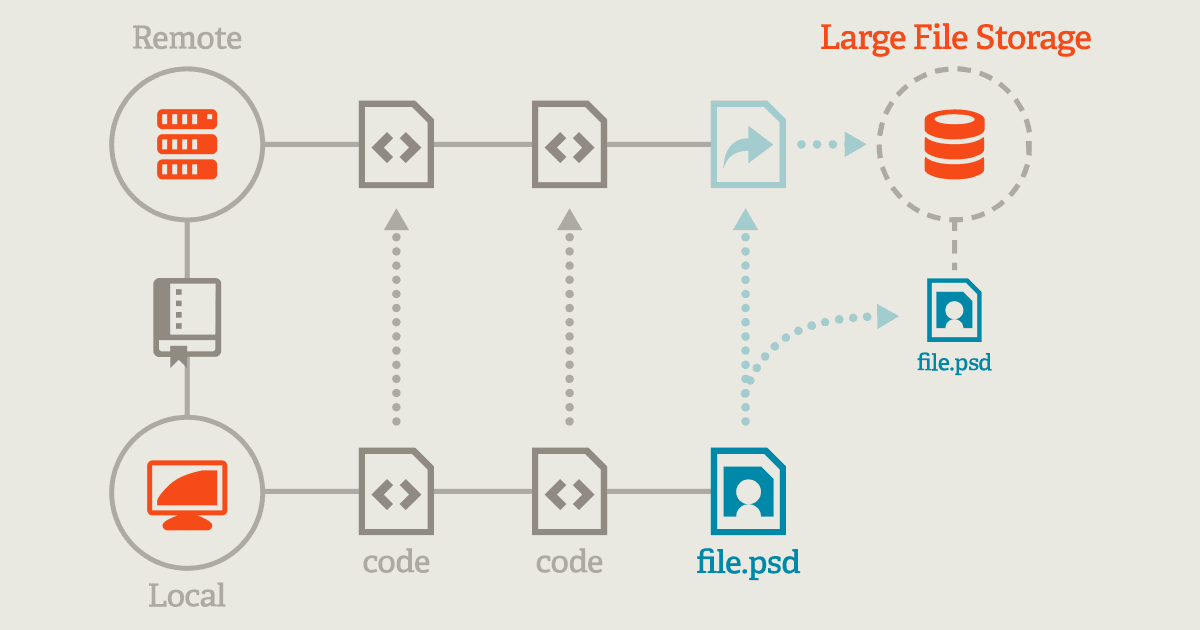
Git LFS replaces large files with text pointers in your repo, storing the actual data on a remote server. This keeps clones fast when versioning videos, datasets, or graphics. Footgun: git lfs track only affects new files, not existing ones.
Why it exists
Git was designed for source code, which is small and text-based. It struggles with large binary files because it tries to store every version of every file, causing repository size to explode and making clones and fetches painfully slow for anyone working on the project.
The mental model
Think of Git LFS as a coat check for your repository's large files. Instead of storing a bulky file directly in Git's history, LFS stores a small text pointer—a claim ticket. The actual file is stored on a separate, dedicated large file server. When you checkout a branch, Git downloads the pointers, and the LFS extension then fetches the actual large files you need.
How it works
You first run git lfs install once per machine. Then, in a specific repository, you tell LFS which files to manage using a command like git lfs track "*.psd". This creates or updates a .gitattributes file, which you must commit to the repository. From then on, when you git add a matching file, Git commits a small pointer file instead of the large file itself. On git push, the LFS client intercepts the command and uploads the actual file content to the LFS server.
When to use it
Use Git LFS for any large binary files that need to be versioned alongside your code but would bloat the repository. This is common for game assets (textures, models), machine learning datasets, videos, audio samples, and large design files like PSDs. It keeps clone and fetch times reasonable for the whole team.
When not to use it
Don't use LFS for files that are text-based or small, as the overhead isn't worth it. It's also not ideal for files that require frequent diffing or merging, as Git's standard tools can't operate on the pointer files. The remote LFS server also adds an external dependency to your checkout and build process.
One canonical example
A team developing a mobile game needs to version 50MB texture files. Without LFS, cloning the repo would take minutes. With LFS, they run git lfs track "*.png". Now, when a developer clones the repo, they download only a few kilobytes of pointers. The actual texture files are downloaded on demand during the checkout process. The most common footgun is forgetting that git lfs track does not apply retroactively; they must use git lfs migrate to convert large files already committed to the repository's history.
Interview question
To ensure Git LFS manages large files that were already committed to a repository's history, what is the necessary action?
- a.Manually remove the large files from the repository's history and then add them back after configuring LFS.
- b.Use git lfs migrate to convert the existing large files in the repository's history.Correct
- c.Update the .gitattributes file to include the large file types and push the changes.
- d.Run git lfs track for the file types and then re-commit the files.
Why? this is the answer
The card explicitly states that 'git lfs track does not apply retroactively' and that users 'must use git lfs migrate to convert large files already committed to the repository's history'. Other options either only affect new files or are not the specific LFS tool for this task.
Just read this? Test yourself on what you have been reading.
Read the original → git-lfs.com
Put your scrolling time to good use
Learn one idea, try a quiz and save useful cards for revision. Tezvyn makes it easy to learn and stay current in your tech field, a few minutes at a time.
The iPhone app is on the way
We are building it. Until it lands, nothing here is held back from you: every interview card, your saved cards, streaks and the job board all work in Safari, plus hundreds of free practice quizzes of thirty questions each. Sign in and it all carries over to the app the day it arrives.
Want it as an icon? Tap Share at the bottom of Safari, then Add to Home Screen. It opens full screen and the cards you have read stay available offline.
We are hiring for this. Open roles that interview on git — each one lists the topics its interview covers.
See open roles