LLM Inference Caching: Pay for Computation Once
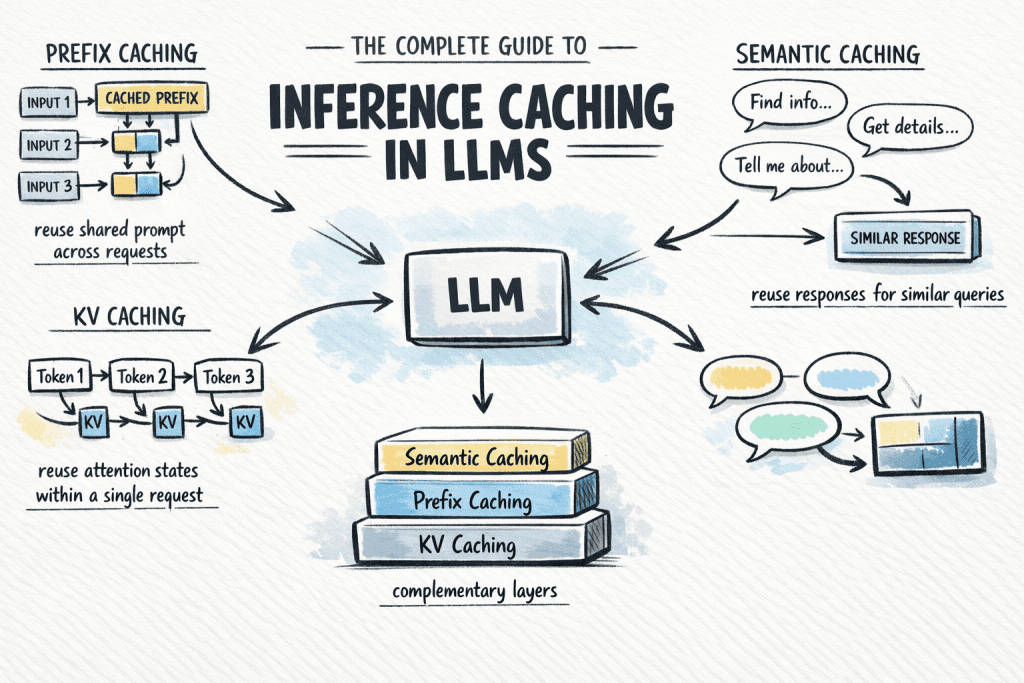
LLM inference caching reuses past computations to cut costs and latency. It avoids reprocessing shared system prompts or serves full answers for common queries without hitting the model. The footgun: semantic caches can return a "similar" but incorrect answer.
Why it exists
Calling large language model (LLM) APIs is expensive and slow. A large portion of this cost comes from redundant computation, like reprocessing the same system prompt for every user or answering common questions from scratch. Inference caching was created to eliminate this waste by storing and reusing the results of expensive computations.
The mental model
Think of inference caching as a multi-level memoization for AI. It's a system for remembering computations to avoid doing the same work twice. At the lowest level, it remembers parts of its own thought process within a single request. At higher levels, it remembers common instructions or entire answers across many different requests, saving both time and money.
How it works
There are three main types of inference caching, each operating at a different layer. First, KV Caching works inside a single inference request. It stores the internal attention states (key-value pairs) for the prompt so the model doesn't recompute them for every single new token it generates. This is an internal optimization that is usually on by default. Second, Prefix Caching extends this concept across multiple requests. If many prompts share an identical starting block, like a system prompt or a reference document, the KV states for that prefix are cached and reused. Third, Semantic Caching is an application-level cache. It stores entire prompt-response pairs. When a new query arrives, it checks if a semantically similar query has been seen before. If a match is found, it returns the cached response immediately, skipping the LLM call entirely.
When to use it
Use prefix caching when your application sends a long, static context with every call, such as a detailed system prompt or few-shot examples. This is common in RAG and agent-based systems. Use semantic caching for high-volume applications with many repetitive user questions, like a customer support chatbot, to provide instant answers to common queries and reduce API spend.
When not to use it
Avoid relying on semantic caching for tasks where nuance is critical and small changes in the prompt demand a different answer, such as in legal analysis or code generation. A "semantically similar" query might be subtly but critically different. Prefix caching provides no benefit if your prompts are highly variable and do not share a common, static prefix.
One canonical example
A customer service chatbot is configured with a long system prompt defining its persona and knowledge base. With prefix caching, this prompt's internal state is computed once and reused for every user query, saving thousands of tokens per conversation. The same bot can use semantic caching to instantly answer "what are your hours?" by retrieving a stored answer, completely avoiding an expensive LLM call.
Interview question
In which scenario would semantic caching be most problematic or risky to implement?
- a.A system that needs to reuse a long, static system prompt across multiple user interactions.
- b.An application where many users ask identical, repetitive questions.
- c.A chatbot designed to generate highly creative and novel responses.
- d.A legal analysis tool where precise wording and nuance are critical for correct output.Correct
Why? this is the answer
The card states to "Avoid relying on semantic caching for tasks where nuance is critical and small changes in the prompt demand a different answer, such as in legal analysis." Option A describes a scenario best suited for prefix caching, not a problem for semantic caching.
Just read this? Test yourself on what you have been reading.
Read the original → machinelearningmastery.com
Put your scrolling time to good use
Learn one idea, try a quiz and save useful cards for revision. Tezvyn makes it easy to learn and stay current in your tech field, a few minutes at a time.
The iPhone app is on the way
We are building it. Until it lands, nothing here is held back from you: every interview card, your saved cards, streaks and the job board all work in Safari, plus hundreds of free practice quizzes of thirty questions each. Sign in and it all carries over to the app the day it arrives.
Want it as an icon? Tap Share at the bottom of Safari, then Add to Home Screen. It opens full screen and the cards you have read stay available offline.
We are hiring for this. Open roles that interview on llm — each one lists the topics its interview covers.
See open roles