The DOM: Your HTML as a Live Object Tree
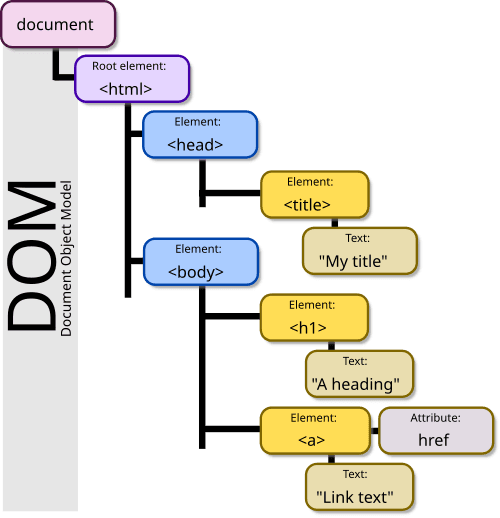
The DOM is the browser's live model of a webpage, represented as a tree of objects. JavaScript uses it to find elements, change content, and react to clicks. The footgun: DOM changes are in-memory; they don't edit the original HTML file on the server.
Why it exists
A browser receives an HTML document as plain text. To make it interactive, the browser needs a structured, in-memory representation that code can manipulate. The DOM is that standardized structure, providing a language-agnostic bridge between code and the visual page.
The mental model
Think of the DOM as a family tree for your webpage. The <html> tag is the great-grandparent. It has children like <head> and <body>. The <body> has its own children, like <h1> and , which are siblings. Your JavaScript code can walk this tree, talk to any family member (a node), and change their properties (like text content or style) or even add or remove members from the tree.
How it works
When a browser loads a webpage, its rendering engine parses the HTML text and creates a corresponding tree of nodes. Each element, attribute, and piece of text in the HTML becomes a node in this tree. These nodes are objects with properties and methods. For example, a element becomes a node object that your JavaScript can access via methods like document.getElementById('my-paragraph'). You can then change its textContent property or use the addEventListener method to make it respond to a click.
When to use it
The DOM is the standard way to create dynamic web pages. You use it any time you need to programmatically update what the user sees without reloading the page. This includes tasks like validating a form, showing or hiding elements, creating animations, or fetching data from an API and displaying it on the page.
When not to use it
While you can build entire applications by directly manipulating the DOM, it can become inefficient. Frequent, large-scale DOM manipulations are computationally expensive, a problem known as "layout thrashing." This is why frameworks like React and Vue exist. They use a "Virtual DOM" to batch and optimize updates, making changes more efficiently than direct, manual manipulation. For simple interactions, direct DOM manipulation is perfectly fine.
One canonical example
A user clicks a "like" button. The JavaScript code attached to that button's click event uses the DOM to find the like count element (e.g., document.getElementById('like-count')), reads its current value from the textContent property, increments it, and updates the element's textContent to show the new number. The page updates instantly without a reload.
Interview question
When JavaScript modifies an element using the DOM, what is the immediate and primary outcome?
- a.The browser's visual rendering of the webpage is updated for the user.Correct
- b.A new, modified HTML document is saved to the user's local file system.
- c.The original HTML file on the web server is permanently altered.
- d.The browser creates a backup of the previous DOM state for undo operations.
Why? this is the answer
The DOM is the browser's live, in-memory model of the webpage, so changes made via JavaScript directly update what the user sees. These changes do not affect the original HTML file on the server, which remains unchanged.
Just read this? Test yourself on what you have been reading.
Read the original → en.wikipedia.org
Put your scrolling time to good use
Learn one idea, try a quiz and save useful cards for revision. Tezvyn makes it easy to learn and stay current in your tech field, a few minutes at a time.
The iPhone app is on the way
We are building it. Until it lands, nothing here is held back from you: every interview card, your saved cards, streaks and the job board all work in Safari, plus hundreds of free practice quizzes of thirty questions each. Sign in and it all carries over to the app the day it arrives.
Want it as an icon? Tap Share at the bottom of Safari, then Add to Home Screen. It opens full screen and the cards you have read stay available offline.
We are hiring for this. Open roles that interview on dom — each one lists the topics its interview covers.
See open roles