Intermediate concepts in Android & Kotlin

Kotlin Inheritance: Open for Extension, Closed by Default
In Kotlin, classes are final by default. Think of inheritance as an opt-in feature you enable with the open keyword. Use it to create specialized versions of a base class, like a Student from a Person.
Kotlin Data Classes: Automatic Boilerplate for Data Holders
A Kotlin data class automatically generates boilerplate like equals() and toString() for classes that just hold data. Use it for model objects or DTOs where value equality matters. The footgun: its copy() method is shallow, sharing mutable objects.
Kotlin Collections: Think Transformations, Not Loops
Treat collection operations as a pipeline, not a for loop. Each function (map, filter) transforms data and passes it to the next stage, ideal for turning API data into UI models.
Structured Concurrency in Kotlin
Structured concurrency treats async operations like code blocks: a parent task's lifetime contains its children. In Kotlin, a CoroutineScope ensures if the parent is cancelled, all its child coroutines are too.
Kotlin's Job: A Handle to a Background Task
A Job is a handle to a coroutine, letting you manage its lifecycle. You get one from launch to control background tasks like network calls. The key footgun: a child's *failure* (Exception) cancels its parent, but a child's *cancellation* does not.

Kotlin Coroutines: async/await for Parallel Results
async starts a coroutine for a parallel result, returning a Deferred value. await pauses until that result is ready. Use it to run independent network calls concurrently. The footgun: using it for sequential tasks creates a needless race condition.
StateFlow: A Hot Flow for UI State
StateFlow is a state-holder observable that emits the current and new state updates to its collectors. Use it to expose UI state from a ViewModel to a UI. The footgun: slow collectors can miss intermediate state updates, receiving only the most recent value.
Kotlin Delegated Properties: Reusing Getter/Setter Logic
Kotlin's delegated properties let you outsource a property's getter/setter logic. Instead of writing boilerplate, you reuse common patterns like lazy initialization (by lazy) or observing changes (by observable).
Adding Build Dependencies with Gradle in Android
Gradle is the tool for adding build dependencies to your Android app. This allows you to integrate external libraries like Jetpack, Compose, or Google Play Services, which are essential for building modern applications.
Android Build Variants: One Codebase, Many Apps
Think of build variants as a matrix for your app builds, combining build types (like debug/release) with product flavors (like free/paid). This lets you manage different API endpoints or features for various versions from a single codebase.
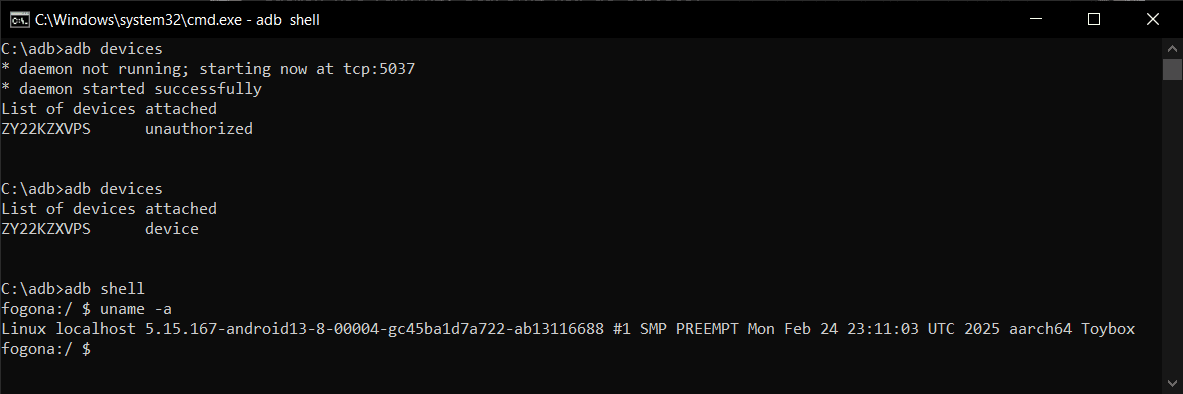
Android Debug Bridge (ADB): A Developer's Remote Control
Android Debug Bridge (ADB) is a developer's universal remote for an Android device. This command-line tool lets you install apps, view logs, and run shell commands, bypassing the UI. It's used for debugging, file transfers, and automation.
Android Services: Running Work Without a UI
An Android Service is a component for long-running background tasks, even when the user isn't in your app. Use it for tasks like playing audio or syncing data.
ContentProvider: Android's Shared Data API
A ContentProvider is a structured API gateway for your app's private data. It lets other apps query, insert, or delete data securely without direct access. The main footgun is improper permission handling, which can leak data or cause crashes.
Android ViewModel: Survive Screen Rotations
A ViewModel is a lifecycle-aware data holder that separates your UI's state from its controller. It keeps data alive during configuration changes like screen rotations, preventing data loss and repeated network calls.
LiveData: Lifecycle-Aware Data Observation
LiveData is a data holder that only notifies active UI components. It connects your ViewModel's data to your UI, preventing crashes and memory leaks by respecting the Android lifecycle.

Android's Task and Back Stack Explained
Think of the back stack as a stack of plates (screens). A "Task" is the entire stack for a user's workflow. The system manages this stack, but you can control it for custom navigation. The biggest footgun is misusing launch modes, which breaks back button.
ViewModel: Surviving Android Configuration Changes
A ViewModel acts like a durable backpack for your UI's data, surviving the destruction and recreation of an Activity during a screen rotation. It holds UI state, like user input or fetched data, preventing data loss.
ConstraintLayout: Flexible UIs Without Nesting
ConstraintLayout positions UI elements by their relationships, like anchoring objects on a blueprint. It's ideal for responsive screens that avoid deep, slow view hierarchies.
RecyclerView: Efficiently Displaying Dynamic Lists
RecyclerView displays long lists by recycling views that scroll off-screen, like a restaurant reusing plates for new customers. It's essential for feeds or contact lists.
Android Styles and Themes: UI Consistency at Scale
A Style is a collection of attributes for a single View, like a button's font and color. A Theme is a style applied to an entire Activity or application, providing a consistent look and feel. They are essential for managing UI appearance efficiently.
We are hiring for this. Every open role lists the topics its interview covers, so you can prepare for the real thing rather than guessing.
See open roles