Everything in Design & UX, page 14
Essential UX research plan components for engineering scope
Name parts—problem, goals, method, users, timeline, metrics, risks—and map them to scope, workload, or instrumentation.

What trade-offs matter between moderated usability tests and surveys?
Whether you align research method to product risk and insight type. Great answers contrast surveys for scalable opinions against moderated tests for behavioral observation, weighing fidelity and speed.

Propose an automated de-identification pipeline for video interview recordings
Propose CV redaction, ASR/NLP for names, human QA, and consent tracking; note model bias and re-ID risk.
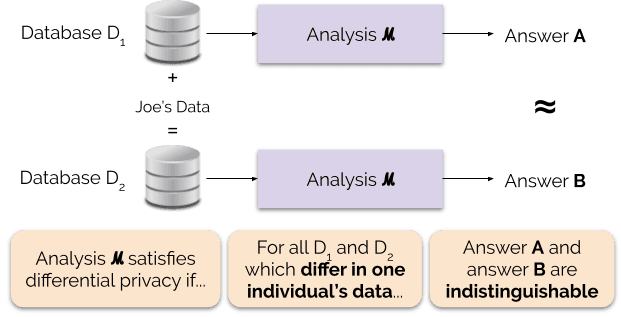
Apply differential privacy to user behavior queries and explain epsilon trade-offs
Mastery of formal privacy guarantees and noise-based query systems. Inject Laplace or Gaussian noise scaled to query sensitivity; track cumulative epsilon across queries; lower epsilon tightens privacy but increases variance and error bars.

Design a centralized consent platform: core components and database schema
Separate CMF from CMP; build an append-only ledger with versioned wording, per-activity granularity, and real-time revocation.

How do you fulfill a GDPR erasure request across data stores?
This tests cross-system deletion under GDPR's 30-day SLA. A strong answer maps PII lineage across S3, databases, and analytics; uses soft deletes for backups; and handles dashboards via reprocessing.
Explain data minimization and how to apply it to a survey schema
Tests translating GDPR adequacy into schema design. Strong answers: define survey purpose first, map each column to a specific need, exclude PII unless essential, and plan periodic review.

Implement verifiable informed consent before a remote usability test
This tests whether you treat GDPR consent as an architectural gate. Strong answers cover CMP-powered pre-session disclosure, gating the test on active consent, server-side recording for auditability, and first-party data alignment.
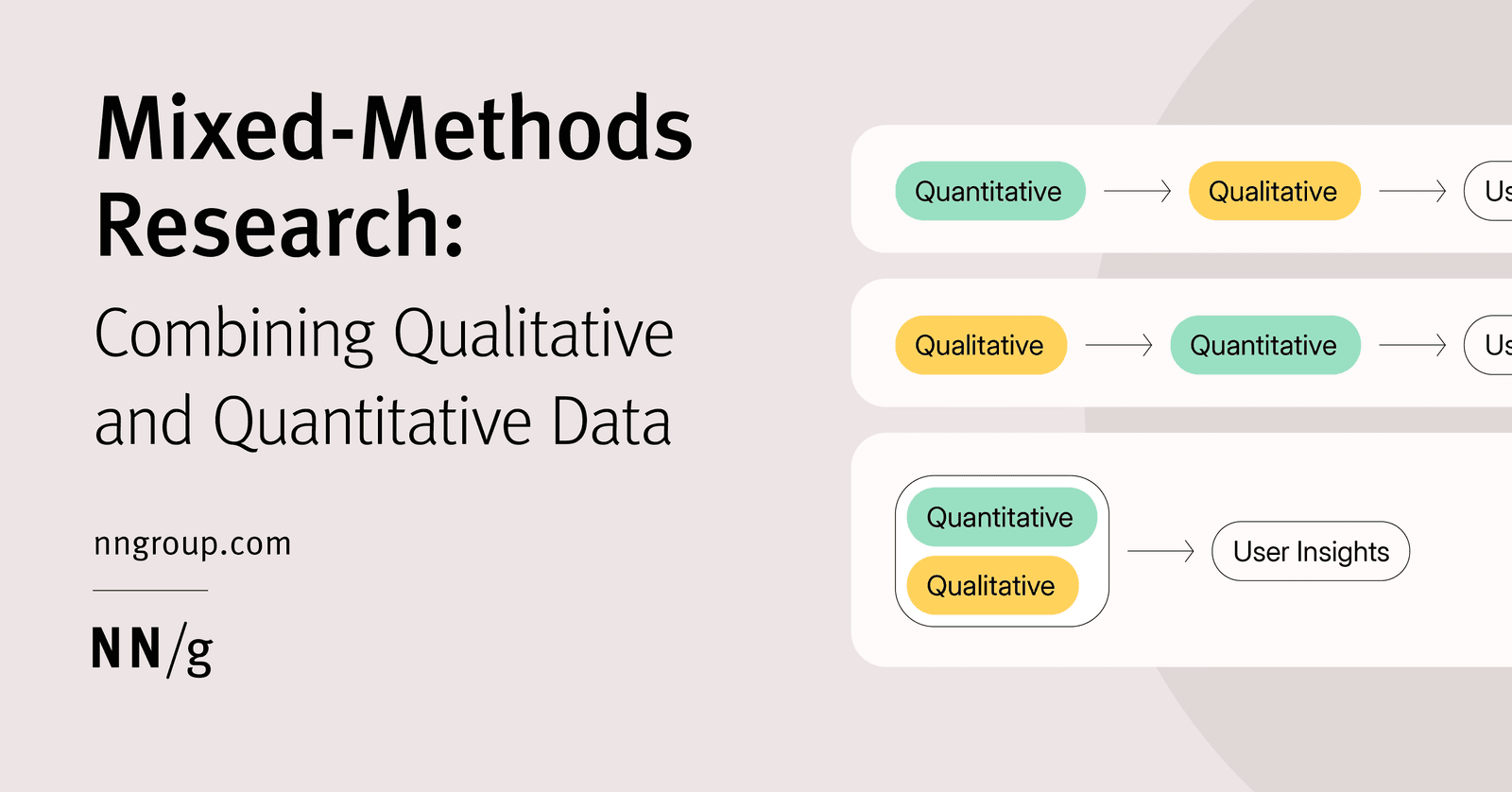
How would you instrument a feature to validate qualitative findings quantitatively?
Mapping themes to events, picking guardrail and success metrics, and sampling.
Describe a lightweight research method to validate a feature with no researcher
What it tests: bootstrapping validation without research headcount. Answer outline: unmoderated concept tests or concierge MVPs; behavioral vs attitudinal data; lightweight recruiting. Red flag: shipping A/B tests or using only internal opinions.

Generative versus evaluative research: when to use each
Generative precedes design to find needs; evaluative follows a build to test it.

How does UX research integrate into a two-week agile sprint?
This tests if you see research as ongoing discovery, not a predev phase. A good answer covers backlog work across sprints, outcome-based prioritization, and engineer touchpoints in refinement. Red flag: saying research happens only before coding starts.

Explain qualitative vs quantitative user data with engineering examples
Contrast the two modes and give one example per type.

What is the primary purpose of UX research before starting development?
Tests if you see pre-dev research as risk reduction. Strong answer: it validates real user needs before code, exposes unknown requirements while changes are cheap, and avoids building for imaginary users.
Research Office Hours: A Drop-In Clinic
Research office hours are a drop-in clinic for product questions, offering expertise without a project brief. Teams use them to gut-check methods or interpret data fast. The trap is drop-ins replacing prioritization and making researchers reactive support.
Strategic Foresight in UX
UX foresight is a telescope: it maps where behavior is heading so you avoid building winners that soon become obsolete. Deploy it when roadmapping multi-year platforms. The trap is treating scenarios as predictions rather than assumption stress-tests.
Screen Reader Testing: Navigate UI Without Sight
Screen reader testing reveals gaps visual checks miss by turning your UI into audio. Run real tasks with only a keyboard and screen reader, checking headings and focus order. The footgun is treating axe passes as equivalent to a human listening through a flow.
Accessibility Heuristic Evaluation
Accessibility heuristics spot keyboard traps and missing labels like a code audit for access. Use them in early reviews if disabled users are weeks away. The footgun is treating a clean score as proof, since only real users validate true usability.
Experience-Based Roadmap: Triage for Product Teams
An experience-based roadmap prioritizes user pain over feature deadlines. It sequences work by the severity of friction users actually encounter, not internal priorities. Teams often confuse it with a feature wishlist and skip validation.
Research Spike: Fast Reconnaissance Before Commitment
A research spike is a time-boxed scout mission to answer one blocking question before the team commits. Use it when requirements are fuzzy. The footgun is letting the spike balloon into a full research project instead of a sharp go or no-go call.
We are hiring for this. Every open role lists the topics its interview covers, so you can prepare for the real thing rather than guessing.
See open roles