Everything in Design & UX, page 13
What lightweight generative research reveals why users drop off a funnel?
Tests bridging analytics to qualitative insight fast. Outline: run 5-8 micro-interviews at the exact drop-off step; probe confidence and expectations; map findings to technical fixes.

Advocate for generative research over a complex feature request?
Tests mapping research methods to product risk. Strong answers reframe the feature as an unvalidated problem, cite qualitative behavioral methods like field studies, and translate unknowns into scope and opportunity cost.

How would you use a journey map to find technical root causes?
Map journey stages to logs and traces, find bottlenecks, propose API or data model changes.

How do you mitigate confirmation bias when a user validates your solution?
In the moment, probe for exceptions; in synthesis, triangulate and invite reviewers.
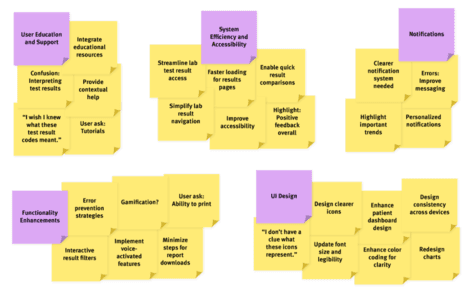
Translate qualitative insights into user stories and requirements
Clusters themes by frequency/severity, reframes pain points as user stories with clear AC, maps to technical spikes, prioritizes by impact.

Your role and pitfalls as an engineer note-taker in interviews
Observe to leverage researcher expertise; pitfalls are skipping prep, academic framing, and inflexible features.

What is the goal of contextual inquiry and what do engineers gain?
Tests grounding engineering in observed user behavior. Goal: watch users in their environment to uncover tacit work practices, workarounds, and mental models. Engineers learn system constraints, integrations, and reliability gaps.
Design a centralized participant management system to prevent over-contacting
Tests ResearchOps governance at scale. Strong answers define unified data tracking contact history, consent, and segments; enforce hard frequency caps and cooling-off windows; and build automated guardrails. Red flag: siloed spreadsheets or soft guidelines.
Design a system integrating analytics data with participant recruiting
Tests system design for behavioral targeting in research ops. A strong answer covers: a warehouse-to-tool pipeline; consent and privacy gates; behavioral SQL segmentation; and frequency capping. Red flag: skipping GDPR and consent to focus only on data joins.

Outline a technical roadmap for an internal research participant panel
Tests systems design for research ops. Strong answers: CRM-synced opt-in, canonical data model with eligibility rules, communication orchestration, and incentive automation.

Propose a strategy for finding and vetting low-incidence participants
This tests sourcing creativity and screening rigor for rare populations. A strong answer proposes niche outreach, snowball referrals, behavioral screeners, and anti-fraud checks. A red flag is simply boosting spend on generic panels or relying on coworkers.
Describe a workflow to automate a 50-person diary study
Tests operational UX research automation and API integration. A strong answer maps a pipeline of calendar APIs, email triggers, and reminder bots with no-show fallbacks. Red flag: manual spreadsheets or survey tools lacking scheduling logic.
What two techniques mitigate professional-tester bias in screener design?
Swap guessable questions for behavioral ones about real tasks, and add exclusion criteria to block web-savvy professional testers.
Design a screener survey to identify non-Feature X mobile users
Ask broad frequency first, use indirect disqualifiers for Feature X without naming it, add attention checks, and over-recruit 7-8 to secure 5.
How would you structure a backend architecture A/B test and define metrics?
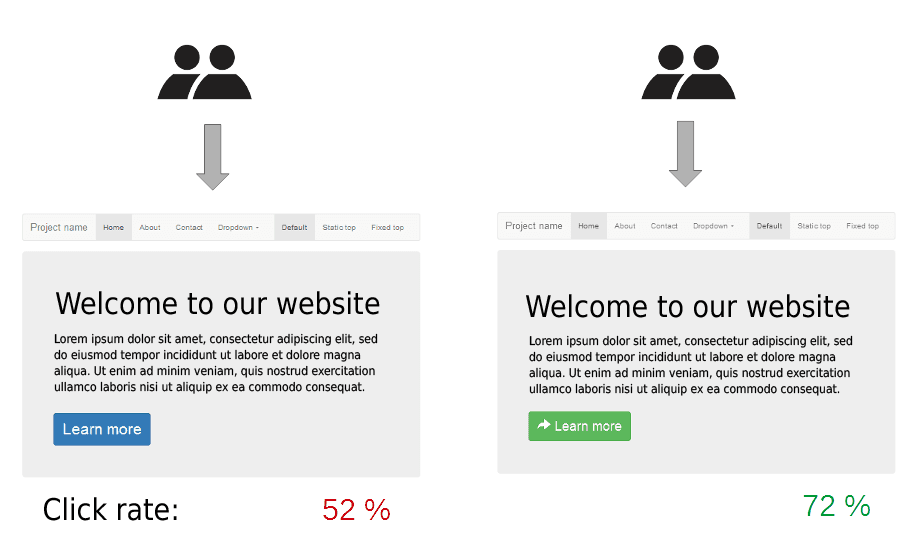
This tests causal inference rigor for infrastructure changes. A strong answer covers sticky user routing, controlling for geography and time, and paired primary metrics like P99 latency and error rate.
Design a one-week lean research plan for a high-risk decision
This tests trading rigor for speed without losing decision signal. A strong answer matches the riskiest assumption to a fast method, sequences generative and validation across five days, and defends bias.

What criteria and questions ensure right users for a specialized dev tool?
Designing a recruiting pipeline that qualifies niche experts and secures attendance. A strong answer covers role criteria, layered tech screens, and no-show backups. Red flag: relying on job titles without verifying real tool usage.

Propose two research methods to investigate checkout abandonment
Tests pairing behavioral and attitudinal research. Great answers match funnel analytics to find drop-offs with usability tests to uncover why users cannot complete fields or leave in anger.
What technical instrumentation supplements a two-week diary study?
Log anonymized feature frequency, session duration, and device switches; link via participant ID.
How do you validate UX within hard technical constraints?
Tests evaluative research design for constrained, buildable prototypes rather than ideal mocks. Strong answers scope to feasible layers, use Wizard of Oz or stubs, and benchmark against current state. Red flag: testing fantasy UI that ignores API limits.
We are hiring for this. Every open role lists the topics its interview covers, so you can prepare for the real thing rather than guessing.
See open roles