More in Design & UX — page 16
Recruiting Participants Who Mirror Real Users
Bad recruiting kills research before the first question. Recruit people currently doing the behavior you study, not just matching demographics. The footgun is using convenience samples like staff or friends, who know your product and give false signals.
UX Research Plan: Alignment Before Fieldwork
A UX research plan is a pre-fieldwork contract that locks in what you must learn and how success is judged. It stops stakeholders from moving goalposts after interviews begin. The footgun is filing it away unread; a plan nobody references is just bureaucracy.

Peer Review: Research's Blind Spot Check
Peer review is a blind spot check by qualified strangers who have no stake in your success. It keeps published research honest by catching flaws the author missed. The trap is treating publication as truth just because it survived review.

The UXR Career Ladder
A UXR career framework turns vague promotion conversations into clear skill targets. Use one when you are a team of one or a manager defining growth criteria. Without it, you stay reactive and unable to prove you are already operating above your level.
Centralized vs Decentralized UX Research Teams
Centralized UX works like an agency, loaning researchers to products and returning them to a resource pool; decentralized embeds UX in product teams. This matters when UX is added after engineering. The footgun is freezing structure rather than evolving it.
Lean UX: Outcomes Over Deliverables
Lean UX treats design as a hypothesis, not a specification. Cross-functional teams run minimum viable experiments, gather user feedback early, and iterate. The footgun: obsessing over polished deliverables instead of validated learning.
Informed Consent in UX Research
Informed consent is the ethical line between a casual chat and research abuse. Once you record, transcribe, or share participant data, you need explicit permission. The footgun is treating a friendly call as private when your notes permanently expose it.
Research Tool Stack Management
A UX research tool stack is your standardized toolkit, not a random app collection. It speeds up projects and helps onboard teammates through ResearchOps. Picking tools before you know your research question forces methods to fit software instead of problems.
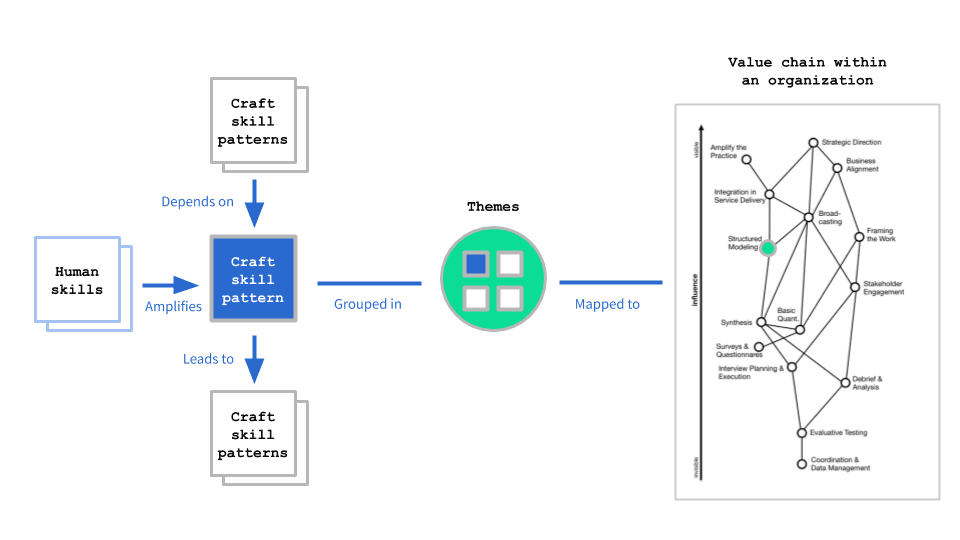
Research Competency Matrix: Mapping Team Growth
A competency matrix maps craft and human skills against career stages to reveal gaps. Use it to plan hiring and align capabilities with organizational needs. The footgun is treating it as a rigid checklist instead of a customizable reflection tool.

ResearchOps Playbooks: Standardize UX Research
A ResearchOps playbook is your team's operating manual for repeatable research. It matters when multiple researchers recruit, analyze, and report across squads. The footgun is writing it once and letting it rot instead of treating it as a living process.

Research Socialization: Make UX Insights Visible
UX research only drives outcomes if people see it. Research socialization pushes insights beyond design and product teams to the wider business. When studies sit trapped in folders, strategy gets built blind.
Single Ease Question (SEQ): Instant Task Difficulty Scores
The Single Ease Question is a 7-point post-task thermometer for perceived difficulty. Ask it immediately after a task attempt in usability tests. It correlates around r=.5 with completion and time, yet 14% of users rate failed tasks as easy.

Third-Party UX Recruiters: Methodological Bouncers, Not Body Shops
Third-party UX recruiters are quality filters, not just people finders. They validate participants fit your methodology, not demographic checkboxes. Use them when one wrong user corrupts a usability study.

Incidence Rate: The Recruitment Cost Multiplier
Incidence rate is the fraction of people who pass your screener. In UX research, a 5% rate means screening twenty people to interview one. Teams often forget to pre-filter panels by demographics they already know, burning budget on obvious rejections.
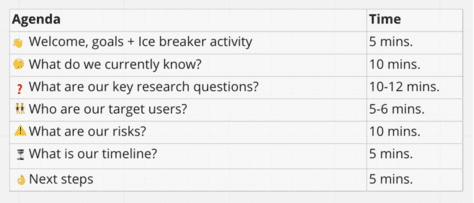
UX Research Kickoff: Align Before You Start
A UX research kickoff is a stakeholder sync before user interviews begin. It locks scope, resolves conflicting priorities, and aligns everyone on core questions. Skip it and you will research the wrong problem while stakeholders disagree on success.
Right to Withdraw: Leave Anytime, No Reason
The right to withdraw is an emergency exit for research participants: leave anytime, reason optional. In usability studies and clinical trials, this protects autonomy. The footgun: pressuring hesitant users to finish destroys trust and poisons your data.

Informed Consent Is Comprehension, Not Paperwork
Informed consent means understanding risks and alternatives before agreeing. It applies whenever researchers collect sensitive data or expose people to risk. The footgun is treating a signature as proof of understanding; comprehension beats paperwork.

Cross-Study Synthesis: The Missing First Step
Research synthesis is the literature review academia requires but industry skips, forcing teams to rediscover what the organization already knows. Use it before primary research when entering new markets or distilling scattered knowledge.

Executive-Level UX Research Communication
Executives fund outcomes, not observations. Frame research by business risk and revenue, not methods. This applies when you need budget or strategic alignment. The footgun is drowning leaders in process details that bury recommendations and stall action.

UX Research Staffing: The 1:5:50 Ratio
A 2020 industry survey found the most common UX team structure is one researcher for every five designers and fifty developers. These ratios signal staffing norms but should never replace measuring actual research impact or team maturity.