Advanced concepts in Flutter & Dart
Dart Generics: Type-Safe Containers and Reusable Code
Generics let you define code that works with multiple types without sacrificing type safety. A List<String> is a list that only accepts strings. This is essential for collections.
Dart Streams: Asynchronous Data Sequences
A Dart Stream is like a conveyor belt for asynchronous data, delivering events or file chunks as they arrive. Use them for continuous data flows like button clicks or reading large files.
Dart Mixins: Constraining Reusable Code with `on`
A Dart mixin is like a plugin of methods for a class. The on keyword acts as a gatekeeper, ensuring the class using the mixin already has specific base features. This is used for sharing UI logic only among Widget subclasses.
Extension Methods: Add to Classes You Don't Own
Extension methods let you add functionality to existing classes you don't control. Use them to create fluent APIs, like calling '42'.parseInt() instead of int.parse('42').
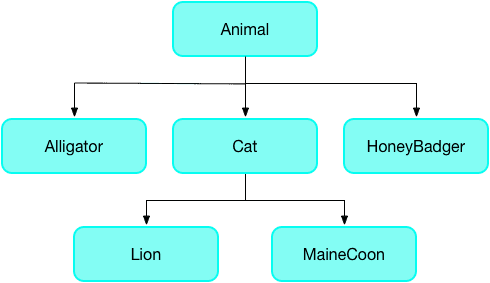
The `covariant` Keyword: Loosening Type Rules
The covariant keyword tells Dart's analyzer to relax its strict rules for method overriding, letting a subclass method accept a more specific parameter type. It's often used in Flutter widgets.
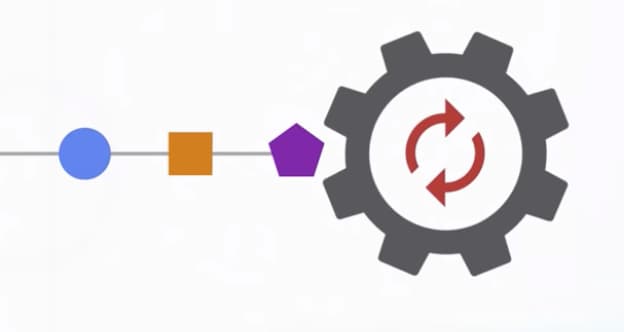
Dart's Microtask Queue vs. Event Queue
Dart's event loop prioritizes a 'microtask' queue for immediate async tasks over the main 'event' queue for I/O and user input. This ensures high-priority code runs first, but risks starving the event queue and freezing the UI if overused.
Dart Streams: Single-Subscription vs. Broadcast
A single-subscription stream is a private channel for one listener; a broadcast stream is a public radio station for many. Use single-subscription for one-off data like a file download and broadcast for shared events like UI updates.
StreamTransformer: Building Custom Stream Operators
A StreamTransformer is a factory for custom stream operators like map or where. Use it to build reusable logic, like parsing data chunks, that can be applied to any stream.
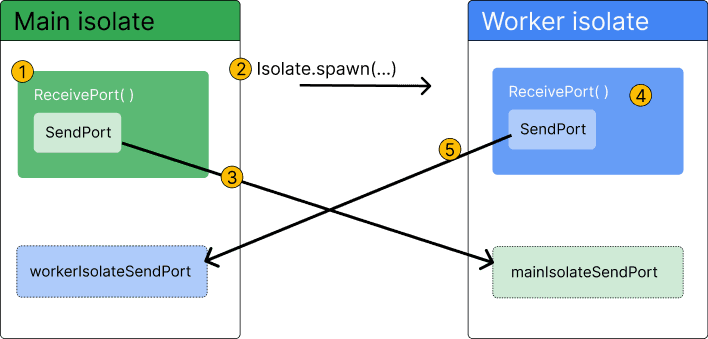
Dart Isolates: True Parallelism Without Shared Memory
Dart isolates provide true parallelism by running code in a separate thread with its own memory. Use them to offload heavy tasks like parsing huge JSON files or complex calculations that would otherwise freeze your Flutter UI.
Flutter's State Lifecycle: From Creation to Disposal
A Flutter State object outlives its widget configuration. The framework manages its journey from creation (initState) to permanent removal (dispose), calling methods like build along the way. This governs all StatefulWidgets.
InheritedWidget: Propagate Data Down the Tree
InheritedWidget provides data to any descendant that asks, avoiding prop drilling. It's the basis for Theme.of(context) and other ambient state. The common footgun is calling .of(context) from a context that's an ancestor, not a descendant, of the widget.
Flutter's Three Trees: Widget, Element, and RenderObject
Flutter separates UI into three trees. Widgets are cheap blueprints. Elements are the stateful managers that persist across frames. RenderObjects do the expensive layout and painting. Understanding this separation is key to mastering Flutter's performance.
CustomSingleChildLayout: Parent-Driven Layout
CustomSingleChildLayout lets a parent widget dictate its child's size and position, ignoring the child's intrinsic size. Use it for layouts where the parent's dimensions are independent, like a custom overlay.
CustomMultiChildLayout: A Delegate for Complex Layouts
CustomMultiChildLayout gives a delegate total control to size and position multiple children. It's for complex layouts where widgets relate to each other, like a radial menu. The key footgun: the parent's size cannot depend on the sizes of its children.
IntrinsicHeight/Width: Sizing by 'Natural' Dimensions
IntrinsicHeight/Width tells a child widget to size itself to its "natural" dimensions, rather than expanding to fill available space. It's useful for making all items in a Row match the tallest item's height, but it's expensive and should be avoided.
Flutter's Gesture Arena: Who Wins the Touch Event?
The Gesture Arena is a contest where multiple gesture detectors compete for one touch event. This happens when a tappable button is inside a scrollable list. The biggest footgun is a gesture not firing because an unexpected detector won the competition.
Build Custom Inputs with Flutter's FormField Widget
FormField is a state wrapper, not a UI widget, that turns any widget into a validatable form input. Use it for custom inputs like sliders or star ratings that must integrate with a Form. The footgun is forgetting to supply the UI via its builder.
RawKeyboardListener: Deprecated Hardware Key Events in Flutter
This is a deprecated Flutter widget for capturing raw hardware keyboard events, bypassing text input systems. It was for games or custom shortcuts, but the biggest mistake is using it now. Use KeyboardListener instead.
PageRouteBuilder: Custom Routes Without the Boilerplate
PageRouteBuilder creates a custom page route on the fly, skipping the boilerplate of a full subclass. Just provide a pageBuilder for the screen's content and a transitionsBuilder for a unique animation.
PopScope: Guarding Your Flutter Routes
PopScope acts as a gatekeeper for back navigation in Flutter, letting you intercept and block attempts to leave a screen. Use it to show a confirmation dialog for unsaved changes. Its behavior differs on iOS; the swipe-back gesture won't trigger its callback.
We are hiring for this. Every open role lists the topics its interview covers, so you can prepare for the real thing rather than guessing.
See open roles